Prepare for your RPA job with 24 UiPath interview questions and simple answers for 2026. Covers basics, REFramework, Orchestrator, Maestro and AI agents.
Getting ready for a UiPath interview can feel heavy. There are so many topics: selectors, queues, REFramework, Orchestrator, and now AI agents too. The good news is that most interviewers ask the same type of questions again and again. If you know the core ideas well and can explain them in plain words, you are already ahead of most people.
This guide gives you real UiPath interview questions with short, clear answers. We start with the basics, move to harder scenario questions, and finish with new topics that are showing up in 2026 interviews. Read it once, then try to answer each question out loud without looking.
Why UiPath Skills Still Matter in 2026
Many people thought AI would end the need for RPA developers. It did not. Companies still need stable bots that move data between old systems, fill forms, read files and send reports. What changed is that UiPath now mixes these bots with AI agents, so employers want people who know both sides.
Here is what is new this year, based on UiPath’s own release notes:
- Maestro Flow is now generally available (September 2026). It lets teams build and run a full business process, with robots, agents, APIs and people, in one flow.
- Maestro Case arrived in June 2026. It is meant for work where the next step depends on what just happened, like claims or disputes.
- Autopilot works as a coding agent inside Studio Web (Preview), and advanced agents are in Preview for long, document-heavy jobs.
- UiPath Functions (Python) are in Preview, so you can run Python logic from inside a process.
Do not worry if some of this sounds new. Interviewers for most jobs still spend about 80 percent of the time on the core skills below. The new topics are a bonus that makes you stand out.
Basic UiPath Interview Questions
Q1. What is UiPath?
UiPath is a platform that builds software robots. These robots copy the steps a person does on a computer, like opening an app, typing data or sending an email. You build them with a drag-and-drop tool, so you do not need to write much code.
Q2. What is RPA?
RPA means Robotic Process Automation. It uses software bots to do rules-based, repeated tasks. Good examples are invoice entry, report creation and data copy between two systems.
Q3. What are the main parts of UiPath?
| Part | What it does |
| Studio | The tool where you design and build automations. Comes as Studio Desktop, StudioX and Studio Web. |
| Robot | The program that runs your automation on a machine. |
| Orchestrator | The control room. It manages robots, queues, assets, schedules and logs. |
| Assistant | A small app where a user starts attended automations. |
| Maestro | The tool that connects robots, agents, APIs and people into one end-to-end process. |
Q4. What is the difference between attended and unattended robots?
| Point | Attended robot | Unattended robot |
| Who starts it | A person, from their own machine | Orchestrator, by schedule or trigger |
| Runs where | User’s desktop | A virtual machine or server |
| Best for | Tasks where a human helps | Large back-office jobs |
| Needs a person present | Yes | No |
Q5. What are the three workflow types in Studio?
- Sequence: simple steps, one after another. Best for small tasks.
- Flowchart: good when you need decisions and branches.
- State machine: best for long processes that move between clear states. REFramework uses this.
Q6. What is the difference between a variable and an argument?
A variable stores data inside one workflow. An argument passes data between workflows. Arguments can be In, Out or In/Out. Think of a variable as a note on your desk, and an argument as a note you hand to a coworker.
Q7. Name some common data types.
String, Int32, Double, Boolean, DateTime, Array, List, Dictionary, DataTable and GenericValue. Most interviewers like to hear that DataTable is the one you use most with Excel.
Intermediate UiPath Interview Questions
Q8. What is a selector?
A selector is a small piece of XML text that tells UiPath how to find a button, field or window on the screen. It holds details like the app name, title and ID. If the selector is wrong, the bot clicks nothing or clicks the wrong thing.
Q9. How do you make a selector work when the page changes?
Use wildcards like * for any text and ? for one character. You can also put a variable inside the selector, for example a row number or a date. Always remove parts that change every time, such as a page title that holds a counter.
Q10. How do you handle errors in UiPath?
There are three layers. First, use Try Catch around risky steps. Second, use Retry Scope for things that fail now and then, like a slow web page. Third, use the Global Exception Handler for any error you did not plan for. Also write clear log messages, so you can find the problem fast.
Q11. What is a queue in Orchestrator?
A queue is a list of work items that bots pick up one by one. It is the best way to split a big job between many robots. Each item has a status such as New, In Progress, Successful, Failed or Abandoned, so you always know what happened to it.
Q12. What is REFramework?
REFramework is a ready-made template built on a state machine. It gives you good error handling, retries and logging from day one. It has four states, as shown below.
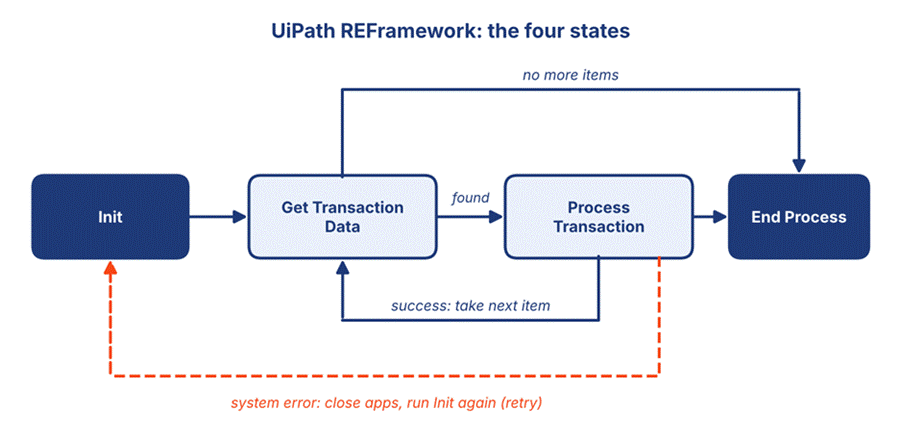
Figure 1: The four states of the REFramework and how a bot moves between them
- Init: reads the config file and opens the apps.
- Get Transaction Data: takes the next item from the queue.
- Process Transaction: does the real work on that item.
- End Process: closes apps and sends the final report.
Q13. What is the difference between a Business Exception and a System Exception?
A Business Exception means the data broke a rule, like a missing invoice number. The bot should skip the item and not retry, because trying again will give the same result. A System Exception means something technical went wrong, like an app that froze. The bot closes everything, starts again from Init and retries the item.
Q14. Which input methods can a click activity use?
| Method | Speed | When to use |
| Simulate | Fastest | Works in the background, but some apps do not accept it. |
| Hardware Events | Slowest | Acts like a real mouse and keyboard. Needs the window in front. |
| Chromium API | Fast | For Chrome and Edge pages, when you want a stable result. |
Q15. How do you read and write Excel data?
Use Read Range to bring a sheet into a DataTable, loop through it with For Each Row, and use Write Range to save results. For large files, work with the DataTable in memory and write once at the end. It is much faster than writing cell by cell.
Advanced and Scenario-Based Questions
This is where interviews are won or lost. Interviewers want to hear how you think, so explain your steps and not just the final answer.
Q16. Your bot works on your laptop but fails on the server. What do you check?
- Screen resolution and scaling. Many bots fail because the server screen is smaller.
- Whether the robot user is signed in and the session stays open.
- App versions and browser extensions. They must match your laptop.
- File and folder paths. Use paths from the config file, not typed ones.
- Logs and screenshots from the failed run.
Q17. How would you process 100,000 invoices?
Split the work in two. A dispatcher process reads the invoices and adds them to a queue. A performer process takes items from the queue and does the work. Then run the performer on several unattended robots at the same time. This is faster, and a failed item does not stop the others.
Q18. How do you keep passwords safe?
Never type a password in a workflow or in a config file. Store it as a Credential asset in Orchestrator and read it with the Get Credential activity. Give access only to people and robots that need it, and use SecureString for any value you must hold in memory.
Q19. How do you keep a large project clean?
- Use clear names for workflows, variables and arguments.
- Keep each workflow small and focused on one job.
- Store the project in Git and use pull requests for review.
- Use the Workflow Analyzer to catch bad habits early.
- Keep all settings, such as URLs and file paths, in the config file.
Q20. How do you test your automation?
Write test cases for the main path and for the failing paths too, such as a missing file or a wrong login. UiPath lets you build and run test cases inside Studio, and you can run them again after every change. This catches problems before the bot reaches production.
New for 2026: Agents and Maestro Questions
If the job post mentions AI, agents or orchestration, expect a few of these.
Q21. What is UiPath Maestro?
Maestro is the layer that ties a full business process together. In one place you can connect robots, AI agents, APIs and human tasks. It tracks each step so teams can see where a case is stuck.
Q22. What is the difference between a robot and an agent?
A robot follows fixed steps and gives the same result every time. An agent uses an AI model to read information, decide what to do next and use tools. A good answer says you use robots for exact, rule-based work and agents for messy work, like reading an email and deciding what it needs.
Q23. When would you pick Maestro BPMN, Flow or Case?
| Type | Best use |
| Maestro BPMN | Fixed processes where steps follow a known order, like purchase approvals. |
| Maestro Flow | A fast, developer-friendly way to build a process on one canvas, including with coding agents. |
| Maestro Case | Goal-driven work where exceptions are common, like insurance claims. |
Q24. How do you keep an AI agent safe?
Set guardrails so the agent can only use approved tools and data. Mask personal data. Add a human review step for risky decisions, and test the agent with a set of sample cases before going live. Keep logs so you can check what it did later.
How to Prepare in One Week
- Day 1–2: Build two small bots, one with Excel and one with a web page. Use real selectors.
- Day 3: Open the REFramework template and read every state until it makes sense.
- Day 4: Make a dispatcher and performer with a queue in Orchestrator (the free Community plan works).
- Day 5: Practice error handling. Break your bot on purpose and fix it.
- Day 6: Read the release notes for Maestro and Agents. Try one small agent.
- Day 7: Answer all the questions above out loud, and time yourself.
Common Mistakes to Avoid
- Learning answers by heart without having built anything. Interviewers can tell quickly.
- Saying “I used Hardware Events” without saying why.
- Forgetting to mention logs, retries and security. These show you think like a real developer.
- Saying you know the new AI features when you have never tried them. Be honest about what you have and have not used.
Frequently Asked Questions (FAQ)
Is UiPath hard to learn for beginners?
No. The drag-and-drop style is easy to start with. Most people can build a simple bot in a few days. The harder parts are selectors, error handling and REFramework, so give those more time.
Do I need to know coding for a UiPath job?
Basic logic is enough for entry-level jobs. It helps to know simple VB.NET or C# expressions, and basic SQL. For senior jobs, knowing Python or APIs is a plus.
Is UiPath still a good career in 2026?
Yes. Companies still run huge numbers of repeated tasks, and they now want people who can mix bots with AI agents. Learning both gives you more choices.
Which UiPath certification should I take?
UiPath Academy offers free courses and certificates. The RPA Developer path is a good start. Check the Academy site for the latest names and exams, since they change.
Can I practice UiPath for free?
Yes. UiPath has a free Community plan and free courses on UiPath Academy. You can build bots and use Orchestrator to practice.
How many questions should I prepare?
Around 40 to 50 well-understood questions are plenty. It is better to know 25 topics deeply than to remember 100 answers badly.
Final Words
Interviews are not about knowing everything. They are about showing that you can build bots that work, fix them when they break, and explain your choices simply. Practice the questions above, build a few small projects, and stay calm. Good luck with your UiPath interview in 2026!