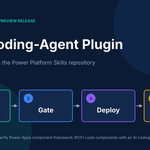
Microsoft’s PCF coding-agent plugin (v1.0.0 preview) lets AI agents scaffold, test, deploy and verify Power Apps PCF controls. Setup and use cases.
Building a Power Apps component framework (PCF) control is rarely just a TypeScript exercise. You scaffold a project, pin dependency versions the platform will accept, build, push with PAC CLI, bind the control on a form and then hope it behaves in production. Each handoff is a chance to lose an afternoon.
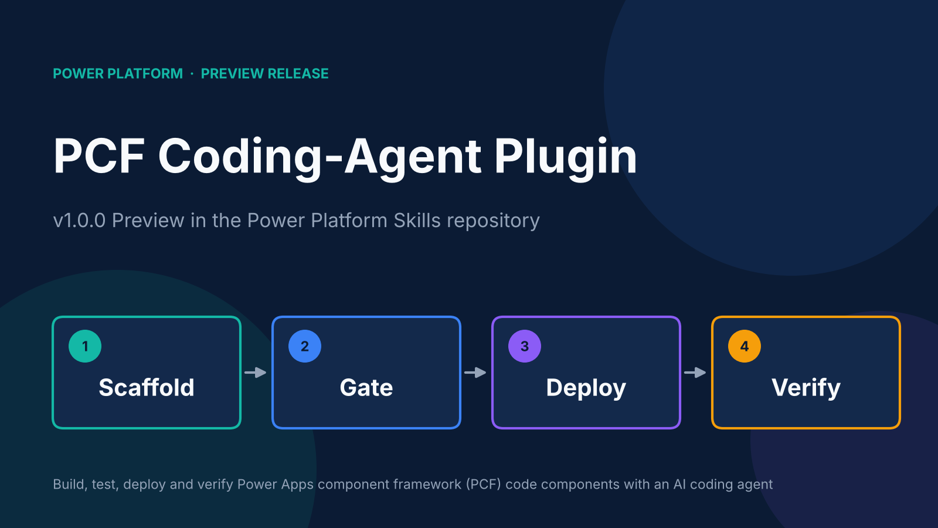
Microsoft has just put an AI-agent-driven answer to that loop into the open. On October 13, 2026, a pull request titled “pcf 1.0.0 (preview)” was merged into the microsoft/power-platform-skills repository, adding a new PCF coding-agent plugin that can build, test, deploy and verify PCF code components from inside GitHub Copilot CLI or Claude Code.
This guide explains what the plugin is, what it can and cannot do today, how to set it up, and where it fits into a real PCF workflow.
What Is the PCF Coding-Agent Plugin?
The PCF plugin is a Microsoft-maintained package of instructions, scripts and templates that an AI coding agent loads to work on PCF code components. PCF controls are custom UI components that extend model-driven and canvas apps. Think of a star rating in place of a number field, or a hierarchy tree in place of a flat lookup.
Instead of asking an agent to improvise a project from memory, the plugin gives it a vetted route: Microsoft-maintained templates and recipes, a compatibility matrix of supported versions, and checks that run before anything touches your environment.
Where it lives: the Power Platform Skills repository
The home is the microsoft/power-platform-skills repository, described as a plugin marketplace for GitHub Copilot and other AI agents. Each plugin there bundles reusable skills, agents and commands for building and deploying Power Platform solutions. The PCF plugin sits at plugins/pcf and is registered in the repository’s marketplace manifests.
Why it is a separate plugin
The pull request explains the design choice. The same PCF control can run in model-driven apps, canvas apps and Power Pages, so it was given a product-neutral plugin rather than living inside the model-apps plugin. A PCF control is also an iterative code project with npm dependencies, a build, tests and versions, which differs from the declarative app specs that the App Builder skill handles. The plugin does not require model-apps to be installed.
Key Features at a Glance
The plugin’s own capabilities document grades each feature by how far it has been proven. Here is the picture in plain terms.
| Feature | What it does | Proof level in the docs |
| Toolchain doctor | Checks Node.js, npm, PAC CLI, .NET, project layout and dependency drift against a compatibility matrix | Tested |
| Templates | Four starting points: field and dataset controls, each in standard or virtual (React) form | Tested |
| Recipes | Six ready-made overlays for common controls | Tested; three also run live |
| Quality gates | Manifest and host lint, source checks, ESLint, unit tests and a production build with bundle checks | Tested |
| Upgrade | Plans bounded repairs to dependencies and build settings, with rollback | Tested |
| Deploy | Wraps pac pcf push with consent, an explicit environment and a registration read-back | Verified live |
| Binding verification | Reads form XML to confirm field bindings, draft and published, on web, phone and tablet | Field bindings verified live |
| Inventory | Lists registered controls and where they are used in solution dependencies | Verified live |
| Power Pages | Standard field controls only, with a pre-deploy compatibility gate | Gate tested; setup guided |
| Canvas apps | Guided environment setup and Studio import steps | Guided |
The four templates and six recipes
Templates give you the skeleton. Recipes layer a working control on top. The six recipes documented today are:
- star-rating for model-driven apps and Power Pages
- lookup-dropdown for model-driven apps
- hierarchy-tree for model-driven apps
- contextual-grid for model-driven apps
- grid-customizer for model-driven apps
- attachment-uploader for model-driven apps
According to the pull request, the recipes use documented APIs only and are built to be keyboard-accessible, ARIA-labelled, right-to-left-aware and localized.
How the Plugin Helps You Build PCF Controls
The workflow follows the life of a control, from a plain-English request to a verified binding on a form.
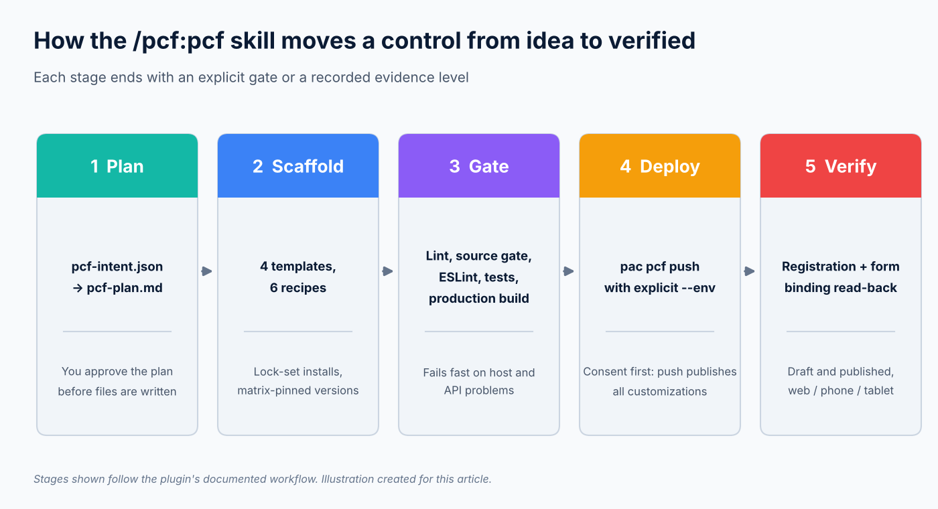
The /pcf:pcf workflow, from intent to verified binding.
1. Start from an intent, not a blank folder
You describe the control. The skill asks only for decisions you did not give, writes a pcf-intent.json file, and renders a pcf-plan.md for your approval. Only after you approve does it scaffold the project and install dependencies from committed lock sets.
2. Let the gates catch problems early
The gate script runs manifest and host lint, a source gate for unsupported APIs and hard-coded element IDs, ESLint, unit tests and a production build with bundle checks. A separate breaking-change comparison is required before you redeploy an existing control, which protects forms that already use it.
One detail shows the value of the compatibility matrix: the pull request notes that the stock React template declares Fluent 9.68.0, a version the platform rejected at import. The plugin’s templates are pinned to React 16.14.0 and Fluent 9.46.2 baselines instead.
3. Deploy with consent
Deployment goes through pac pcf push. The skill asks for consent that names the environment, the solution or publisher prefix, and the fact that a push publishes all customizations in that environment. The script never runs without an explicit environment, and it refuses a development bundle unless you override it.
4. Verify what actually shipped
After you bind the control in the Maker form designer, the skill reads back the saved form to confirm the binding. It then labels the result with an evidence level rather than a vague “done”.
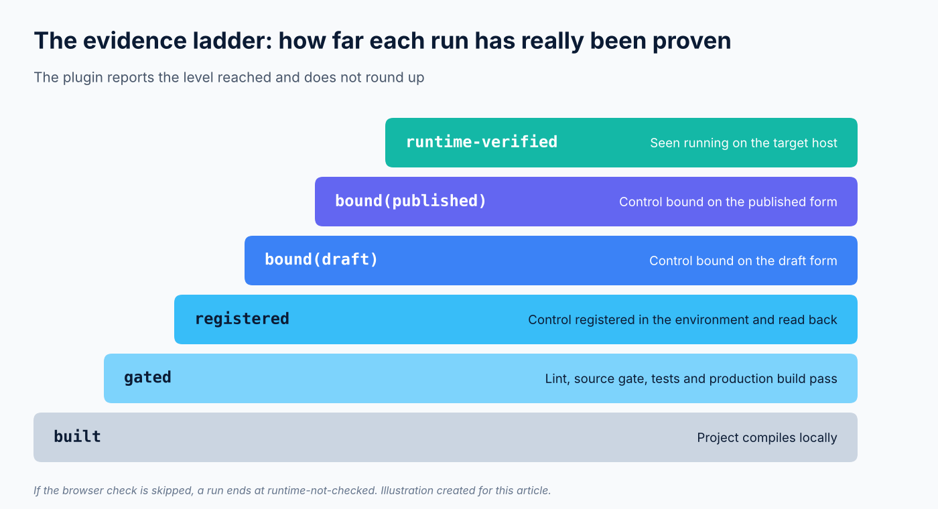
Evidence levels reported at the end of each run.
Analysis: this honesty mechanism is the most distinctive part of the release. AI-generated code often looks finished long before it is proven. Forcing every run to end at a named level, and defaulting to runtime-not-checked when no browser test happened, keeps reviewers focused on what still needs a human.
Benefits for Power Platform Developers
- Faster starts. Templates and recipes replace the blank-project phase, and plan approval comes before code is written.
- Fewer version surprises. A single compatibility matrix drives templates, lock sets, lint rules and upgrade targets. A weekly CI drift check reports when published tooling moves.
- Safer deployments. Consent prompts, explicit environments and bundle checks reduce accidents in shared environments.
- Built-in quality. Generated projects start with tests, lint, resx strings, accessibility patterns and a production build mode.
- Clear audit trail. Local receipts, registration read-backs and evidence levels make reviews easier.
- Works with your agent. The repository targets GitHub Copilot and other AI agents, and the PR shows both Copilot CLI and Claude Code commands.
How to Set Up the PCF Plugin
What you need
| Task | Requirement |
| Scaffold, lint, test, build, doctor, upgrade | Node.js 20+ and npm |
| Deploy | PAC CLI and the .NET SDK |
| Verify and inventory | Azure CLI, signed in as the same identity as the active pac profile |
| Canvas apps | An admin must turn on Power Apps component framework for canvas apps in the environment |
Install and run it
The pull request documents a straightforward route from a local clone. Use your preferred agent:
- Clone the repository and open it in a terminal.
git clone https://github.com/microsoft/power-platform-skills.git
cd power-platform-skills
- Start your agent with the plugin directory.
copilot –plugin-dir ./plugins/pcf # GitHub Copilot CLI
claude –plugin-dir ./plugins/pcf # Claude Code
- Invoke the skill, or just describe the task.
/pcf:pcf create a star rating control for a whole-number
column on a model-driven form
- For deployment, authenticate against a development environment you own.
pac auth create –environment https://<your-org>.crm.dynamics.com
pac org who # confirm the target environment
az login # same identity as the active pac profile
The repository also acts as a marketplace, and the README lists the PCF plugin among the available plugins. If you prefer that route, add the marketplace with /plugin marketplace add microsoft/power-platform-skills and pick the PCF plugin from it. The –plugin-dir method above is the one the pull request spells out for the PCF plugin.
Tip: use a development environment. Deploy publishes all customizations there, and a push can take a few minutes.
Practical Use Cases
Replace a plain field with a better control
Ask for the star-rating recipe on a whole-number column. The skill plans it, scaffolds it, runs the gates, and stops at gated and runtime-not-checked if you decline deployment. That makes it a safe way to see the full workflow without touching an environment.
Build a one-off control from a description
The pull request describes an unattended test where an agent built a keyboard-operable Priority Badge control for a Choice column from a plain-English request, reaching green gates with 11 unit tests. Custom controls do not have to start from a recipe.
Rescue a project that will not build
Run the doctor on an existing project, for example one created with pac pcf init. It reports toolchain, lockfile and dependency drift against the matrix. The upgrade step then plans changes and applies them only after you consent. If npm install fails during an upgrade, the plugin restores the original files.
Know what is registered before you clean up
The inventory script lists registered controls and the solution dependencies that reference them. The documentation is careful here: an empty where-used result is not proof that a control is safe to delete, because Liquid and other text references are not detected.
Wire it into CI and release pipelines
The plugin ships example pipelines for GitHub Actions and Azure DevOps in its pipelines/ folder, which gives teams a starting point for repeatable deployments.
What to Know Before You Adopt It
| Area | Current state |
| Maturity | Preview. Behavior, file formats and commands may change. No recipe is runtime-certified yet. |
| Power Pages | Standard field controls only. Dataset controls on Pages are not supported, and virtual (React) controls fail the Pages lint. |
| Canvas apps | Guided, not automatically checked. Runtime stays unchecked until you test in Power Apps Studio. |
| Binding checks | Field bindings are fully verified. Dataset, sub-grid and grid-customizer bindings are reported as configuration-not-verified. |
| Not covered | Mobile and offline scenarios, and registration without PAC CLI. |
| Telemetry | Usage telemetry is on by default and sends a skill_started event per run. Opt out with /pcf:telemetry off or the POWER_PLATFORM_SKILLS_TELEMETRY_PCF_OPTOUT=1 environment variable. |
The project backlog also shows where it is heading. Planned items include registering controls through the Dataverse SDK without PAC CLI, a hand-off from the App Builder skill, Power Pages dataset support, and browser runtime checks for every recipe. Development is active: a follow-up pull request merged the same day to fix review findings in the lookup, grid and workflow code.
Frequently Asked Questions
Is the PCF coding-agent plugin ready for production use?
It is labelled preview, so treat it as an accelerator rather than an autopilot. Behavior may change between releases and no recipe has been certified at runtime. Use a development environment, review generated code like any pull request, and run your own browser checks before release.
Which AI coding agents can use it?
The pull request shows GitHub Copilot CLI and Claude Code using the –plugin-dir flag. The repository is described as a marketplace for GitHub Copilot and other AI agents, and the PCF plugin does not depend on the model-apps plugin.
Does it support canvas apps and Power Pages?
Both are supported in a guided way. For canvas apps, an admin must enable the component framework feature in the environment, and the skill walks you through Studio import. For Power Pages, only standard field controls are covered in this release. Dataset controls are not supported there.
Will it change my environment or collect data?
Deployment happens only after consent that names the environment and warns that all customizations are published. Telemetry is enabled by default with base fields only, and you can opt out with the command or environment variable noted above.
Conclusion
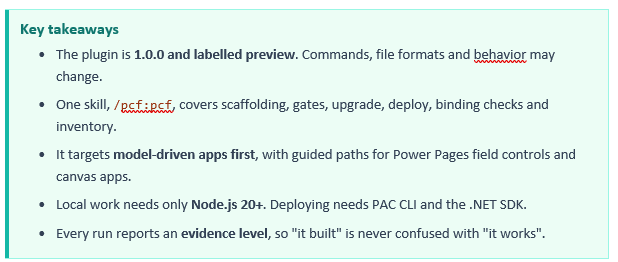
The PCF coding-agent plugin turns the scattered chores of PCF development into one guided, checkable workflow. Its biggest strengths are the pinned compatibility matrix, the pre-deployment gates and the evidence levels that keep AI-generated work honest.
It is still a v1.0.0 preview, so start in a development environment, try the star-rating recipe, and watch the backlog for Pages datasets, SDK-based registration and runtime certification. For Power Platform developers already using coding agents, it is well worth an afternoon of testing.
Similar Article
- Microsoft Fabric Pricing Explained: Capacity Costs, Licensing Options, and Cost Optimization
- Microsoft Fabric Real-Time Intelligence Tutorial: Build Real-Time Data Analytics Solutions
- Fabric Notebook Toolkit Tutorial for Beginners With Examples
- Microsoft Fabric vs Power BI: Key Differences, Features, Pricing, and Which One to Choose
- Microsoft Fabric Dataflows Gen2 Tutorial for Beginners: A Simple Step-by-Step Guide
- Microsoft Power Apps Raises Data Row Limit to 10,000: What Developers Need to Know
- Power Apps Gets a New Pop-Out Formula Editor: Write Power Fx Formulas More Easily