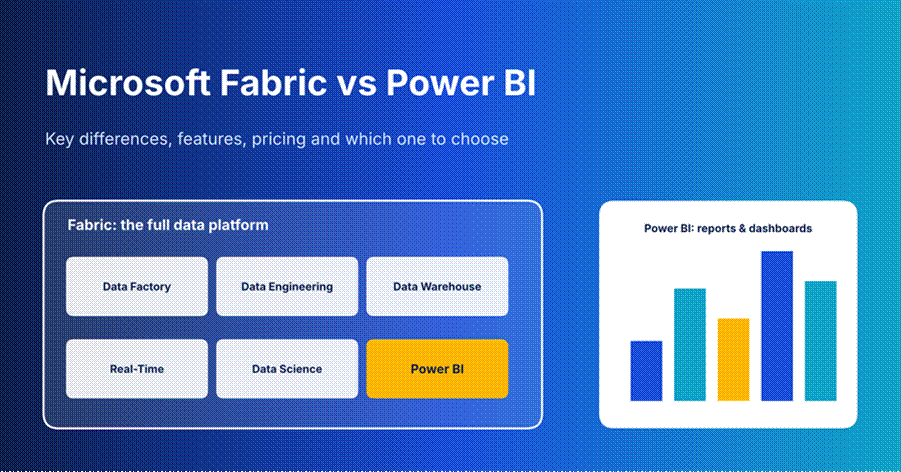
Confused between Microsoft Fabric and Power BI? See the key differences, features, 2026 pricing and a simple way to decide which one fits you
If you are stuck choosing between Microsoft Fabric and Power BI, you are in good company. A lot of people think these two are rivals. They are not. Power BI is a tool for building reports and dashboards. Microsoft Fabric is a much bigger platform, and Power BI sits inside it.
So the real question is this: do you only need reports, or do you also need a place to store, clean and organize your data? This guide answers that in plain words. All prices were checked in October 2026.
| The short answer Pick Power BI if you only want reports and dashboards. It costs $14 per user each month (Pro). Pick Microsoft Fabric if you also need to store, clean and manage lots of data in one place. It starts at about $263 a month for the smallest size. You do not pick one over the other. Power BI is part of Fabric. |
What Is Power BI?
Power BI is Microsoft’s tool for turning raw numbers into charts, tables and dashboards that people can understand at a glance. You connect it to your data, drag things onto a page, and share the result with your team.
It comes in three parts:
- Power BI Desktop: a free Windows app where you build reports.
- Power BI Service: the online site where you publish and share those reports.
- Power BI Mobile: apps for phones and tablets so you can check numbers on the go.
It works with more than 100 data sources, such as Excel, SQL Server and Google Analytics. For light data cleaning it uses a built-in tool called Power Query. For custom calculations it uses a formula language called DAX. Most business analysts pick it up quickly, especially if they already know Excel.
What Is Microsoft Fabric?
Microsoft launched Fabric in 2023 as an all-in-one data platform. The idea is simple. Instead of buying five or six separate tools to move, store, clean, analyze and show data, you get them together under one roof and one bill.
Fabric bundles these parts, which Microsoft calls workloads:
- Data Factory: moves data from one place to another.
- Data Engineering: cleans and prepares very large data sets.
- Data Warehouse: stores structured data you can query with SQL.
- Real-Time: handles data that keeps flowing in, like website clicks or sensor readings.
- Data Science: lets teams build and test machine learning models.
- Power BI: the reporting layer that turns all of it into visuals.
Under all of this sits OneLake. Think of it as OneDrive, but for company data. Every Fabric tool reads from and writes to the same place, so you do not need to make copies of your data for each tool.
How Fabric and Power BI Fit Together
Here is the easiest way to picture it. Fabric is the whole kitchen. Power BI is the serving counter where the finished food goes out to customers. Data teams do the prep work in the kitchen. Report builders plate it up at the counter.
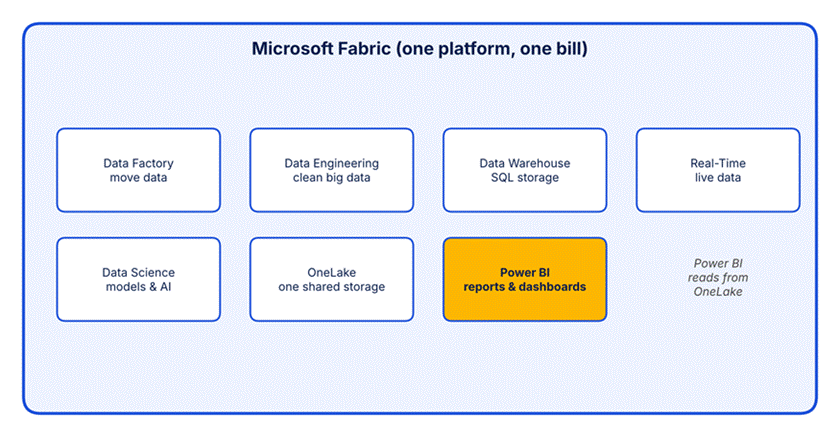
Power BI is one of several workloads inside Fabric and reads straight from OneLake.
Your old Power BI reports, dashboards and data models keep working the same way. Nothing breaks. Power BI is also still sold on its own, so you can use it without ever touching the rest of Fabric.
Microsoft Fabric vs Power BI: Key Differences
This table shows the main gaps side by side.
| Power BI | Microsoft Fabric | |
| What it is | A reporting and dashboard tool | A full data platform that includes Power BI |
| Main job | Show data as charts and reports | Move, store, clean, analyze and show data |
| Best for | Business analysts and managers | Data teams plus analysts working together |
| Data storage | Reads from other places | Has its own storage (OneLake) |
| Data cleaning | Light work with Power Query | Heavy work with pipelines, Spark and SQL |
| AI help | Copilot and AI visuals for reports | Copilot across every workload |
| How you pay | Per user, each month | By capacity (size of compute), by the hour |
| Free option | Desktop app and a free licence | Free licence and a trial |
| Learning curve | Gentle | Steeper, more parts to learn |
Features: What You Get With Each
What Power BI does well
- Clear, interactive dashboards that update as data changes.
- Fast report building with drag and drop.
- Easy sharing inside your company, plus apps for phones.
- Row-level security, so each person only sees the data meant for them.
- Natural language questions, where you type a question and get a chart.
What Fabric adds on top
- One shared storage place, so teams stop making messy copies of the same file.
- Pipelines that pull data in from many sources on a schedule.
- Tools for big data, SQL warehouses and live data streams.
- Machine learning tools for data scientists.
- One security and governance setup across everything.
A small point that helps in real life: when your data lives in OneLake, Power BI can read it directly without making another copy. That means fewer refresh jobs, fewer things to break, and numbers that match across teams.
Pricing in 2026: What Each One Costs
This is where most of the confusion happens, because the two are billed in different ways. Power BI mostly charges per person. Fabric charges for the size of the computer power you reserve. The prices below are US list prices and can change by region.
Power BI per-user prices
| Licence | Price | Good for |
| Free | $0 | Learning and personal use, no secure sharing |
| Pro | $14 per user / month | Teams that build and share reports |
| Premium Per User (PPU) | $24 per user / month | Analysts who need bigger models and advanced features |
Pro and PPU prices are billed yearly. The old per-capacity Premium plans (the P-SKUs) are being retired, and Fabric capacity now takes their place. A P1 plan maps to an F64 in Fabric.
Fabric capacity prices
Fabric sizes are called F SKUs. The number is the amount of compute power. Pay-as-you-go costs $0.18 per capacity unit per hour, and a 1-year plan cuts the price by about 40 percent.
| Size | Units | Pay-as-you-go / hour | Pay-as-you-go / month | 1-year plan / month |
| F2 | 2 | $0.36 | ~$263 | ~$156 |
| F4 | 4 | $0.72 | ~$526 | ~$313 |
| F8 | 8 | $1.44 | ~$1,051 | ~$625 |
| F16 | 16 | $2.88 | ~$2,102 | ~$1,251 |
| F32 | 32 | $5.76 | ~$4,205 | ~$2,501 |
| F64 | 64 | $11.52 | ~$8,410 | ~$5,003 |
| F128 | 128 | $23.04 | ~$16,819 | ~$10,005 |
The F64 rule that changes everything
Here is the detail that most people miss. On an F64 or bigger, people who only view reports do not need a paid Power BI licence. A free Fabric licence is enough. Below F64, every viewer still needs Pro or PPU.
People who build and publish reports still need a Pro licence, whatever the size. Keep that in mind when you add up the bill.
Where Fabric becomes cheaper: a simple break-even
Let us do the math with the F64 on a 1-year plan, which is about $5,003 a month.
- At $14 per viewer, Pro costs more than F64 once you pass about 357 viewers.
- At $24 per viewer, PPU costs more than F64 once you pass about 208 viewers.
- On pay-as-you-go (about $8,410), the points move to roughly 600 Pro viewers or 350 PPU viewers.
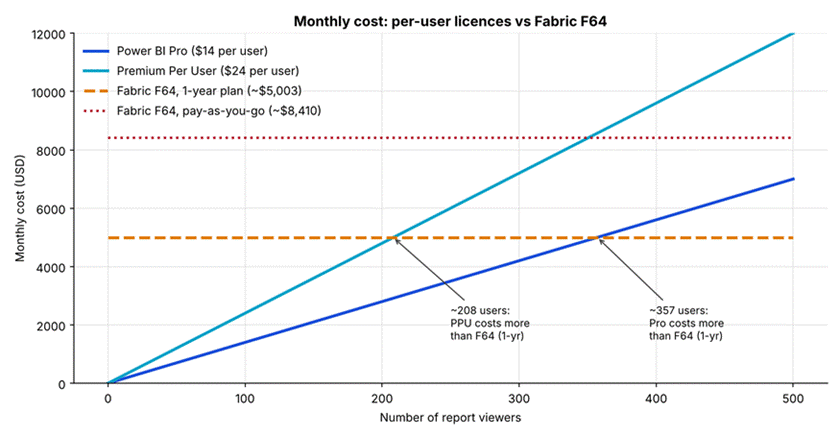
Fabric F64 stays flat, while per-user costs keep rising as you add viewers.
These numbers are my own simple math from the list prices above, so treat them as a guide and not a quote. Still, they show a clear pattern. For a small group, per-user licences win. For a big audience, capacity wins, and you also get the rest of Fabric thrown in.
Costs people forget
- Storage: OneLake storage is billed on its own, at roughly $0.023 per GB each month.
- Wasted capacity: If you leave a pay-as-you-go capacity running all month, you pay for every hour, even at night. Pause it when nobody needs it.
- Publisher licences: Report builders still need Pro, even on a big capacity.
- Region: Prices differ by country, so check Microsoft’s calculator for your area.
- Copilot and heavy jobs: These use up capacity too, so a small size may feel slow once many people use it.
Which One Should You Choose?
Skip the hype and look at your own situation. Here is a plain way to decide.
Choose Power BI on its own if:
- Your main goal is dashboards and reports.
- Your data already sits in Excel, a database or apps like Salesforce and is reasonably clean.
- You have fewer than about 50 to 200 users.
- You do not have a data engineering team.
Choose Microsoft Fabric if:
- You need to pull data from many places and clean it before reporting.
- Your data is large, or it arrives in real time.
- Data engineers, data scientists and analysts all need to work on the same data.
- You have 200 or more report viewers, or you already pay for Power BI Premium.
A middle path
You can start small. Many teams begin with Power BI Pro, then add a small Fabric capacity (like an F2 or F4) when they need pipelines or a warehouse. Your reports carry over, so you are not starting again.
If you want to try before you pay, Microsoft offers a free Fabric trial, which is a safe way to see whether the extra tools are worth it for you.
Common Mistakes to Avoid
- Buying Fabric just because it is new. If you only make reports, extra tools will add cost and confusion.
- Picking a small capacity and expecting free viewers. The free viewer rule starts at F64.
- Leaving capacity running all day. Pause it or use a reserved plan if you need it always on.
- Ignoring who does what. Decide early who builds reports, who views them and who manages data. That decides which licences you need.
- Skipping the trial. A few weeks of testing can save you from a costly wrong guess.
Frequently Asked Questions
Is Power BI part of Microsoft Fabric?
Yes. Power BI is the reporting workload inside Fabric. It is also still available as a separate product, so you can use it without the other Fabric tools.
Does Fabric replace Power BI?
No. Fabric adds data storage, data engineering and more around Power BI. Your Power BI reports keep working the same way.
Is Microsoft Fabric free?
There is a free licence and a trial, but running real workloads needs a paid capacity. The smallest size, F2, is about $263 a month on pay-as-you-go.
Do I still need Power BI Pro if I buy Fabric?
Yes, for anyone who builds and publishes reports. On F64 or bigger, people who only view reports can use a free licence. Below F64, viewers need Pro or PPU as well.
What happened to Power BI Premium?
The per-capacity Premium plans (P-SKUs) have been retired. Fabric F SKUs replaced them, and a P1 plan maps to an F64. Premium Per User at $24 is still available.
Can a small business use Fabric?
Yes. An F2 or F4 capacity is made for small teams and testing. But if all you need is reports, Power BI Pro is usually cheaper and simpler.
Which is easier to learn?
Power BI. If you know Excel, you can build a first report in a day or two. Fabric has many more parts, so it takes longer.
Final Thoughts
Microsoft Fabric and Power BI are not opposites. One is the full platform, and the other is the part people see. If dashboards are your goal and your data is in good shape, Power BI alone will do the job at a fair price. If your data is messy, big or spread across many systems, Fabric gives you one place to handle it all.
Count your viewers, list who builds what, and run the break-even math above. That will tell you more than any sales page can. Prices and rules change, so double-check the latest numbers on Microsoft’s official pricing pages before you buy.
Similar Article
- Microsoft Fabric vs Snowflake: A Detailed Comparison of Cloud Data Warehouse Solutions
- Microsoft Fabric vs Databricks: Features, Performance, Pricing, and Key Differences
- Microsoft Fabric Pricing Explained: Capacity Costs, Licensing Options, and Cost Optimization
- Microsoft Fabric Real-Time Intelligence Tutorial: Build Real-Time Data Analytics Solutions
- Fabric Notebook Toolkit Tutorial for Beginners With Examples