Learn how Microsoft Fabric pricing works. See F SKU costs, pay-as-you-go vs reserved prices, licensing options, and 10 simple ways to cut your bill.
Microsoft Fabric pricing confuses a lot of people at first. You see terms like “capacity units,” “F SKU,” “reserved,” and “pay-as-you-go,” and it’s hard to guess what your monthly bill will look like.
Here’s the short version. Fabric is mostly not priced per user. You buy a block of computing power called capacity, and everything you do in Fabric draws from it. That includes reports, data pipelines, notebooks, and warehouses. Bigger block, bigger bill.
In this guide, you’ll learn how Fabric pricing works, what each size costs, which license you need, and how to lower your bill without slowing your team down. All prices are in US dollars and were checked in October 2026. Prices change by region, so always confirm them on Microsoft’s official pricing page before you buy.
How Microsoft Fabric Pricing Works
Fabric brings many tools under one roof: Power BI, Data Factory, data engineering, data warehouse, data science, and real-time analytics. In the past, you paid for each tool on its own. Now you pay once for a shared pool of power.
That pool is measured in Capacity Units, or CUs. Think of CUs like electricity. Every task you run uses a bit of it. A big data refresh uses a lot. A quick report view uses a little. The number in the plan name tells you how many CUs you get. So an F2 gives you 2 CUs, and an F64 gives you 64.
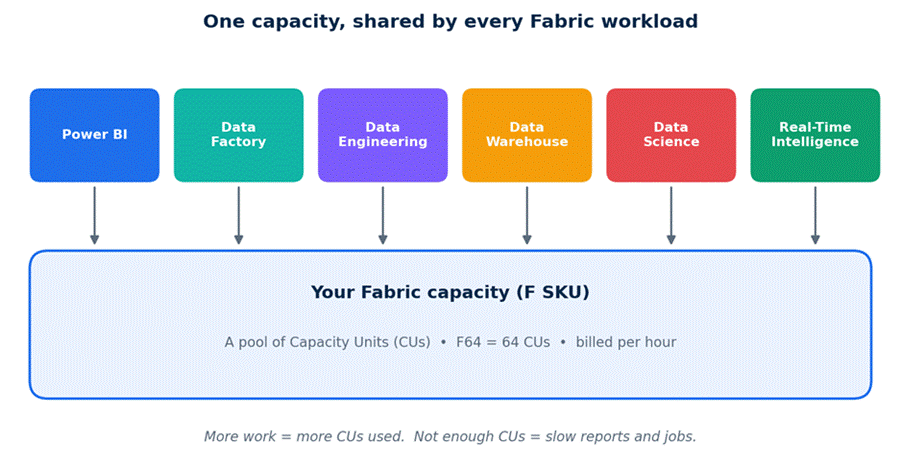
Every Fabric workload pulls from the same capacity pool.
Your Fabric bill usually has three parts:
- Capacity: the F SKU you buy. This is the biggest cost for most teams.
- Storage: the data you keep in OneLake, billed separately.
- User licenses: some people still need a Power BI license, depending on your capacity size.
Microsoft Fabric Capacity Costs (F SKU Price List)
Pay-as-you-go pricing is about $0.18 per CU per hour in the US. The price per CU stays the same at every size. If you double the size, you double the cost. There’s no bulk discount until you move to a reservation.
This table shows what each size costs if you leave it running all month (730 hours). The reserved column uses the one-year reservation rate, which works out to about 40% less.
| SKU | CUs | Pay-as-you-go per hour | Pay-as-you-go per month | 1-year reserved per month (approx.) |
| F2 | 2 | $0.36 | $263 | $156 |
| F4 | 4 | $0.72 | $526 | $313 |
| F8 | 8 | $1.44 | $1,051 | $625 |
| F16 | 16 | $2.88 | $2,102 | $1,251 |
| F32 | 32 | $5.76 | $4,205 | $2,501 |
| F64 | 64 | $11.52 | $8,410 | $5,003 |
| F128 | 128 | $23.04 | $16,819 | $10,005 |
| F256 | 256 | $46.08 | $33,638 | $20,011 |
Estimated US prices. The range goes up to F2048, which costs about $269,000 per month on pay-as-you-go.
Most small and mid-size teams land between F2 and F64. Anything above that is usually a large company with heavy data work.
Pay-As-You-Go vs Reserved Capacity: Which Is Cheaper?
You can buy the same capacity in two ways. They work very differently.
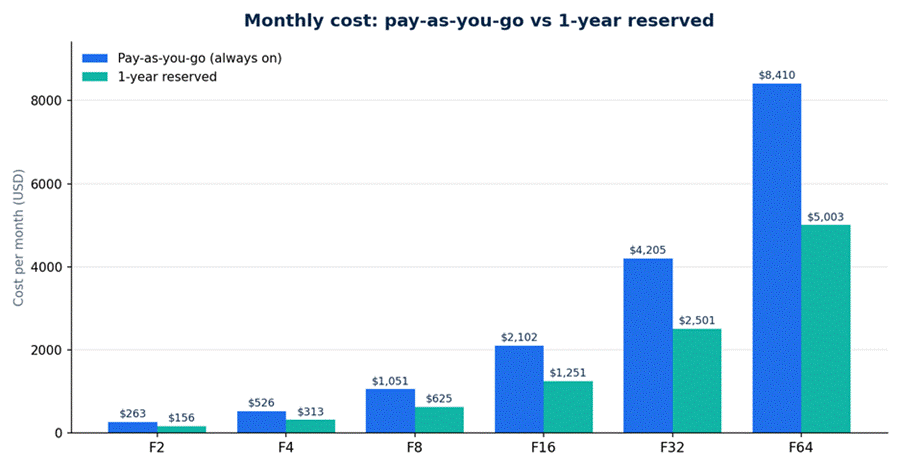
Reserved capacity costs about 40% less per month when it runs all day, every day.
Pay-as-you-go
- You pay by the hour for the time the capacity is on.
- You can pause it when nobody is using it, and the compute charge stops.
- You can scale up or down any time. There’s no contract.
One-year reservation
- You promise to pay for the capacity for a full year.
- In return, you get about 41% off the pay-as-you-go price.
- You pay even if the capacity sits idle or is paused. The commitment doesn’t stop.
The simple break-even rule
Because the discount is about 41%, a reservation only wins if you’d use the capacity more than roughly 59% of the time. That’s about 14 hours a day, every day. If your capacity runs less than that, pay-as-you-go with pausing is usually cheaper, even at the higher hourly rate.
| Real example: an F16 capacity Always on with pay-as-you-go: $2,102 a month. Reserved for a year: $1,251 a month. Pay-as-you-go but only on for 10 hours a day, 22 days a month: about $634 a month. The “cheaper” reservation costs nearly double the paused option for a team that works office hours. |
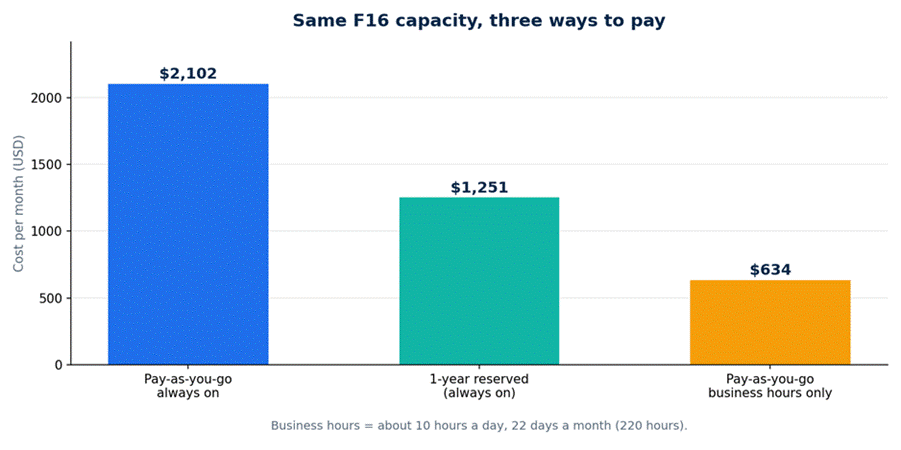
Pausing can beat a reservation when your team only works in office hours.
A smart middle path also exists. Reserve only the amount you use around the clock, and keep the extra on pay-as-you-go. That way you get the discount on your steady load and the freedom to pause the rest.
Microsoft Fabric Licensing Options Explained
Licensing is where people trip up most. Capacity pays for the computing power, but it doesn’t always cover the people using Power BI. Here are your main options:
| Option | Best for | How you pay |
| Fabric free trial | Testing Fabric before you spend money (about 60 days at the time of writing) | Free |
| F SKU, pay-as-you-go | Teams with uneven or office-hours workloads | Per hour, through Azure |
| F SKU, reserved | Steady workloads that run most of the day | Fixed monthly rate, one-year commitment |
| Power BI Pro | Individual report creators and viewers on small capacities | About $14 per user per month |
| Power BI Premium Per User | Small teams who want Premium Power BI features | About $24 per user per month |
| Older Power BI Premium (P SKUs) | Companies that already own them | Monthly plan, being phased out in favor of F SKUs |
User license prices are approximate and can change. Check Microsoft’s site for your region.
The F64 rule you should know
This one detail can change your whole budget. On F64 and larger, people who only view reports don’t need their own Power BI Pro license. On anything smaller than F64, every viewer needs a Pro license. People who build and publish reports need a Pro or Premium Per User license at any size.
So when does F64 make sense? An F64 on a one-year reservation costs about $5,003 a month. That’s about the same as 357 Power BI Pro licenses at $14 each. If you have more than roughly 360 people viewing reports, F64 can be cheaper than buying Pro for everybody. On pay-as-you-go, the match is closer to 600 users. Under those numbers, a smaller capacity plus Pro licenses usually costs less.
Extra Fabric Costs That Surprise People
The capacity price is not the whole bill. Watch for these:
- OneLake storage: about $0.023 per GB per month, which is around $23 per terabyte. You still pay for stored data when your capacity is paused.
- Power BI Pro licenses: report creators always need one, and so do viewers on capacities below F64.
- Autoscale Billing for Spark: an optional setting for Spark jobs that bills on its own pay-as-you-go rate. Reservation discounts don’t apply to it.
- Reservation lock-in: if you reserve too much, you pay for it all year, used or not.
- Other Azure services: if you connect outside services or move data between regions, those may add their own charges.
How Fabric Uses Your Capacity (and What Happens When You Run Out)
Knowing how CUs get used helps you pick the right size. Here are rough numbers for common jobs:
- A small Spark cluster (2 to 4 cores) uses about 2 to 4 CUs while it runs.
- A medium cluster uses about 8 CUs.
- A large cluster with 32 or more cores uses 32 CUs or more.
- A small Power BI data model refresh can use roughly 0.1 to 1 CU-hour.
Fabric doesn’t punish you for a short spike. It spreads heavy background work over time, so a busy hour doesn’t instantly break things. But if you keep going past your limit for long, Fabric slows your jobs and reports down. This is called throttling.
That’s why size matters in both directions. Too small, and people wait on slow reports. Too big, and you burn money on power nobody uses. Microsoft offers a free Capacity Metrics app that shows how much of your capacity you really use. Check it before you change sizes.
What Fabric Might Cost for Three Types of Teams
These are simple examples to give you a feel for the numbers. Your own setup will differ.
| Team | Typical setup | Smart way to buy | Rough monthly cost |
| Small team (about 10 users) | Light reports, a few data refreshes | F2 on pay-as-you-go, paused after hours, plus Pro licenses | $80 to $260 for capacity, plus $140 for Pro |
| Mid-size company (about 150 viewers) | Daily dashboards, some data pipelines | F8 to F16 reserved, plus Pro for each viewer | $625 to $1,251 for capacity, plus $2,100 for Pro |
| Large company (500+ viewers) | Many reports, heavy data work | F64 or higher, reserved | $5,003 and up, no viewer Pro licenses needed |
Pro license costs use $14 per user. Capacity costs are US estimates.
10 Simple Ways to Cut Your Microsoft Fabric Bill
- Start small and measure first. Use the free trial or a small pay-as-you-go capacity. Run it through a full business cycle, such as a month-end close, before you commit to anything.
- Pause when nobody is working. Pay-as-you-go capacity is billed by the second. Turning it off at night and on weekends is the easiest saving there is.
- Reserve only your steady load. Look at the lowest level of use you see every day. Reserve that much. Leave the rest on pay-as-you-go.
- Run heavy jobs at quiet times. Schedule big refreshes and pipelines overnight so they don’t pile up with people running reports.
- Check your usage every month. Open the Capacity Metrics app. If you never go above half of your capacity, you can probably drop a size.
- Refresh less often. Does that report really need updating every 30 minutes? Many don’t. Use incremental refresh so you only reload new data.
- Keep testing away from production. Put development and test work on a small capacity that you pause often. Keep your main capacity for the real thing.
- Clean up old data. Delete old tables, files, and copies you don’t use. Storage costs are small, but they add up and they never pause.
- Do the Pro vs F64 math as you grow. When your viewer count climbs toward 360, run the numbers again. The cheapest option changes as you add people.
- Try Autoscale Billing for Spark if your jobs spike. It lets heavy Spark work run on its own pay-as-you-go meter, so you don’t need a bigger capacity for a few busy hours.
Common Pricing Mistakes to Avoid
- Reserving on day one. You don’t know your real usage yet. Measure first, then commit.
- Forgetting to pause. A pay-as-you-go capacity that runs all night is just a reservation at full price.
- Buying F64 just for the free viewers when you only have 100 people. Pro licenses may cost far less.
- Ignoring region. Prices differ between regions, and your currency matters too.
- Skipping the Enterprise Agreement check. If your company has one with Microsoft, you may get better rates than public pricing.
Frequently Asked Questions About Microsoft Fabric Pricing
How much does Microsoft Fabric cost per month?
It depends on the size you pick. The smallest paid size, F2, costs about $263 a month on pay-as-you-go if you leave it running all month. F64 costs about $8,410 a month. Reserved prices are about 41% lower.
Is Microsoft Fabric priced per user?
Mostly no. You pay for capacity, and your team shares it. But some people still need a Power BI Pro license, especially if your capacity is smaller than F64.
Can I try Microsoft Fabric for free?
Yes. Microsoft offers a free trial with a trial capacity. At the time of writing, it lasts about 60 days. It’s the best way to see how much capacity you actually need.
Can I pause Microsoft Fabric to save money?
You can pause pay-as-you-go capacity, and the compute charge stops while it’s paused. You can’t save money by pausing a reserved capacity, because you pay for the reservation either way. Storage charges continue in both cases.
What is the difference between F SKU and P SKU?
P SKUs are the older Power BI Premium plans, sold monthly. F SKUs are the newer Fabric plans, and they offer pay-as-you-go billing and pausing. Microsoft is moving customers toward F SKUs.
Which Fabric SKU should I start with?
Most teams do well starting with F2 or F4 on pay-as-you-go, then moving up once real usage data shows what they need. Don’t jump to F64 unless you have a large group of report viewers.
How much does OneLake storage cost?
About $0.023 per GB per month, or around $23 per terabyte. It’s billed on its own, apart from your capacity.
Final Thoughts
Microsoft Fabric pricing looks tricky, but it comes down to a few choices. Pick a capacity size. Decide between pay-as-you-go and a reservation. Check whether your viewers need Pro licenses. Then keep an eye on usage.
If you’re new to Fabric, start with the free trial, measure what you really use, and pause anything you’re not using. Reserve only when your usage stays steady. Do that, and you’ll pay for the power you need and nothing more.