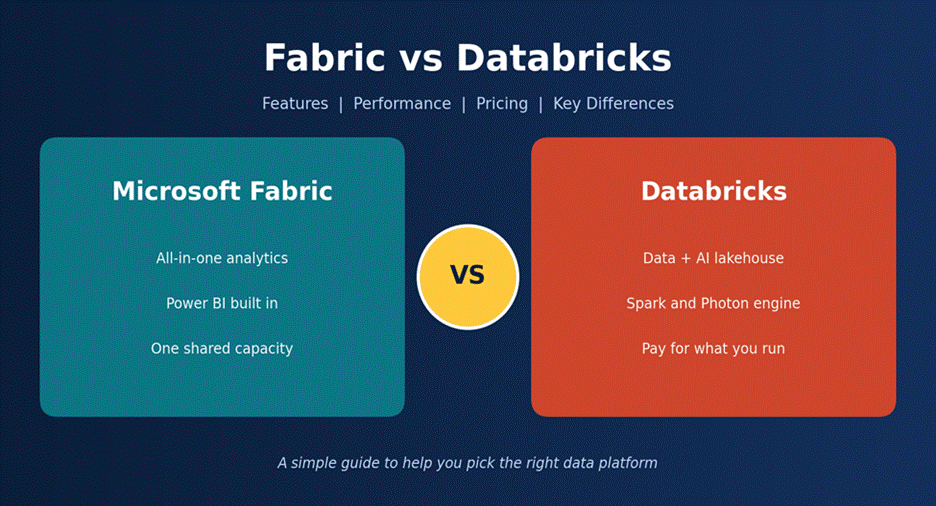
If your company works with data, you have likely heard both names by now: Microsoft Fabric and Databricks. Both help you store data, clean it, study it, and build AI on top of it. But they work in very different ways. Pick the wrong one and you can lose months of effort and a lot of money.
This guide compares Microsoft Fabric vs Databricks in plain words. We look at features, speed, price, and the kind of team each tool suits best. At the end, you should know which one fits you.
| The short answer Choose Microsoft Fabric if your company already runs on Microsoft 365 and Power BI, and you want one tool that both business users and data teams can share.Choose Databricks if you have strong engineers, heavy machine learning plans, or you run on more than one cloud.Use both if your needs are mixed. Lots of large companies do this, and we explain how below. |
What Is Microsoft Fabric?
Microsoft Fabric is a ready-made data service from Microsoft. You do not set up servers. You sign in, and the tools are there. It brings Power BI (reports), Data Factory (moving data), a data warehouse, Spark notebooks, and real-time analytics into one place.
The center of Fabric is OneLake. Think of it as OneDrive for your data. Every Fabric tool reads from it and writes to it, so you do not keep making copies of the same table. Data is saved in the Delta format, which is open, so you are not locked into a secret file type.
You pay for Fabric by buying capacity. That is one pool of computing power that every tool in Fabric shares.
What Is Databricks?
Databricks was started by the people who created Apache Spark, a popular tool for handling very large data. It follows the lakehouse idea: cheap data lake storage with the speed and rules of a data warehouse on top.
Databricks runs on AWS, Azure, and Google Cloud. Its main parts are:
- Spark and Photon for fast data processing
- Databricks SQL for analysts who write queries
- Unity Catalog for access rules, tracking, and data discovery
- MLflow and Mosaic AI for building and running machine learning models
- Lakebase, a Postgres-style database for apps
One thing that confuses people: Azure Databricks is simply Databricks sold inside Microsoft Azure. It uses the same engine, the same Spark, and the same Unity Catalog.
Microsoft Fabric vs Databricks at a Glance
| Area | Microsoft Fabric | Databricks |
| Type of product | All-in-one analytics service (SaaS) | Data and AI platform |
| Best known for | Power BI and easy setup | Spark, machine learning, big data |
| Main users | Analysts, BI teams, small data teams | Data engineers, data scientists |
| Storage | OneLake (one lake for the whole company) | Delta Lake in your own cloud storage |
| Clouds | Azure-based (can link to AWS S3 and Google storage) | AWS, Azure, Google Cloud |
| Power BI link | Built in, with Direct Lake mode | Works well, through DirectQuery |
| Governance | Microsoft Purview and OneLake security | Unity Catalog |
| Price model | Fixed capacity (F SKUs) | Pay for what you use (DBUs) |
| Learning curve | Gentler | Steeper, but more control |
Features Compared
Data storage
Both tools use Delta tables, so your data is not trapped. The difference is who owns the lake. With Fabric, Microsoft runs OneLake for you, and it covers your whole company in one place. With Databricks, your data usually sits in your own cloud storage account, and you keep the keys. Fabric is simpler. Databricks gives you more control.
Data engineering
Fabric offers low-code options like Dataflow Gen2 and Data Factory pipelines, plus Spark notebooks for people who write code. A business analyst can build a basic data flow without a developer.
Databricks is code first. You work in notebooks, jobs, and pipelines, mostly in Python and SQL. That feels harder at first, but engineers get far more room to tune things and handle messy, large, or streaming data.
Business intelligence
This is where Fabric shines. Its Direct Lake mode lets Power BI read Delta files in OneLake directly. There is no import step and no slow DirectQuery. Reports feel fast, and data stays fresh.
Direct Lake has limits, though. Very large tables can hit size limits, and some features, such as certain security rules, can push Power BI back to the slower DirectQuery mode. Check the current limits before you build around it.
Databricks works with Power BI too, using DirectQuery over a SQL warehouse. It is good, just not as smooth as Direct Lake. Databricks also has its own dashboards if you want to skip Power BI.
AI and machine learning
Databricks has the edge here. It created MLflow and has deep tools for training, tracking, and serving models, plus a feature store and model governance. If your team builds and runs models every week, this matters a lot.
Fabric has data science notebooks, Copilot, and links to Azure AI services. That is enough for many teams. But if machine learning is the heart of your work, Databricks goes deeper.
Governance and security
Unity Catalog is widely seen as the stronger tool for fine-grained access rules, lineage (where data came from), and model control. Fabric depends on workspace roles, OneLake security, and Microsoft Purview. It is improving fast, and it fits well if you already use Purview. Some reviewers pointed out gaps in how shortcuts follow source-system security rules in early 2026, so test this with your own data.
Cloud choice
If you must run on AWS or Google Cloud, Databricks is the natural pick. Fabric lives in Azure. It can read data in S3 or Google storage through shortcuts, but the heavy work still runs in Microsoft’s cloud.
Performance: Which One Is Faster?
Honest answer: it depends on the job. Anyone who says one tool always wins is selling something.
Databricks uses Photon, a fast engine for SQL and data processing. Databricks says it can give up to 12 times better price-performance in some SQL tests. That is a vendor claim, and real results change with the shape of your work. Fabric has its own engines for Spark and SQL, and they are fast enough for most business tasks.
| Task | Likely better fit | Why |
| Power BI dashboards | Fabric | Direct Lake skips the import step |
| Large ETL and heavy transforms | Databricks | More tuning, Photon, Jobs Compute |
| Machine learning training | Databricks | MLflow, GPUs, model serving |
| Mixed team workloads, steady use | Fabric | Shared capacity is easy to manage |
| Many teams running at once | Databricks | Each team can have its own compute |
One practical point that spec sheets skip. In Fabric, all workloads share one capacity. If someone runs a huge job at noon, it can slow reports for everyone else. Fabric smooths usage over time, so short bursts are fine, but steady overload leads to slowdowns. In Databricks, you can give each team its own compute, so one team does not hurt another.
| Our tip Do not trust any benchmark, including ours. Take three real jobs from your own company, run them on both platforms for two weeks, and compare speed and cost. |
Pricing: Fabric vs Databricks
Price is where most people get confused, because the two tools charge in different ways. Prices below are US list prices checked in October 2026. They change by region and by deal, so always confirm on the official pricing pages.
How Fabric pricing works
You buy an F SKU, which is a set number of capacity units (CUs). An F2 has 2 CUs, an F64 has 64, and so on. Each size costs twice the one below it.
- Pay-as-you-go: about $0.18 per CU per hour in US regions. You can pause it when you are not using it.
- Reserved: a one-year deal saves about 41%, but you cannot pause it.
- Storage: OneLake costs about $0.023 per GB per month, billed separately.
- Power BI users: from F64 and up, people with a free license can view reports. That can save a lot if you have hundreds of viewers.
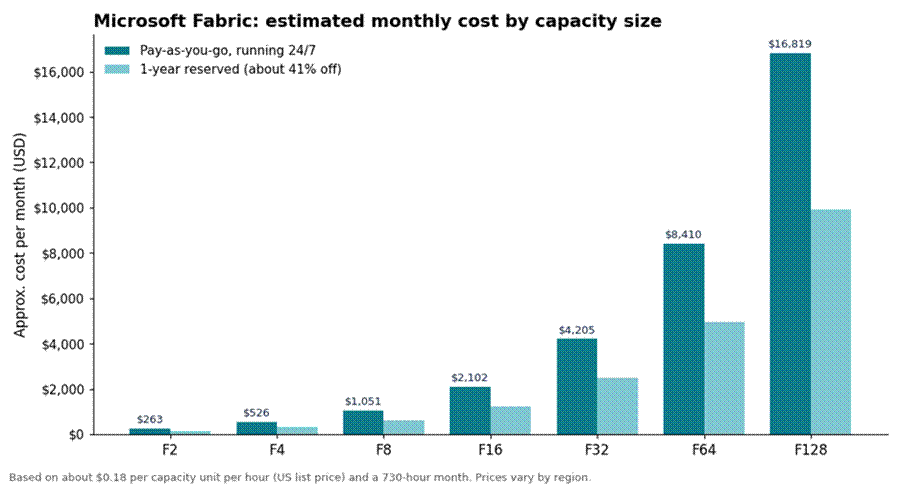
Figure 1: Estimated monthly cost of Fabric capacity (US list prices).
How Databricks pricing works
Databricks charges in DBUs (Databricks Units). Your bill is the DBUs you use multiplied by a rate. The rate depends on the type of work, and it is billed per second. With classic compute you also pay your cloud company for the machines. Serverless bundles the machines into the price.
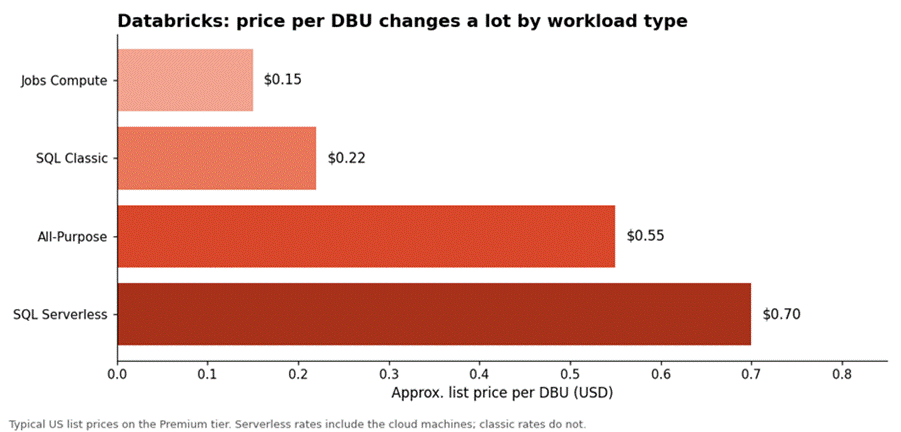
Figure 2: The same machine can cost very different amounts depending on the compute type.
Notice the gap between Jobs Compute and All-Purpose. A scheduled job running on an interactive cluster can cost two to four times more for the same work. This is the single most common way teams waste money on Databricks.
Also note that the old Standard tier is being phased out, so Premium is now the base level.
A simple cost example
Take a small Fabric setup. An F8 capacity has 8 CUs. Running it all month costs about $1,051 (8 x $0.18 x 730 hours). But if your team only works about 10 hours a day on weekdays, and you pause it the rest of the time, you pay for roughly 220 hours. That is about $317. Same capacity, one third of the cost.
Now Databricks. A job that runs 4 hours a day on a mid-size machine (about $0.56 per hour for the VM) plus 1 DBU per hour on Jobs Compute at $0.15 comes to around $0.71 per hour, or about $86 a month. Put that same job on All-Purpose compute at $0.55 per DBU and it costs roughly twice as much. These are rough examples, not quotes, but they show where the savings hide.
| Cost question | Fabric | Databricks |
| What do I pay for? | A capacity, on all the time or paused | DBUs used, plus cloud machines (classic) |
| Easy to predict? | Yes, a fixed monthly size | Harder, it follows usage |
| Biggest waste risk | Oversized SKU, or capacity left running | Idle clusters, jobs on All-Purpose |
| Cheaper when | Use is steady and many people view reports | Work is bursty or heavy on scheduled jobs |
| Free option | Trial capacity | Free Edition |
So which is cheaper? For BI-heavy companies with many report viewers and steady use, Fabric often costs less. For bursty workloads, large engineering jobs, or teams that watch their clusters closely, Databricks can cost less. Neither is cheap if you leave things running and never look at the bill.
Key Differences in Plain Words
- Who it is built for. Fabric is built for the whole company, including business users. Databricks is built for data and AI specialists.
- How much you manage. Fabric hides most setup. Databricks lets you tune almost everything, which means more work.
- How you pay. Fabric uses a fixed capacity. Databricks bills by use.
- Where it runs. Fabric is Azure-centered. Databricks runs on three clouds.
- Power BI. Fabric has the tightest link through Direct Lake.
- Machine learning and governance. Databricks is deeper and more mature in both.
Which One Should You Choose?
Choose Microsoft Fabric if:
- Your company already uses Microsoft 365, Azure, and Power BI
- Most of your users are analysts and business teams
- You want fewer tools to buy, connect, and manage
- You prefer a steady monthly cost
Choose Databricks if:
- You have skilled data engineers and data scientists
- Machine learning and AI are central to your work
- You use AWS or Google Cloud, or may in the future
- You need strict, fine-grained data rules
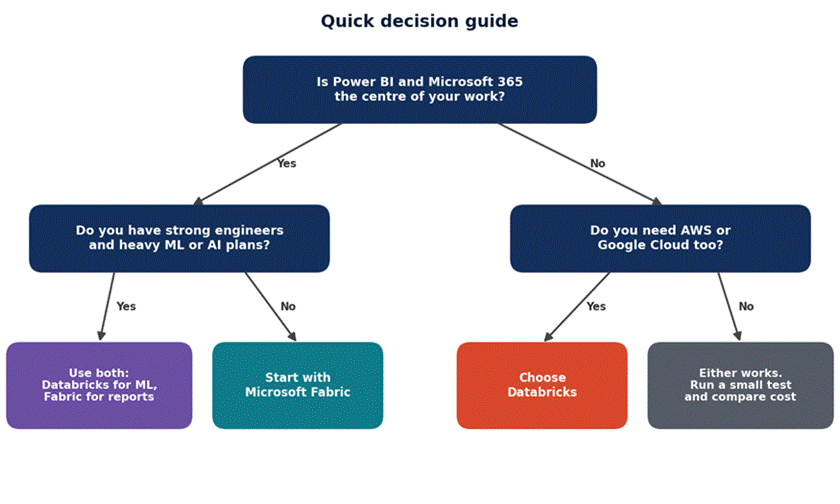
Figure 3: A simple way to start the decision. Your own test results should have the final say.
Can You Use Both Together?
Yes, and many companies do. A common setup looks like this: Databricks handles the heavy data work and machine learning, then writes the results as Delta tables into OneLake. Power BI reads them through Direct Lake.
One warning from the field. Access rules you set in Unity Catalog do not automatically apply when Fabric reads the same files directly. Plan your security for both sides, or you may leave a door open.
Mistakes to Avoid
- Buying a big Fabric SKU on day one. Start on pay-as-you-go, measure real use, then reserve only your steady base.
- Running scheduled jobs on All-Purpose compute in Databricks. Move them to Jobs Compute.
- Forgetting to pause or auto-stop. Idle capacity and idle clusters both burn money.
Final Verdict
There is no single winner. Microsoft Fabric is the easier, more joined-up choice for Microsoft-focused companies that care most about reports and shared analytics. Databricks is the stronger choice for engineering-heavy teams, serious machine learning, and multi-cloud plans.
If we had to give one rule, it would be this: let your people decide, not the logo. Look at who will use the platform every day. If they live in Power BI, start with Fabric. If they live in notebooks, start with Databricks. And if both groups exist in your company, use both and connect them through OneLake.
Frequently Asked Questions
Is Microsoft Fabric a replacement for Databricks?
Not exactly. They overlap, but they are built for different users. Fabric is an all-in-one analytics service. Databricks is a deeper data and AI platform. Many companies run both.
Which is cheaper, Fabric or Databricks?
It depends on how you work. Fabric is often cheaper for steady, BI-heavy use. Databricks can be cheaper for bursty or job-heavy work if you use Jobs Compute and shut down idle clusters. Test with your own workload.
Is Databricks better for machine learning?
For most teams, yes. Databricks has MLflow, Mosaic AI, a feature store, and strong model governance. Fabric covers the basics and works with Azure AI services.
Does Databricks work with Power BI?
Yes. Power BI connects to Databricks SQL warehouses, usually through DirectQuery. It works well, but it is not as tight as Fabric’s Direct Lake mode.
Is Fabric only available on Azure?
Fabric runs in Microsoft’s cloud. It can read data from AWS S3 and Google Cloud storage through shortcuts, but your capacity is bought and run through Microsoft.
Which is easier to learn?
Fabric, for most people. It has low-code tools and a familiar Microsoft feel. Databricks asks for more coding skill, but it rewards you with more control.