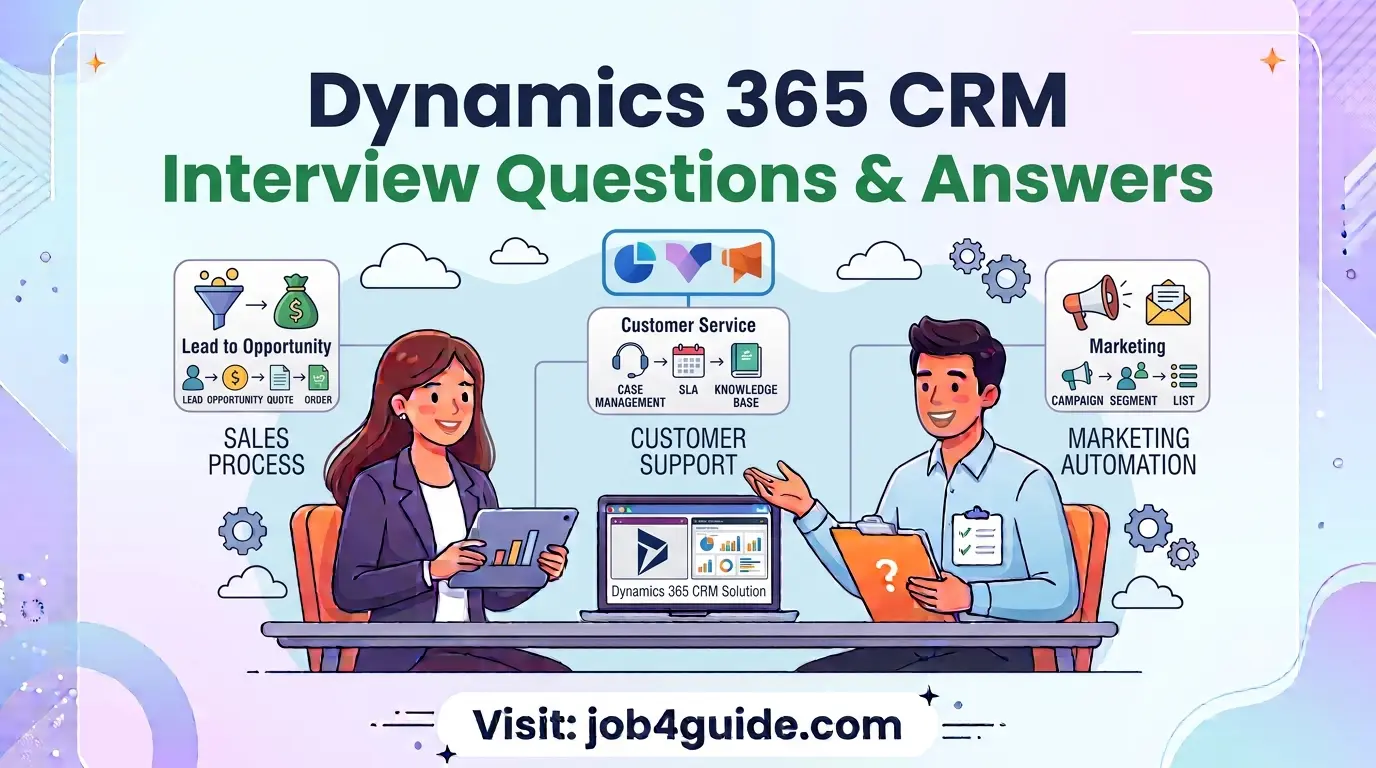
If you have an interview for a Dynamics 365 CRM role coming up in 2026, you are probably feeling a mix of excitement and nerves. That is normal. The good news is that most companies ask a fairly predictable set of questions, and once you know what they are, preparing becomes a lot easier. This guide walks you through the real questions candidates are facing this year, along with answers written in plain, easy language, not textbook jargon.
We put this list together by looking at how hiring for Dynamics 365 CRM has changed over the last couple of years. Companies now care less about people who have just memorised definitions, and more about people who can explain how they actually solved a problem in the system. So along with the standard questions, you will also find some scenario-based ones near the end, because that is where most interviews are heading now.
A Quick Look at the Interview Process
Before we jump into the questions, it helps to know what the interview journey usually looks like. It is not the same everywhere, but most companies follow something close to this pattern.
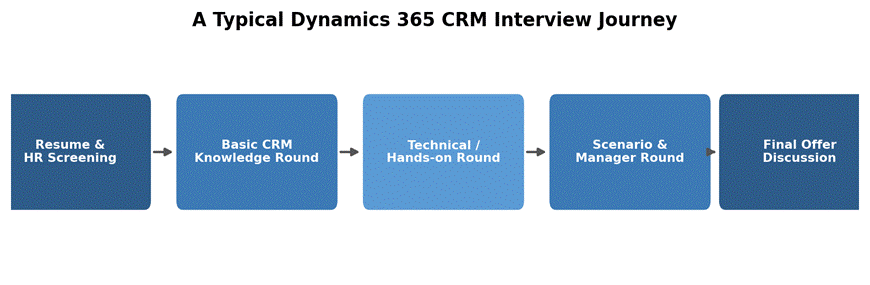
Figure 1: A typical hiring flow for a Dynamics 365 CRM position.
Some companies skip the HR round and go straight to the technical round, especially for smaller businesses hiring in a hurry. But the core idea stays the same: they want to check your basic knowledge first, then your hands-on skill, and finally how you think through real problems.
Where Interviewers Usually Focus
Not every topic gets equal attention in an interview. Based on patterns from recent hiring cycles, here is roughly how the questions are usually spread out.
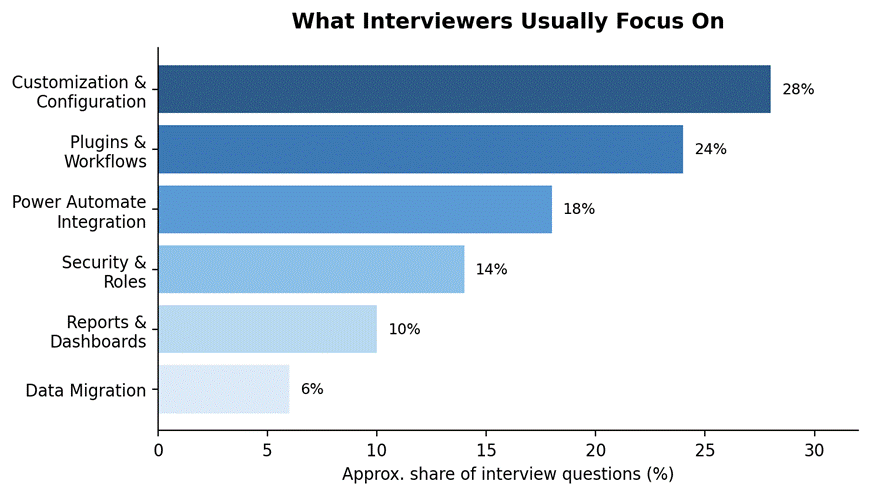
Figure 2: Rough share of questions asked across common Dynamics 365 CRM topics.
This tells you something useful: spend most of your prep time on customisation, plugins, and workflows. These three areas alone cover more than half of what gets asked.
Basic Level Questions (For Freshers and Early Career)
These are the questions you will almost certainly get if you have less than two years of experience, or if this is your first CRM role.
Q: What is Dynamics 365 CRM?
A: It is a cloud-based software from Microsoft that helps businesses manage their relationships with customers. It covers sales, customer service, marketing, and field service, all connected in one place so teams do not have to work in separate tools.
Q: What is the difference between Dynamics 365 CRM and Dynamics 365 ERP?
A: CRM (Customer Relationship Management) is built around sales, marketing, and customer service work. ERP (Enterprise Resource Planning) is built around the back-end side of a business, like finance, supply chain, and operations. Dynamics 365 offers both, but they solve different problems.
Q: What are the main modules in Dynamics 365 CRM?
A: The four you will hear about most are Sales, Customer Service, Marketing, and Field Service. Some companies also use Project Operations and Customer Insights, but the first four are the core ones.
Q: What is an entity in Dynamics 365?
A: Think of an entity as a table that stores a type of data, like Contacts, Accounts, or Leads. Each entity has fields (called columns) and each record in it is like a row. If you have used Excel, an entity is basically a smarter, more connected version of a spreadsheet tab.
Q: What is the difference between a Lead and an Opportunity?
A: A Lead is a person or company that might be interested in what you sell, but you have not confirmed it yet. Once you qualify that lead and there is a real chance of doing business, it becomes an Opportunity. In short, a Lead is a maybe, and an Opportunity is a serious possibility.
Q: What is a solution in Dynamics 365?
A: A solution is a package that holds your customisations, like entities, fields, forms, and workflows. It lets you move changes from one environment to another, for example from a test environment to the live one, without doing everything manually again.
Q: What are Views and Forms used for?
A: A View controls how a list of records looks, like which columns show up in a grid. A Form controls how a single record looks when you open it, including which fields are visible and how they are arranged.
Intermediate Level Questions
These questions check if you have actually worked inside the system and configured things yourself, not just used it as an end user.
Q: What is the difference between a Workflow and a Business Process Flow?
A: A Workflow runs quietly in the background to automate steps, like sending an email or updating a field, without the user seeing it happen. A Business Process Flow is visible to the user. It shows up as a guided bar at the top of a record, walking someone through the right steps in the right order.
Q: What is a Plugin, and when would you use one?
A: A plugin is custom code, usually written in C#, that runs when something specific happens in the system, like a record being created or updated. You would use one when the built-in tools, like workflows or Power Automate, cannot handle the logic you need, especially if it has to run instantly and cannot wait.
Q: What is the difference between synchronous and asynchronous plugins?
A: A synchronous plugin runs immediately and the user has to wait for it to finish before moving on. An asynchronous plugin runs in the background after the action is done, so the user does not have to wait. You would choose synchronous when the result has to be ready right away, like blocking a save if a rule is broken.
Q: What are the different security models in Dynamics 365?
A: There are a few layers: Security Roles decide what a user can do, like read, write, or delete. Business Units group users and records together, often based on department or region. Teams let you share access with a group of people without changing everyone’s individual role. Field-level security locks down specific fields so only certain people can see or edit them.
Q: What is a Dataverse table, and how is it related to an entity?
A: Dataverse is the underlying data platform behind Dynamics 365, and table is just the newer name for what used to be called an entity. Microsoft renamed it a few years ago to make it sound less technical, but they mean the same thing.
Q: How would you import data into Dynamics 365?
A: The simplest way is the built-in Import Data Wizard, where you upload a CSV or Excel file and map the columns to fields. For larger or repeated imports, tools like the Configuration Migration Tool or Power Query give more control, especially when you need to clean the data first.
Q: What is Power Automate’s role in Dynamics 365 CRM?
A: Power Automate is Microsoft’s automation tool, and it is slowly taking over a lot of the work that used to need workflows or plugins. You can use it to send notifications, connect Dynamics 365 with other apps like Teams or SharePoint, and automate multi-step processes without writing code.
Advanced and Technical Questions
These come up for senior roles, developer roles, or when the interviewer wants to see how deep your hands-on experience really goes.
Q: What is the plugin registration tool used for?
A: It is a tool you use to connect your custom plugin code to specific events in Dynamics 365, like ‘before a record is saved’ or ‘after a record is deleted’. Without registering it correctly, your plugin code will just sit there and never run.
Q: What is the difference between Pre-Operation and Post-Operation stages in plugins?
A: Pre-Operation runs before the actual database change happens, so you can still stop or change the data before it is saved. Post-Operation runs after the change is already saved, so it is used when you need to react to something that has already happened, like sending a follow-up email.
Q: How do you handle error logging in a plugin?
A: Most developers wrap the plugin logic in a try-catch block and throw an InvalidPluginExecutionException with a clear message when something goes wrong. This message is what the user sees on screen, so it needs to be simple, not a raw technical error.
Q: What is the ALM (Application Lifecycle Management) process in Dynamics 365?
A: It is the structured way teams move changes through different environments, usually Development, Test or UAT, and then Production. Solutions, along with tools like Azure DevOps pipelines, are used to keep this process organised so changes do not get lost or applied in the wrong order.
Q: What is the difference between a managed and unmanaged solution?
A: An unmanaged solution is still open for editing, and it is what you work in during development. A managed solution is locked and ready to deploy, usually pushed into test or production environments where you do not want people making random changes.
Q: How would you improve performance in a Dynamics 365 environment that feels slow?
A: A few common places to check: unnecessary or badly written plugins running on every save, too many workflows firing at once, forms with too many fields or sub-grids loading all at once, and large amounts of unindexed data. Fixing performance is usually less about one big change and more about several small clean-ups.
Q: What is the ribbon workbench, and why would you use it?
A: It is a free tool many consultants use to customise the buttons and menus in Dynamics 365 without writing raw XML by hand. It gives you a visual, drag-and-drop way to add or hide buttons based on rules you set.
Scenario-Based and Behavioural Questions
More companies are asking these now because they show how you actually think, not just what you have memorised. There is rarely one perfect answer, so focus on explaining your reasoning clearly.
Q: A client says their sales team is not using Dynamics 365 and prefers spreadsheets. How would you approach this?
A: First, I would find out why, instead of assuming they just dislike change. Usually it comes down to the system being harder to use than their spreadsheet, or missing a feature they rely on. Once I know the real reason, I can fix the actual problem, whether that is simplifying the form, adding a missing field, or just training them better.
Q: You made a change in production that broke something for users. What do you do?
A: I would first roll back the change if possible, to stop the impact quickly. Then I would tell the affected team what happened and roughly how long the fix will take, rather than staying quiet. After that, I would look at why it slipped past testing, so the same mistake does not happen again.
Q: How do you handle a situation where the client keeps changing requirements mid-project?
A: I try to document every change request in writing, even a quick email, so there is a clear record. I also explain, politely, how each change affects the timeline or cost. Most clients are reasonable once they understand the trade-off, and it also protects both sides if there is confusion later.
Q: Give an example of a time you had to explain a technical issue to a non-technical person.
A: This is a personal experience question, so answer with a real example from your own work. The interviewer mainly wants to see if you can simplify things without sounding condescending, and whether you check that the other person actually understood before moving on.
Skills You Should Actually Prepare
Beyond just answering questions, interviewers quietly judge whether your skills match what the role needs. Here is a simple breakdown of what usually matters at each level.
| Level | Core Skills to Show | Good to Also Know |
| Fresher / 0-2 yrs | Entities, forms, views, basic navigation, Leads vs Opportunities | Basic Excel, simple Power Automate flows |
| Consultant / 2-5 yrs | Workflows, business process flows, security roles, solutions | Client communication, requirement gathering |
| Developer / 3+ yrs | Plugins, C#, JavaScript, Web API, plugin registration tool | Azure DevOps, ALM, performance tuning |
| Lead / Architect | Solution design, ALM strategy, integration planning | Team mentoring, stakeholder management |
Simple Tips to Do Better in Your Interview
- Do not memorise answers word for word. Understand the idea, then explain it in your own words. Interviewers can tell the difference instantly.
- If you have hands-on experience, mention real examples. Saying ‘I once fixed a workflow that was firing twice’ is far more convincing than a textbook definition.
- It is fine to say ‘I have not worked on that yet, but here is how I would approach learning it.’ Honesty works better than guessing.
- Keep a demo environment or trial account ready if the interview includes a practical round. Practising on a real system beats reading about it.
- Ask questions back. Asking about the team’s current projects or challenges shows genuine interest, not just a need for a job.
Frequently Asked Questions
Is Dynamics 365 CRM a good career choice in 2026?
Yes. Businesses are still moving away from older CRM systems and spreadsheets, and Microsoft keeps adding AI-based features like Copilot into Dynamics 365, which is creating more roles, not fewer. Demand for people who understand both the functional and technical sides remains strong.
Do I need to know coding to work with Dynamics 365 CRM?
Not always. Functional consultants mostly work with configuration, no-code tools, and client requirements, so coding is not required. But if you want to move into a developer or technical consultant role, learning C# and JavaScript will help a lot.
How long does it usually take to prepare for a Dynamics 365 CRM interview?
If you already have hands-on experience, two to three weeks of focused revision is usually enough. If you are new to the platform, plan for at least six to eight weeks, including some practice inside a free trial environment.
What is the best way to get hands-on practice before an interview?
Microsoft offers a free trial of Dynamics 365, which is enough to practise entities, forms, workflows, and basic security roles. Many candidates also build a small sample project, like a simple lead-tracking setup, just to have something real to talk about in the interview.
Are certifications necessary for Dynamics 365 CRM roles?
They are not always required, but they do help, especially if you are new to the field and do not have much work experience to show. A certification like MB-210 (Sales) or MB-230 (Customer Service) tells an employer you have covered the basics properly.
What is the biggest mistake candidates make in these interviews?
Talking only in definitions, without connecting anything to real work. Interviewers remember candidates who explain a problem they solved far more than candidates who recite a clean textbook answer.
Final Thoughts
Preparing for a Dynamics 365 CRM interview does not have to feel overwhelming. Go through the basics first, get comfortable explaining them in plain words, then move on to the technical and scenario questions. Most interviews are looking for someone who understands the system well enough to solve real problems, not someone who has memorised every definition. Take your time, practise out loud if you can, and walk in with confidence in what you already know.