Getting ready for a job that uses reports and data? Then SSRS will almost surely come up. Many companies still run their daily, weekly and monthly reports on it, so hiring managers keep asking about it. I put this guide together to help you answer with confidence, in plain words, without sounding like you memorized a textbook.
You will find basic, mid-level and advanced questions here, plus real-life scenario questions, a few quick tables, and an FAQ at the end. Read it once, then say the answers out loud. That is the best way to make them stick.
What Is SSRS? A Quick Refresher
SSRS is a tool from Microsoft that helps you build, publish and manage reports. You write a query, drag fields onto a page, and the server turns it into a neat report. People can open that report in a browser, print it, or get it by email. Reports are saved in a file with the .rdl extension. RDL stands for Report Definition Language, and it is just XML under the hood.
Here is how the pieces fit together:
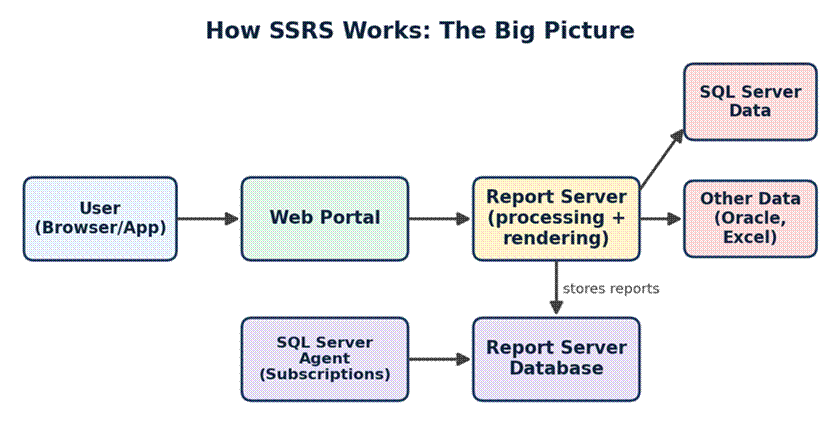
Figure 1: A simple view of how SSRS parts talk to each other
The user opens the web portal. The report server reads the report from its own database, pulls fresh data from your data source, and shows the final result. If a report is scheduled, SQL Server Agent kicks it off at the right time.
Basic SSRS Interview Questions
These are the warm-up questions. Get them right and the interviewer relaxes.
1. What is SSRS and why do companies use it?
SSRS is a server-based reporting tool. Companies use it because it is cheap when you already own SQL Server, it handles both simple and complex reports, and it lets you send reports to many people on a schedule. It also supports export to PDF, Excel, Word, CSV and more.
2. What are the main parts of SSRS?
There are four things to remember: the Report Server (does the work), the Web Portal (where users browse reports), the Report Server Database (stores reports, settings and schedules), and the design tools (Report Builder and Visual Studio with SSDT).
3. What is the difference between Report Builder and SSDT?
Report Builder is a light tool made for business users and quick reports. SSDT (SQL Server Data Tools, used inside Visual Studio) is for developers. It gives you projects, source control and easy deployment of many reports at once.
4. What is a data source and a dataset?
A data source holds the connection details, like server name and login. A dataset holds the query or stored procedure that gets the data. Think of the data source as the road and the dataset as the delivery truck.
5. What is the difference between shared and embedded data sources?
A shared data source lives on the server and many reports can use it. If the password changes, you fix it in one place. An embedded one sits inside a single report only. In real projects, shared is almost always the better choice.
6. What is a Tablix?
Tablix is the mix of a table, matrix and list in one control. It lets you group rows and columns in any way you like. Most report items you drag onto the page are Tablix underneath.
7. What is an RDL file? And what is RDLC?
RDL is the report file used by the SSRS server. RDLC is a similar file used by the ReportViewer control inside apps, where the app supplies the data and no report server is needed.
Report Types You Must Know
Interviewers love to ask about the different report styles. This table saves you from mixing them up.
| Report type | What it does | Simple example |
| Parameterized | Asks the user for input before showing data | Pick a year and region |
| Drill-down | Hides details that expand with a + sign on the same page | Click a country to see its cities |
| Drill-through | Opens a second, more detailed report | Click an order to open its full invoice |
| Subreport | Shows a report inside another report | Customer summary inside a bill |
| Linked | A copy that points to the original report but has its own settings | Same report for two teams, different defaults |
| Snapshot | A saved copy of a report at a given time | Month-end sales as of the 30th |
Intermediate SSRS Interview Questions
8. What are parameters and how do cascading parameters work?
Parameters let users filter a report. In cascading parameters, the second choice depends on the first. For example, when you pick a country, the state list shows only states from that country. You build this by using the first parameter inside the query of the second one.
9. How do you handle multi-value parameters?
Turn on the multi-value option and use IN (@ParamName) in your query. If you use a stored procedure, SSRS sends the values as one comma-separated text, so you need to split it. STRING_SPLIT works well in newer SQL Server versions.
10. What are expressions in SSRS?
Expressions are small formulas written in Visual Basic. They change how a report looks or acts. For example, =IIF(Fields!Sales.Value > 1000, “Green”, “Red”) colors a cell based on the value. You will also use built-in fields like Globals!PageNumber and User!UserID.
11. What is the difference between drill-down and drill-through?
Drill-down opens more rows on the same page. Drill-through jumps to a different report and can pass values along. That is the short and clear answer most interviewers want.
12. How do you show page numbers and totals on every page?
Put the items in the page header or footer. Use =Globals!PageNumber & ” of ” & Globals!TotalPages for page numbers. One catch: dataset fields cannot be used directly in the header or footer. The usual workaround is a hidden text box in the body that the header points to.
13. What export formats does SSRS support?
PDF, Excel, Word, CSV, XML, TIFF image, MHTML and PowerPoint. Excel and PDF are used the most. A good tip: if users complain that Excel output looks broken, check for merged cells and hidden items, because those usually cause the problem.
14. What is a subscription?
A subscription is a saved order that says, “Send me this report at this time, in this format.” It can go by email or to a file share. A data-driven subscription goes one step further and sends different versions to different people using a list from a table. That feature is only in higher editions.
Caching vs Snapshot vs Live: A Common Trap
Many candidates blur these three together. Keep this table in your head:
| Mode | How data is fetched | Best used when |
| Live | Runs the query every single time someone opens the report | Data changes often and must be fresh |
| Cached | Keeps a temporary copy for a set time, per parameter set | Many users open the same report all day |
| Snapshot | Saves a full copy at a scheduled time | You need history or a report for a fixed date |
Advanced SSRS Interview Questions
15. How do you improve the speed of a slow report?
First, find out where the time goes. The ExecutionLog3 view tells you if it is spent on data, processing or rendering. Then the usual fixes are:
- Move heavy logic into a stored procedure and add the right indexes.
- Filter data in the query, not with report filters, so less data travels.
- Cut down on subreports and lookups, as each one runs extra queries.
- Use caching or snapshots for reports that many people open.
- Show fewer rows per page, or add a summary first and details on click.
16. How does security work in SSRS?
SSRS uses role-based security. You give a user or group a role on a folder or report. The common roles are Browser, Content Manager, Publisher, My Reports and System Administrator. Good practice: give rights to AD groups, not single people, and give the least access needed.
17. What is the ReportServer database and what does it store?
There are two: ReportServer stores report definitions, folders, security, schedules and subscriptions. ReportServerTempDB holds temporary data such as cached copies and session data. Always back up ReportServer, and don’t forget the encryption key.
18. Why is the encryption key backup important?
SSRS uses that key to protect saved passwords and connection strings. If you move to a new server or restore the database without the key, your data sources break and you must enter all passwords again. Back it up using Reporting Services Configuration Manager and store it safely.
19. What is the difference between native mode and SharePoint integrated mode?
In native mode, SSRS runs on its own with its own web portal. In SharePoint mode, reports live inside SharePoint libraries. Native mode is the common choice now, and newer SSRS versions no longer support SharePoint integrated mode.
20. How do you call SSRS reports from code?
You can pass values in the URL, use the ReportViewer control, or call the REST API and the older SOAP web service. The REST API is the modern way and is handy for automating tasks like uploading reports or refreshing data.
Scenario-Based Questions (These Separate Good From Great)
Here, the interviewer wants to hear how you think. Talk through your steps out loud.
Scenario 1: A report worked yesterday but fails today. What do you check?
I would start with the error message in the portal and the ExecutionLog3 view. Next, I check if the data source login or password changed, if the database is online, and if a recent change in the stored procedure broke something. Last, I run the query on its own in SSMS to see if it fails there too.
Scenario 2: Users need the same report with different data based on who they are.
I would use the built-in field User!UserID inside the query, so each person only sees rows they are allowed to see. That way I keep one report instead of ten copies.
Scenario 3: The Excel export has blank columns and merged cells.
This usually happens because report items are not lined up. I would fix alignment on the design surface, remove extra spacing columns, and avoid overlapping items. For heavy data work, I would also offer a plain CSV export.
Where a Report Lives: The Full Life Cycle
If an interviewer asks, “Walk me through your work on a typical report,” this picture is a handy way to explain it in four steps.
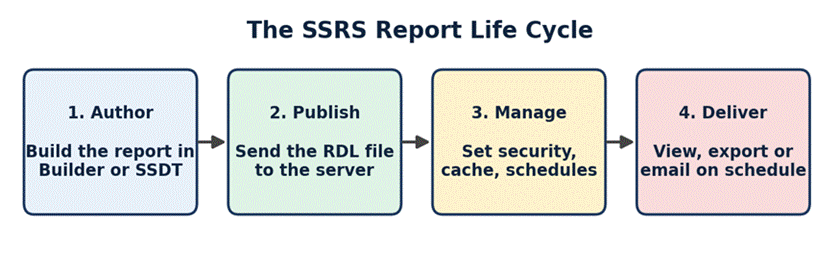
Figure 2: The four stages every SSRS report goes through
SSRS in 2026: What You Should Know
This is the part most guides skip, and it can make you stand out. Microsoft has said that SSRS 2022 is the last version of SSRS. Going forward, on-premises reporting moves to Power BI Report Server, which can run the same paginated (RDL) reports along with Power BI reports. Paginated reports are also available in the Power BI service in the cloud.
What does this mean for you?
- Your SSRS skills are not wasted. RDL report design is the same in Power BI Report Builder.
- Many firms still run SSRS 2016, 2019 or 2022, so you will keep seeing it for years.
- Be ready to say a line or two about moving old reports to Power BI Report Server or Power BI service.
Saying this in an interview shows you follow where the tool is going, not just how it works today.
Tips to Crack Your SSRS Interview
- Build one small project at home. A sales report with parameters, a chart and a drill-through teaches more than reading ten articles.
- Know your SQL. Most SSRS questions turn into SQL questions. Joins, grouping and stored procedures come up all the time.
- Use real stories. Say “In my last project, a report took 4 minutes and I brought it to 20 seconds by…” It sounds far better than a definition.
- Admit what you don’t know. It is fine to say, “I haven’t used that, but here is how I would find out.”
- Practice explaining simply. If you can explain a Tablix to a friend, you understand it.
Frequently Asked Questions (FAQ)
Is SSRS still worth learning in 2026?
Yes. Lots of companies still depend on it, and the skills carry over to Power BI paginated reports. It is a safe skill to have, especially for jobs in finance, healthcare and operations.
Is SSRS free?
SSRS comes with a SQL Server license. There is also a free Developer edition for learning and testing, and Express editions with limits. Check the current terms on the Microsoft site before planning a project.
What is the difference between SSRS and Power BI?
SSRS is best for pixel-perfect, printable, page-style reports such as invoices and statements. Power BI is best for interactive dashboards where people click and explore data.
Do I need to know coding to use SSRS?
You need good SQL. Basic Visual Basic expressions help too, but most work is done by dragging and dropping.
How long does it take to learn SSRS?
If you already know SQL, you can learn the basics in two to three weeks and feel comfortable with advanced topics in about two months of regular practice.
What is the difference between SSRS, SSIS and SSAS?
SSRS is for reports. SSIS moves and cleans data (ETL). SSAS builds data models and cubes for analysis.
Final Thoughts
SSRS interviews are rarely about tricky puzzles. They are about whether you understand the basics well and can solve real reporting problems. Learn the core parts, practice a few reports by hand, know the difference between the similar-sounding terms, and mention where the tool is heading in 2026. Do that, and you will stand out from most candidates.