Getting ready for a Salesforce interview can feel like a lot. There are so many tools, so many terms, and every company seems to ask something different. I have seen people with good skills freeze up just because they did not know how to explain a simple idea out loud.
This guide fixes that. Below you will find the most common questions, short and clear answers, a simple study plan, and practical tips you can use this week. It works whether you are going for an Admin, Developer, or Consultant role.
Why Salesforce Skills Still Matter in 2026
Salesforce is still one of the most used CRM tools in the world. Banks, hospitals, schools, and small shops all use it to track customers and sales. Because of that, companies keep hiring people who can set it up and keep it running.
What has changed is the kind of questions you get. Old tools like Workflow Rules and Process Builder have reached end of support, so interviewers now expect you to know Flow well. Many teams are also testing Agentforce and Data Cloud, so you may get a question or two about them. You do not need to be an expert, but you should know the basic idea.
How a Salesforce Interview Usually Works
Every company is a bit different, but most follow the same path. Knowing the steps helps you feel calm because nothing comes as a surprise.
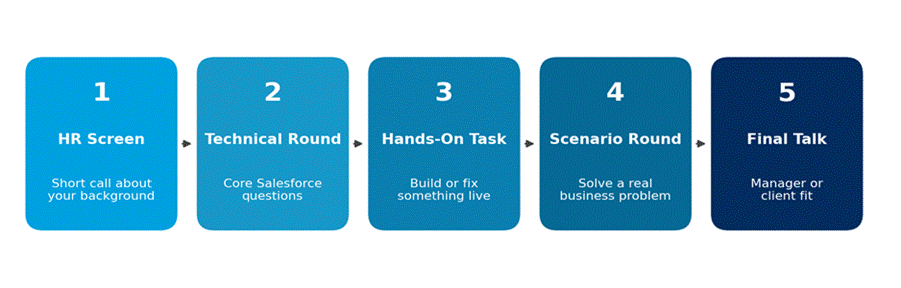
A typical Salesforce hiring process. Some companies skip or combine steps.
Small companies may finish in two rounds. Big consulting firms can take four or five. Either way, expect a mix of theory questions and real-life problems.
What Each Role Focuses On
Before you study, know what your target role cares about. This saves you a lot of time.
| Role | What They Ask About | What Impresses Them |
| Admin | Objects, fields, security, reports, Flow, data loading | Clear steps and clean setup habits |
| Developer | Apex, SOQL, triggers, Lightning Web Components, limits | Code that is safe for many records |
| Consultant | Business needs, solution design, user training | Asking good questions before answering |
| Architect | Data model, security design, integrations | Trade-offs explained in plain words |
Basic Salesforce Interview Questions and Answers
Almost everyone gets these. Do not skip them just because they look easy. Interviewers use them to check how well you explain things.
1. What is Salesforce?
Salesforce is a cloud-based CRM. CRM means customer relationship management. It stores customer details, tracks sales, and helps teams support their customers. Because it is in the cloud, people use it from a web browser without installing anything.
2. What is the difference between a standard object and a custom object?
Standard objects come with Salesforce, like Account, Contact, and Opportunity. Custom objects are ones you create for your own needs, like a Property or a Course. Custom object names end with __c.
3. What is the difference between a Lookup and a Master-Detail relationship?
In a Lookup, the two records are loosely linked and each can live on its own. In a Master-Detail, the child record depends on the parent. If you delete the parent, the child goes too. Only Master-Detail allows roll-up summary fields.
4. What is the difference between a Profile and a Permission Set?
A Profile is the base set of access for a user, and each user has exactly one. A Permission Set adds extra access on top. Most teams now keep profiles small and give extra access through permission sets.
5. What are the ways to share records in Salesforce?
Think of it as layers. First is Organization-Wide Defaults, which sets the lowest level of access. Then come the role hierarchy, sharing rules, and manual sharing, which open access up. Remember, these layers can only give more access, never take it away.
Admin Interview Questions
6. When would you use Flow?
I use Flow to automate tasks without code. For example, when a deal reaches a certain stage, a Flow can create a task, send an email, and update a field. Flow replaced Workflow Rules and Process Builder, so it is the tool to pick today.
7. What is a validation rule?
It is a check that stops bad data from being saved. For example, you can block an Opportunity from closing if the Amount field is empty. The user sees an error message that tells them what to fix.
8. What is the difference between a Report and a Dashboard?
A report is a list of records with filters and groups. A dashboard shows results from one or more reports as charts, so managers can see numbers at a glance.
9. How do you load a large amount of data?
For up to about 50,000 records, Data Import Wizard works fine. For bigger jobs I use Data Loader. Before loading, I clean the file, check for duplicates, and test with a small batch first.
10. What is a record type?
A record type lets different teams see different picklist values and page layouts on the same object. For example, a Case for billing can look different from a Case for tech support.
Developer Interview Questions
11. What are governor limits?
Salesforce shares its servers among many customers, so it puts limits on how much code can run at once. Some common ones for a normal transaction are 100 SOQL queries, 150 DML statements, and 10 seconds of CPU time. Good developers write code that stays well under these.
12. What is a trigger, and what is a good way to write one?
A trigger is Apex code that runs before or after a record is saved, updated, or deleted. The best habit is one trigger per object, with the real work placed in a separate handler class. And always write it to handle many records at once, not just one.
13. What is the difference between SOQL and SOSL?
SOQL searches one object (and its related ones) and works like a database query. SOSL searches for text across many objects at the same time. Use SOQL when you know where the data is, and SOSL when you do not.
14. When would you use Batch Apex?
When I need to process a large number of records, like updating a million accounts overnight. Batch Apex splits the work into small chunks, and each chunk gets its own set of limits.
15. What is a Lightning Web Component?
It is a modern building block for Salesforce screens. It uses standard web tools like HTML, JavaScript, and CSS. The @api decorator makes a property public so a parent component can pass data in.
16. What is the difference between Future methods, Queueable Apex, and Batch Apex?
Future methods are simple but limited. Queueable Apex is a better upgrade because you can chain jobs and pass in complex data. Batch Apex is best for very large data sets.
Common Mix-Ups Interviewers Test
Some questions ask you to pick between two things that look alike. A short, clear comparison earns easy points.
| Topic | Option A | Option B |
| Automation | Record-triggered Flow: runs when a record changes | Scheduled Flow: runs at a set time |
| Access | Profile: base access, one per user | Permission Set: extra access, many per user |
| Data search | SOQL: one object, exact query | SOSL: text search across objects |
| Import tool | Data Import Wizard: small jobs, easy | Data Loader: large jobs, more control |
| Async Apex | Queueable: flexible, can chain | Batch: built for huge data sets |
Scenario Questions You Should Practice
This is where most people lose marks. The interviewer wants to hear how you think, so talk through your steps out loud.
17. A sales manager wants to see only their own team’s deals. How do you set that up?
I would set the Opportunity default access to Private, then build the role hierarchy so managers sit above their team. That way each manager sees their team’s deals but not other teams’ deals. If one special group needs more access, I would add a sharing rule.
18. Your Flow fails when users upload many records. What do you check?
First I open the Flow error email or the debug log. Then I look for actions placed inside a loop, because those often break limits. The fix is usually to collect records in a list and run one update after the loop ends.
19. How would you stop duplicate leads?
I would turn on duplicate rules and matching rules. The matching rule decides what counts as a duplicate, like the same email. The duplicate rule decides what happens, like blocking the save or showing a warning.
Tip for scenarios: Use a simple pattern. Repeat the problem, ask one clarifying question, explain your choice, then say what you would test. It sounds calm and it works.
Questions About Agentforce and AI
You may not be asked these for every job, but they are becoming common. Here is a simple way to answer.
20. What is Agentforce?
It is Salesforce’s tool for building AI agents that can handle tasks like answering customer questions or updating records. Agents work using your company’s own data and rules, so a person can set what they can and cannot do.
21. Why does clean data matter for AI?
AI can only work with what it is given. If your records are old, doubled, or missing fields, the answers will be poor. Good data habits come first, and the AI tools come after.
If you have not used these tools yet, say so honestly. Then explain what you know and how you would learn the rest. Interviewers like honesty far more than a made-up answer.
Practical Tips to Prepare
- Use a free Developer Edition org. Reading is not enough. Build a small app with two objects, a Flow, and a report. You will remember it much better.
- Finish a few Trailhead modules. Trailhead is free, and the badges show up nicely on your resume.
- Say your answers out loud. Many people know the answer but stumble when speaking. Practice with a friend or record yourself.
- Prepare two real stories. Pick two things you built or fixed, and know the problem, your steps, and the result.
- Know your resume. If you list Apex or Flow, expect deep questions on it.
- Ask questions at the end. Ask about the team, the Salesforce clouds they use, or how they handle releases. It shows real interest.
A Simple 4-Week Study Plan
If you have a month, this plan keeps things simple. Study about one hour a day and spend part of that time in your practice org.
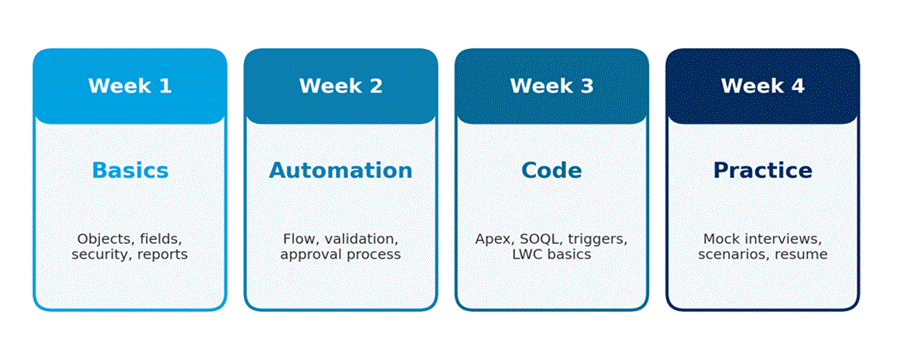
Adjust the weeks based on your role. Admins can spend less time on code.
Mistakes to Avoid
- Giving long, wandering answers. Keep each answer to about a minute.
- Memorizing lines without understanding them. Follow-up questions will expose it quickly.
- Ignoring Flow because you prefer code. Many teams want the simplest tool that works.
- Guessing when you do not know. It is fine to say, “I have not used that, but here is how I would find out.”
- Forgetting the basics. Even senior candidates get caught on simple security questions.
Frequently Asked Questions
Is Salesforce hard to learn for beginners?
No. The admin side is friendly for beginners, and you can build real skills in two or three months with regular practice. Coding takes longer, but it is very doable.
Do I need a certification to get hired?
It is not always required, but it helps a lot for entry-level jobs. The Salesforce Administrator certificate is a popular first step because it proves you know the basics.
Should I learn Flow or Apex first?
Learn Flow first. It teaches you how Salesforce thinks about data and logic. Then move to Apex when you meet tasks that Flow cannot do well.
How many questions should I practice?
Quality matters more than numbers. Knowing 40 questions well is better than skimming 200. Focus on the ones for your role.
Can a fresher get a Salesforce job?
Yes. Companies hire freshers who show hands-on work. A practice project, a few Trailhead badges, and one certification can make your resume stand out.
Final Thoughts
A good Salesforce interview is not about knowing everything. It is about showing that you understand the basics, can solve real problems, and can explain your thinking in simple words. Build something in a practice org, say your answers out loud, and be honest about what you are still learning.