Wondering how Microsoft Fabric is different from a normal data setup? See what changes in cost, speed, skills and control, in simple words
If you work with data, you have probably heard the name Microsoft Fabric a lot this year. Maybe your manager asked about it. Maybe a sales person brought it up in a meeting. Either way, the same question keeps coming back: is Fabric really different from the data setup we already have, or is it just a new name on old tools?
The honest answer is a bit of both. Some things change a lot. Some things stay the same. In this guide, I’ll walk through both sides in plain words, so you can decide what makes sense for your team. No heavy talk, and no sales pitch.
| The quick answer Fabric puts data movement, storage, SQL, Spark, real-time data and Power BI into one product. Every tool inside it works on one shared copy of data stored in OneLake. You pay for a shared pool of power (called capacity), not for each service one by one. It is newer than Snowflake or Databricks, so a few parts are still catching up. It fits best for teams that already use Microsoft tools, especially Power BI. |
What do we mean by a traditional data platform?
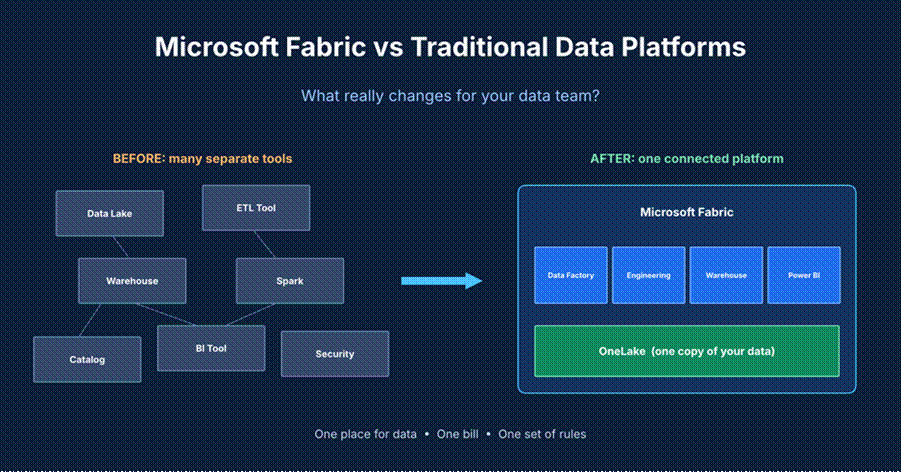
A traditional data platform is a set of separate tools that you connect together. There is no single product. You build it piece by piece.
On Azure, for example, a common setup has these parts:
- A data lake (like Azure Data Lake Storage) to keep raw files
- A data movement tool (like Azure Data Factory) to bring data in
- A processing and warehouse tool (like Azure Synapse) to clean data and run SQL
- A reporting tool (like Power BI) so people can see the numbers
- Extra tools for security, data catalogs and monitoring
Each part has its own setup, its own permissions and its own bill. Data often gets copied from one place to another so each tool can use it. This works, and many companies run it well. But it takes a lot of glue work to keep everything talking to each other.
Think of a kitchen where every appliance comes from a different shop. They all work. But each one has a different plug, and somebody has to keep track of all the cables.
So what is Microsoft Fabric?
Microsoft Fabric is an all-in-one data and analytics platform. It is sold as a service, which means Microsoft runs the servers and you simply sign in and use it. It brings together ideas from earlier Microsoft tools: Azure Data Factory, Azure Synapse and Power BI. It adds a shared storage layer called OneLake underneath everything.
People often call OneLake the OneDrive for data. You keep your data in one place, and every tool in Fabric reads from and writes to that same place.
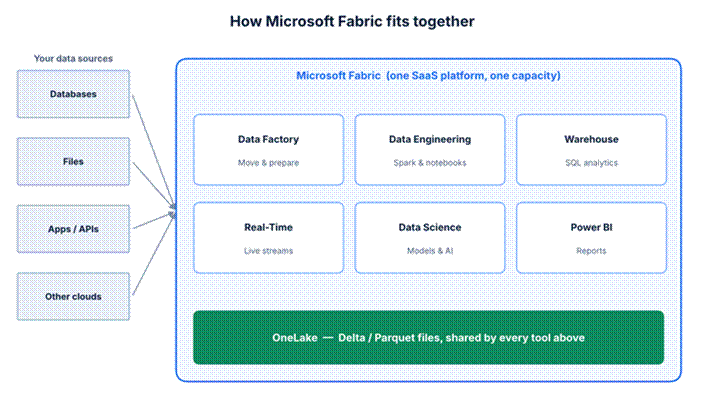
All Fabric tools sit on top of OneLake and share the same data files.
One important point: Fabric is built for analytics. It is not meant to run the day-to-day transactions of an app, like an online shop checkout. You would still use a normal database for that.
Microsoft Fabric vs traditional data platforms: side-by-side
Here is the simplest way to see the difference. This table compares a typical Azure-style setup with Fabric.
| Area | Traditional setup | Microsoft Fabric |
| Setup | Many services, each created and linked by hand | One workspace in one portal |
| Storage | Separate lake and warehouse, often with copies | OneLake, one shared copy of data |
| File format | Depends on the tool | Delta tables on Parquet files by default |
| Billing | Each service has its own meter | One shared capacity, plus storage billed per GB |
| Power BI link | Import the data, or run live queries | Direct Lake reads OneLake files directly |
| Permissions | Set again in each tool | Managed more in one place |
| Skills needed | Many separate specialists | More overlap, easier to share work |
| Maturity | Years of proof in the field | Newer and changing fast |
The 6 biggest things that change with Fabric
1. You keep one copy of your data
In the old way, the same sales table might live in the lake, again in the warehouse, and again inside a Power BI file. Every copy can go out of date. Every copy costs money to store.
With OneLake, tools work on the same files. Fabric also has something called shortcuts. A shortcut points to data that lives somewhere else, like another storage account, so you can use it without copying it. For teams with data in many places, this alone can remove a lot of boring pipeline work.
2. Reports can load faster with Direct Lake
Normally, Power BI either imports a copy of your data (fast, but it needs refreshing) or runs live queries against a database (always fresh, but often slower). Fabric adds a third way called Direct Lake. Power BI reads the Parquet files in OneLake directly, with no import step.
Partners and Microsoft-focused firms say this can be much faster on large datasets, especially at hundreds of millions of rows. I’d treat those numbers carefully. Your results depend on your data and your design. Test with your own reports before you promise anything to your boss.
3. You buy capacity, not separate services
This is the change that surprises finance teams the most. Fabric is sold by capacity. You choose a size, like F2, F4, F8 and so on, all the way up to F2048. The number after the F is how many capacity units you get. Every Fabric tool you use draws from that same pool.
- Pay-as-you-go: you can pause the capacity when nobody is using it, such as at night or on weekends.
- Reserved: you commit for a longer time and get a lower price. It makes sense when your usage is steady.
- The F64 mark: at F64 and above, you get Power BI Premium-style features, and report viewers no longer each need their own Pro license. For companies with many viewers, this can pay for itself.
Prices change, so always check the official Azure Fabric pricing page before you plan a budget. As a rough idea, one 2026 pricing guide lists F64 at a little over five thousand US dollars per month at pay-as-you-go rates.
4. Less glue work, but a new learning curve
Because tools live together, you spend less time building connections between them. A data engineer, an analyst and a report builder can all work in the same workspace and see the same data.
But don’t expect it to be effortless. Lakehouses, shortcuts and Direct Lake are new ideas for many teams. Plan for some training time up front.
5. More people can take part
Fabric is made for both technical and business users. Someone who already knows Power BI will feel at home. SQL people can use the warehouse. Spark people can use notebooks. This is quite different from a pure engineering platform, where business users often wait for the data team.
There is also Copilot, Microsoft’s AI helper, built into Fabric. It helps write code and build reports. Just remember that Copilot also uses your capacity, so heavy use can take a noticeable share of it. Keep an eye on usage.
6. Control moves to one place, but depth can differ
Having security, sharing rules and monitoring in one place makes life easier. Fewer logins, fewer mismatched rules. That said, some rivals go deeper in certain areas. Snowflake is known for strong built-in controls like row-level rules and data masking. Databricks has Unity Catalog for its own governance. If your rules are very strict, check that Fabric covers each one.
What does Fabric really cost?
The capacity price is only part of the bill. Here is a simple way to think about the full cost.
| Cost item | How you are charged | Simple tip |
| Compute | Capacity size, pay-as-you-go or reserved | Pause idle capacity. Reserve only when usage is steady. |
| Storage | Per GB in OneLake, like other cloud storage | Delete old and unused data. |
| OneLake requests | Reads and writes use your capacity units | Microsoft lowered the proxy rate to match the redirect rate, so it is simpler now. |
| Copilot | Uses your capacity | Track how much it takes. |
| People and training | Time and courses | Start with one small project. |
Fabric vs Databricks vs Snowflake
Most people don’t compare Fabric only with old setups. They also compare it with the two big names in modern data. Here is a simple view.
| Microsoft Fabric | Databricks | Snowflake | |
| Main focus | All-in-one analytics | Big data and machine learning | Cloud data warehouse |
| Best for | Microsoft-heavy and mixed teams | Engineering-heavy teams | SQL analytics and data sharing |
| Coding skill | Low to medium | Medium to high | Low to medium |
| Reports built in | Yes (Power BI) | No, needs another tool | No, needs another tool |
| Maturity | Newer | Mature | Mature |
| Governance | Central, still growing | Unity Catalog | Strong built-in controls |
You don’t always have to pick one. Plenty of companies mix them. For example, a team might process heavy data in Databricks and use Fabric for reports. Another might keep Snowflake as the warehouse and use OneLake shortcuts so Power BI can read that data without copying it.
When Fabric may not be the best choice
I don’t think Fabric is right for everyone. Be careful if:
- Your main work is advanced machine learning, where Databricks is still the favorite for many teams.
- You run across several clouds and don’t want to be tied to Microsoft.
- You need very tight, stand-alone data governance that you can audit on its own.
- You rely on a Synapse feature that Fabric doesn’t have yet. For instance, the pay-per-query serverless SQL option did not carry over.
- You need a database for an app. Fabric is for analysis, not for running apps.
Thinking of moving from Azure Synapse?
Microsoft sees Fabric as the next step after Synapse, and many parts map across neatly. Dedicated SQL pools lead to the Fabric Warehouse. Synapse Spark leads to Fabric Data Engineering. Still, a move takes planning. Here is a calm way to go about it:
- List what you have. Write down every pipeline, table and report, and who uses it.
- Pick one small project. Choose something useful but not risky.
- Test on a small capacity. Pause it when you’re not using it to keep costs low.
- Watch the usage. Open the Capacity Metrics app often in the first weeks.
- Move step by step. Shift one report or pipeline at a time, and keep the old one running until the new one is trusted.
My take: the real change is who can do the work
When I look at all this, the biggest change is not a feature. It’s how teams work. In a traditional setup, a lot of energy goes into connecting tools and waiting for the right specialist. Fabric tries to shrink that gap, so an analyst, an engineer and a manager can look at the same data in the same place.
Does it do that perfectly? No. It’s still young, the pricing takes some learning, and some rivals are stronger in their own corners. But if your company already lives in Microsoft tools, it’s hard to ignore. And if you’re starting fresh, it can save you months of setup.
My advice is simple. Don’t switch everything at once. Pick one real problem, try Fabric on it, measure the cost and the speed, and then decide.
Frequently asked questions
Is Microsoft Fabric a replacement for Azure Synapse?
Microsoft treats Fabric as the next generation of its data platform, and it takes ideas from Synapse. But Synapse still exists, and some Synapse features are not in Fabric yet. Check your needs before you move.
What is OneLake in simple words?
OneLake is the shared storage that sits under all of Fabric. Think of it as one big folder for your data that every Fabric tool can use, so you don’t keep making copies.
What is Direct Lake mode?
It’s a way for Power BI to read data straight from files in OneLake. You skip the usual import step, which can make big reports quicker and fresher.
How is Fabric priced?
You buy a capacity size (like F2 or F64) and all Fabric tools share it. You can pay as you go and pause it, or reserve it for a lower rate. Storage is billed separately per GB. Always check the official pricing page, because prices change.
Is Fabric better than Databricks or Snowflake?
Not always. Fabric is strong for all-in-one analytics and Power BI. Databricks is strong for big data and machine learning. Snowflake is strong for warehousing and data sharing. The right pick depends on your team and goals.
Final thoughts
Microsoft Fabric changes how a data platform is put together. Instead of many tools stitched together, you get one connected place with one copy of data, one pool of capacity and one portal. That means less glue work, faster reports in many cases, and a bigger group of people who can take part.