A simple, easy-to-follow guide for freshers and working professionals
Companies are hiring people who can build AI agents inside Microsoft Copilot Studio. If you have an interview coming up, you may feel a little nervous. That is normal. This guide will help you feel ready.
In this article, we will go through real interview questions. We will also give you simple answers in plain words. You do not need to be a coding expert to understand this guide. We will explain each idea in a way anyone can follow, even if you are new to Copilot Studio.
By the end of this article, you will know what to expect in your interview, what topics matter most, and how to talk about your skills with confidence.
What Is Microsoft Copilot Studio?
Microsoft Copilot Studio is a tool that lets you build AI agents without writing a lot of code. Think of an agent as a smart helper that can answer questions, complete small tasks, and talk to other apps like Outlook, Teams, or SharePoint.
You can build an agent that answers HR questions, tracks orders, books meetings, or helps customers on a website. The agent uses AI to understand what a person is asking and then gives a useful answer or takes an action.
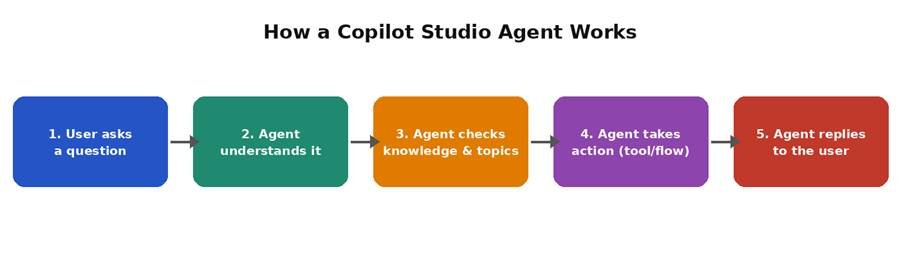
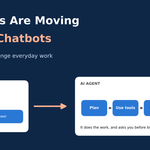
Figure 1: A simple view of how a Copilot Studio agent handles a user request.
Why Are Companies Hiring for This Skill in 2026?
More businesses want to save time and cut costs. Instead of hiring extra staff for repeated tasks, they build agents that can do the work any time of day. This is why the demand for Copilot Studio skills has grown a lot.
- Businesses want faster customer support without adding more staff.
- Teams want to automate boring, repeated tasks like answering the same questions.
- Companies already use Microsoft tools like Teams and SharePoint, so Copilot Studio fits in easily.
- Low-code tools let smaller teams build agents without a big development team.
Basic Interview Questions and Answers
These questions check if you understand the basics. Interviewers often start here, even for experienced candidates, just to see how clearly you can explain things.
Q: What is a Copilot Studio agent?
A: It is an AI-powered helper built inside Microsoft Copilot Studio. It can chat with users, answer questions, and complete tasks by connecting to other systems and data.
Q: What is the difference between a topic and a trigger in Copilot Studio?
A: A topic is a planned conversation path, like a mini script for one subject, such as ‘reset password’. A trigger is what starts that topic, like a phrase the user types or an event that happens.
Q: What are knowledge sources in Copilot Studio?
A: Knowledge sources are places where the agent finds information, such as a website, a SharePoint site, or an uploaded file. The agent reads this content and uses it to answer questions.
Q: Can you build a Copilot Studio agent without writing code?
A: Yes. Copilot Studio is a low-code tool. You can build topics, connect data, and add actions using menus and simple steps. Coding is only needed for advanced, custom tasks.
Q: What channels can a Copilot Studio agent be published to?
A: Common channels include Microsoft Teams, a website, Facebook, and custom apps through an API. The same agent can often work across more than one channel.
Q: What is ‘Generative answers’ in Copilot Studio?
A: This is a feature where the agent uses AI to read knowledge sources and create an answer on its own, instead of following a fixed script. It helps the agent handle questions you did not plan for.
Q: What is an entity in Copilot Studio?
A: An entity is a piece of information the agent needs to pull out of what the user says, such as a date, a city name, or an order number.
Q: What is the difference between Copilot Studio and Power Virtual Agents?
A: Power Virtual Agents was the older name for this tool. Microsoft renamed and expanded it into Copilot Studio, adding stronger AI features and support for building fuller AI agents, not just simple chat bots.
Intermediate Interview Questions and Answers
Once the basics are clear, interviewers move to questions about building and connecting agents to real systems. These questions check if you can actually use the tool, not just talk about it.
Q: How do you connect a Copilot Studio agent to Power Automate?
A: Inside a topic, you add an action step and choose a Power Automate flow. The flow can do things like create a record, send an email, or call another system. The agent passes information to the flow and can use the result in its reply.
Q: How do you stop an agent from giving wrong answers?
A: You control this by limiting the knowledge sources, testing the agent with real questions, and adding clear instructions in the topic. You can also turn off generative answers for sensitive topics and use a fixed script instead.
Q: What is variable management in Copilot Studio?
A: Variables store information during a conversation, such as a user’s name or order number. Good variable management means naming variables clearly and only storing what you actually need.
Q: How do you test an agent before publishing it?
A: Copilot Studio has a built-in test chat panel. You type sample questions and check the replies. You should test normal questions, tricky questions, and questions the agent should not know how to answer.
Q: What is escalation to a human agent, and how do you set it up?
A: Escalation means passing the chat to a real person when the AI cannot help. You set this up using a hand-off action, often connected to a tool like Omnichannel for Customer Service or a live chat system.
Q: How do you handle multiple languages in a Copilot Studio agent?
A: Copilot Studio can detect the user’s language and reply in the same language using built-in translation. You can also set a specific language for the agent if the business only serves one region.
Q: What is the role of Dataverse in Copilot Studio?
A: Dataverse stores data in a structured way, like a database. Agents can read from and write to Dataverse to remember details, track requests, or pull business data during a chat.
Q: How do you keep an agent’s answers within company rules?
A: You write clear instructions in the topic, restrict knowledge sources to approved content, and review conversation logs often to catch anything that looks wrong.
Advanced and Scenario-Based Questions
These questions test real-world thinking. The interviewer wants to see how you solve problems, not just recall facts.
Q: A user asks a question outside the agent’s knowledge. What should happen?
A: The agent should say it does not know the answer instead of guessing. A good design either offers to connect the user to a human or points them to another resource, rather than making up an answer.
Q: How would you design an agent that handles HR leave requests?
A: Start with a topic that asks for the leave dates and reason. Use an entity to capture the dates. Connect a Power Automate flow to check leave balance and submit the request to the HR system. End with a clear confirmation message.
Q: The agent gives inconsistent answers to the same question. How do you fix this?
A: Check if the answer comes from generative answers reading multiple sources with different information. Narrow the knowledge sources, add a clear topic for that exact question, or update the source content so it only has one clear answer.
Q: How do you measure if a Copilot Studio agent is doing a good job?
A: Look at analytics inside Copilot Studio, such as how many chats were resolved without a human, common questions asked, and where users dropped off. These numbers show what to improve.
Q: How would you secure an agent that handles sensitive company data?
A: Use authentication so only approved users can chat with the agent. Limit data access based on user roles. Avoid storing sensitive details in plain variables, and review what data the agent is allowed to read.
Q: What would you do if a client wants the agent to work in Teams and on a public website at the same time?
A: Build one agent and publish it to both channels. Check that any data actions and authentication settings make sense for both an internal audience (Teams) and an external audience (website), since public users usually need lighter authentication.
Skills You Should Highlight in Your Interview
Interviewers often score candidates against a simple skill checklist. Here is what that checklist usually looks like, and how you can talk about each part.
| Skill Area | What It Covers | How To Show You Know It |
| Topic Design | Building conversation flows and triggers | Describe a topic you built and why you designed it that way |
| Knowledge Sources | Connecting files, sites, and SharePoint | Explain how you picked and tested a knowledge source |
| Actions & Flows | Linking to Power Automate and other systems | Give an example of an action that saved manual work |
| Testing | Checking the agent works before release | Talk about a bug you found while testing and how you fixed it |
| Analytics | Reading usage data after launch | Mention a metric you tracked and a change it led to |
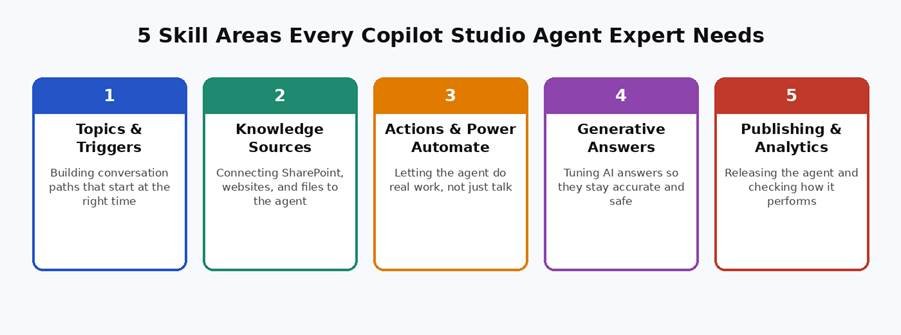
Figure 2: The five skill areas most interviewers check for.
Tips to Prepare for Your Interview
- Build a small practice agent. Even a simple FAQ bot shows real hands-on skill.
- Keep one project story ready. Be ready to explain what you built, what went wrong, and how you fixed it.
- Learn the basic terms well: topic, trigger, entity, knowledge source, and action.
- Practice explaining ideas in plain words. Interviewers like clear answers more than fancy words.
- Read about recent updates. Microsoft adds new features often, so check what is new before your interview.
- Ask questions back. Asking about the company’s use case shows genuine interest.
Common Mistakes Candidates Make
- Memorizing answers without understanding them. Interviewers can tell the difference.
- Not knowing the difference between a chatbot and an AI agent that can take action.
- Ignoring testing and security topics, and only talking about building topics.
- Speaking only in technical terms without explaining what the tool actually does for a business.
Frequently Asked Questions (FAQ)
Do I need coding skills to work with Copilot Studio?
No, basic work does not need coding. But knowing some coding or Power Fx (a formula language) helps for advanced tasks like custom logic or plugins.
Is Copilot Studio the same as ChatGPT?
No. ChatGPT is a general AI chat tool. Copilot Studio is a platform for building your own custom AI agents that connect to your company’s own data and systems.
What job titles use Copilot Studio skills?
Common titles include Power Platform Developer, Copilot Studio Developer, AI Automation Specialist, Business Analyst, and Dynamics 365 Consultant.
How long does it take to learn Copilot Studio basics?
Most people can learn the basics in two to four weeks of steady practice, especially if they already know Power Automate or Power Apps.
Is Copilot Studio only for large companies?
No. Small and medium businesses use it too, mainly to save time on customer support and repeated internal questions.
What should I build to show in an interview if I have no work experience?
Build a small agent for a made-up business, such as a bakery or a clinic. Add a few topics, one knowledge source, and one Power Automate action. This alone shows real practical skill.
Final Thoughts
Copilot Studio is becoming a normal part of many business teams, not just IT departments. Interviewers want to see that you understand how agents work, how to connect them to real systems, and how to keep them safe and accurate.
Use this guide to practice out loud, build a small project, and get comfortable with the basic terms. Confidence comes from practice, not from memorizing lines. Good luck with your interview!