A simple, no-jargon guide for freshers and experienced professionals
If you have an Azure Data Factory interview coming up in 2026, this guide will help you walk in ready. Azure Data Factory, or ADF, is still one of the most used tools for moving and shaping data in the cloud, and companies keep hiring for it every month. Below you will find real interview questions, grouped from easy to hard, written in plain and simple English. No confusing words, no copy-paste theory — just answers you can actually understand and repeat in your own words during an interview.
This guide covers the basics for freshers, the tricky middle-level questions that trip up most candidates, and the scenario-based questions that senior interviewers love to ask in 2026. You will also find a quick comparison table, a list of prep tips, and an FAQ section at the end.
What Is Azure Data Factory?
Azure Data Factory is a cloud service from Microsoft. Its job is simple: pick up data from one place, move it, clean it up if needed, and drop it somewhere else — usually a data warehouse, a data lake, or a database. Companies use it to build what is called a data pipeline, which is just a set of steps that runs on its own, often every day or every hour, without anyone clicking a button.
ADF does not store data itself. Think of it as a manager that tells other Azure services (and even non-Azure systems) what to do and when to do it. That is why it is called an orchestration tool rather than a database.
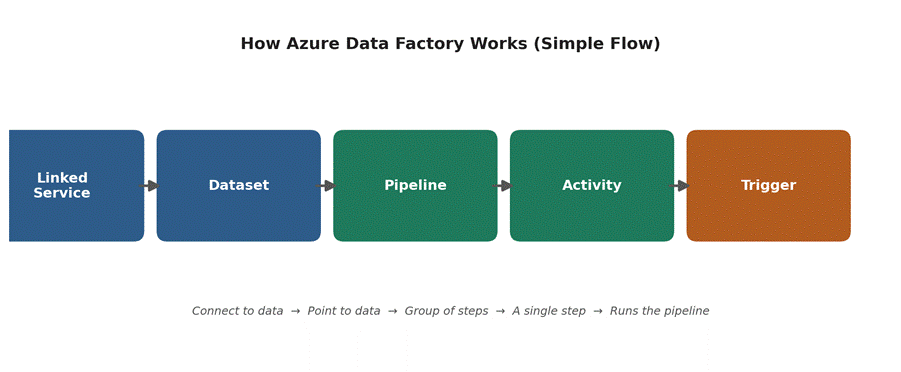
Fig 1: The simple flow of how ADF’s building blocks connect to each other.
The Core Building Blocks, in One Table
Before jumping into questions, here is a one-line cheat sheet for the five terms every ADF interview starts with:
| ADF Component | In One Line |
| Linked Service | The connection details to a source or target |
| Dataset | The specific table, file, or folder to read/write |
| Pipeline | A group of activities that run together |
| Activity | One single task inside a pipeline |
| Trigger | What starts a pipeline run |
| Integration Runtime | The compute engine that does the actual work |
Why These Questions Matter in 2026
A few things have changed the way ADF interviews are conducted in 2026, so it helps to know the current landscape before you walk in:
- Microsoft Fabric now includes a Data Factory experience, so interviewers often ask how the two relate.
- Copilot-style AI help inside ADF (for writing expressions and building pipelines) comes up in conversation, mainly to check if you understand the pipeline logic and not just the AI shortcut.
- Git-based CI/CD and cost control are asked more often now, since companies want engineers who can ship changes safely and keep the Azure bill in check.
- Managed Airflow inside ADF is a newer topic for teams who run Apache Airflow DAGs alongside regular pipelines.
Beginner-Level Azure Data Factory Interview Questions
These are the questions almost every interview opens with. Get comfortable saying these out loud in your own words.
Q1. What is Azure Data Factory used for?
It is used to build pipelines that copy and transform data from many different sources — like SQL Server, files, APIs, or SaaS apps — into a target system such as Azure Synapse, a data lake, or a database. It is mainly used for ETL and ELT work in the cloud.
Q2. What is a pipeline in ADF?
A pipeline is a group of activities packed together to do one piece of work, such as “load sales data every night.” You can run the whole pipeline with one click or one trigger, instead of running each step by hand.
Q3. What is a Linked Service in ADF?
A Linked Service is basically a connection string. It stores the details ADF needs to connect to a system — server name, database name, login details, or an API key. Think of it as an address book entry for a data source.
Q4. What is a Dataset, and how is it different from a Linked Service?
A Dataset points to the actual data inside that connection — for example, one specific table or one specific folder of files. The Linked Service is the door into the house; the Dataset tells ADF which room to go to.
Q5. What is an Activity in ADF?
An Activity is a single task inside a pipeline, such as copying a file, running a stored procedure, or checking if a file exists. A pipeline can have one activity or fifty, chained together in order.
Q6. What types of Triggers does ADF support?
There are three main kinds. A Schedule Trigger runs a pipeline at fixed times, like every day at 6 AM. A Tumbling Window Trigger runs in fixed time slices and remembers where it left off, which is great for backfilling old data. An Event-Based Trigger runs a pipeline the moment something happens, such as a new file landing in Blob Storage.
Q7. What is Integration Runtime (IR)?
Integration Runtime is the actual compute that does the work behind a pipeline — the engine, in simple words. Without it, ADF just has instructions with no way to carry them out.
Q8. What is the difference between Azure Data Factory and SSIS?
SSIS is an older Microsoft tool that runs on a server or VM and needs Visual Studio to build packages. ADF is fully cloud-based, works through a browser, scales on its own, and can still run old SSIS packages through the Azure-SSIS Integration Runtime.
Intermediate-Level Azure Data Factory Interview Questions
Once the basics are out of the way, interviewers move into how pipelines actually work day to day.
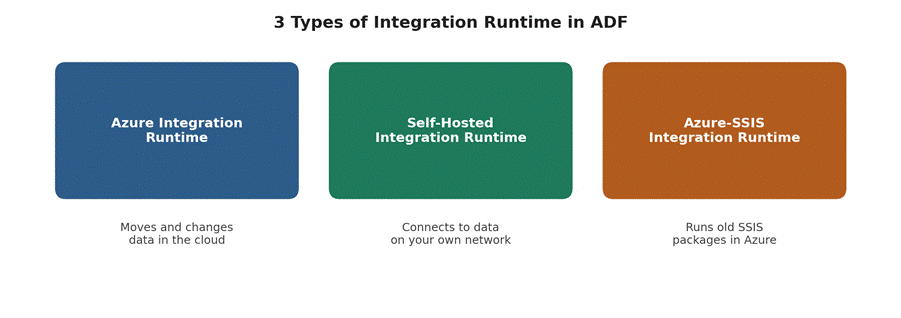
Fig 2: The three types of Integration Runtime and what each one is for.
Q9. What is a Mapping Data Flow?
A Mapping Data Flow is the part of ADF where you build data transformations — joins, filters, lookups, aggregations — using a drag-and-drop screen instead of writing code. Behind the scenes, ADF turns your design into Spark code and runs it on a Spark cluster that spins up and down automatically.
Q10. How does the Copy Activity work?
Copy Activity reads data from a source Dataset and writes it to a sink (target) Dataset. It can handle format changes along the way, like converting a CSV file into rows in a SQL table. Behind the scenes, it uses something called DIUs (Data Integration Units) to control how much power is used, which also affects cost.
Q11. What is the difference between Pipeline Parameters and Variables?
Parameters are set once when a pipeline run starts and cannot be changed while it is running — they are like settings you lock in before you begin. Variables can be changed at any point during the run, using an activity like “Set Variable,” which makes them useful for counters or building up a value step by step.
Q12. What is the Lookup Activity used for?
Lookup Activity reads a value or a small set of rows from a source and passes that result to the next step in the pipeline. A common use is reading a config table to decide which files to process next.
Q13. When would you use a ForEach Activity?
ForEach loops through a list of items and runs the same set of activities for each one. A typical case is looping through a list of table names and running the same copy logic for every table, instead of building one pipeline per table.
Q14. What is the difference between a Schedule Trigger and a Tumbling Window Trigger?
A Schedule Trigger just fires at set times and does not track history — if it misses a run, it does not automatically go back and fix it. A Tumbling Window Trigger keeps track of each time slice, can retry failed slices, and supports backfilling old data ranges, which makes it a better fit for pipelines that depend on order.
Q15. How do you handle errors inside an ADF pipeline?
Most engineers use a mix of these: setting retry counts on activities, adding “On Failure” paths so a cleanup or alert step runs when something breaks, using Try-Catch style patterns built from If Condition activities, and sending failure alerts through Logic Apps or Azure Monitor so the team finds out fast.
Q16. How does ADF pricing work, in simple terms?
You mostly pay for three things: pipeline orchestration (a small cost per activity run), data movement (billed per DIU-hour for Copy Activity), and Data Flow execution (billed per vCore-hour for the Spark cluster).
Advanced and Scenario-Based Questions
These questions check if you can actually design and run a pipeline in the real world, not just recite definitions.
Q17. How would you move data from an on-premises SQL Server to Azure using ADF?
You would install a Self-Hosted Integration Runtime on a machine inside the company network (or close to the on-prem server), register it in ADF, then create a Linked Service that uses that runtime to connect. From there, a normal Copy Activity can move the data into Azure, because the Self-Hosted IR acts as the bridge between the private network and the cloud.
Q18. How do you set up CI/CD for ADF pipelines?
ADF connects to a Git repository (Azure DevOps or GitHub). Developers work on a feature branch, then merge into the main collaboration branch. A publish step turns that into ARM templates, deployed to test and production factories through a release pipeline. This keeps manual changes out of production and gives a clean history of who changed what.
Q19. How would you design a pipeline for incremental load instead of loading full data every time?
Keep a watermark value — like the last updated date or highest ID already loaded — in a control table. Each run, a Lookup Activity reads that watermark, the Copy Activity only pulls newer rows, and a final step updates the watermark for next time. This avoids reloading the whole table every run.
Q20. When would you choose a Mapping Data Flow over a Databricks Notebook Activity?
Mapping Data Flow suits fairly standard logic — joins, filters, aggregations — with a visual, low-code build. A Databricks Notebook fits better when the logic is complex, needs custom Python or Scala code, machine learning steps, or fine-grained performance tuning the visual tool cannot offer.
Q21. How do you monitor and troubleshoot a failed pipeline run?
The Monitor tab in ADF shows every pipeline run with its status. Clicking into a failed run shows which activity failed and the exact error message. For deeper issues, Azure Monitor and Log Analytics can be connected to ADF to keep longer history, set up alerts, and build dashboards, since the built-in Monitor tab only keeps a limited window of history.
Q22. What is a Global Parameter, and when is it useful?
A Global Parameter is defined once at the factory level and can be used across many pipelines, instead of repeating the same value everywhere. It is handy for things like environment names or a shared folder path that many pipelines need to reference, especially when combined with CI/CD across dev, test, and production factories.
Q23. How do you handle schema drift in ADF?
Schema drift means the source data structure changes over time — a new column shows up, or one gets renamed. Mapping Data Flow has a built-in “Allow schema drift” option that lets a data flow accept new or changed columns without breaking, and rules can be added to map those drifted columns automatically instead of manually updating the pipeline every time the source changes.
Q24. What are Managed Virtual Network and Private Endpoints in ADF, and why do they matter?
A Managed Virtual Network lets ADF’s Integration Runtime run inside its own private network, and Private Endpoints let it connect to sources like Azure SQL or Storage without using the public internet. Companies with strict security rules ask about this often in 2026.
Q25. How does Azure Data Factory relate to Microsoft Fabric in 2026?
Microsoft Fabric now has its own Data Factory experience, using the same pipeline and Data Flow concepts ADF users already know. Standalone ADF is still fully supported and widely used, but many companies are testing Fabric for new projects since it brings pipelines, Power BI, and warehousing into one workspace. Interviewers usually just want to hear that you know both exist, not that you have deep hands-on Fabric experience.
Azure Data Factory vs SSIS vs Databricks
This comparison comes up often, either directly or hidden inside a “why did you choose this tool” question.
| Feature | Azure Data Factory | SSIS | Azure Databricks |
| Type | Cloud orchestration & ETL tool | On-prem/VM based ETL tool | Cloud big-data & analytics engine |
| Coding needed | Low-code, some expressions | Low-code (Visual Studio) | Requires Python, Scala, or SQL |
| Best for | Moving & scheduling data across systems | Classic SQL Server-based ETL | Heavy transformations, ML, big data |
| Scaling | Automatic, cloud-native | Manual, tied to server size | Automatic Spark cluster scaling |
| Pricing model | Pay per activity / DIU-hour / vCore-hour | License + server cost | Pay per cluster compute hour |
Tips to Crack Your ADF Interview in 2026
- Build one small pipeline yourself first — even a simple “copy a CSV into a SQL table” project shows real hands-on knowledge.
- Be ready to draw the flow: Linked Service, Dataset, Pipeline, Activity, Trigger, and explain it out loud.
- Practice explaining incremental load and watermark logic — it comes up in almost every mid-to-senior interview.
- Know when to pick Mapping Data Flow over Databricks, and why.
- Brush up on basic pricing (DIU-hour, vCore-hour) — cost questions come up often now.
- Have one real (or practice) story ready about a pipeline failure you fixed.
- Skim what Microsoft Fabric’s Data Factory experience is — it shows you follow where the tool is heading.
Frequently Asked Questions (FAQ)
Is Azure Data Factory a good skill to learn in 2026?
Yes. Companies still run large amounts of ETL work on ADF, and it also connects well with Microsoft Fabric, so the skill carries forward even as tools evolve.
Do I need to know coding for an ADF job?
Not heavy coding, but you should be comfortable with ADF expressions (a simple formula language), basic SQL, and reading JSON, since pipelines are stored as JSON behind the scenes.
Is ADF harder to learn than SSIS?
Most people find ADF easier to start with because it runs in a browser and needs no local installation. The concepts are similar to SSIS, just built for the cloud.
How many ADF interview questions should I prepare?
Around 25 to 30 well-understood questions, covering basics, transformations, triggers, error handling, and one or two real scenarios, is usually enough for most interview levels.
Will I be asked about Microsoft Fabric in an ADF interview?
It is common to get at least one question about how ADF and Fabric relate, even for a pure ADF role, since companies want to know if you follow where the tool is heading.
Can a fresher get an ADF job without real project experience?
Yes, if they can show a small personal project, explain the core concepts clearly, and talk through how a basic pipeline works from start to finish.
Final Thoughts
Azure Data Factory interviews are not really about memorising definitions. Most interviewers want to see that you understand how the pieces fit together and that you can explain a real pipeline from start to finish. Go through these questions a couple of times, try building one small pipeline on your own if you can, and you will walk into the interview with far more confidence than most other candidates.
Good luck with your interview — and if you get asked a question that was not on this list, take a breath, break it down into the building blocks you already know (Linked Service, Dataset, Pipeline, Activity, Trigger), and work through it out loud. That is exactly what a real interviewer wants to see.