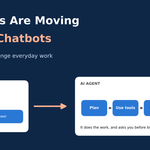
AI agents do more than answer questions. Learn how they differ from chatbots, where they help at work, and how to start safely.
Not long ago, using AI meant typing a question and reading the answer. You asked, it replied, and you did the rest yourself.
That is starting to change. A new kind of tool, called an AI agent, does not stop at the answer. It takes your goal, makes a plan, uses your apps, and finishes the job. Think about the difference between a friend who tells you how to book a train ticket and a friend who just books it for you.
In this guide, I will explain what AI agents are in plain words, how they differ from chatbots, and where they already help at work. I will also be honest about where they fall short, and share a simple way to try them without big risks.
What Is an AI Agent?
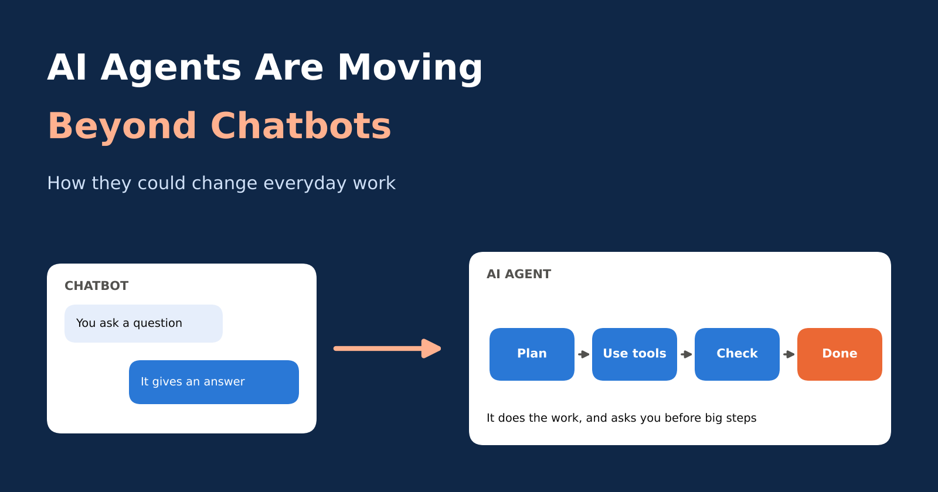
An AI agent is a software tool that works toward a goal with only a little help from you. You give it a task. It decides the steps, uses tools to do them, checks its own work, and tells you what happened.
The tools are usually things you already use every day, like email, a calendar, spreadsheets, files, or a web browser. That is the big shift. A chatbot talks. An agent does.
Most AI agents share these five traits:
- A goal, not just a question. You say what you want done, such as “sort this week’s invoices.”
- A plan. It breaks the goal into small steps.
- Tools. It can open apps, search the web, or read files.
- A check. It looks at the result and tries again if something went wrong.
- A pause for you. It asks before doing anything risky, like spending money.
AI Agents vs Chatbots: What Is the Real Difference?
People often use the two words as if they mean the same thing. They do not. A chatbot is built for conversation. An agent is built to get work done. The table below shows the main differences.
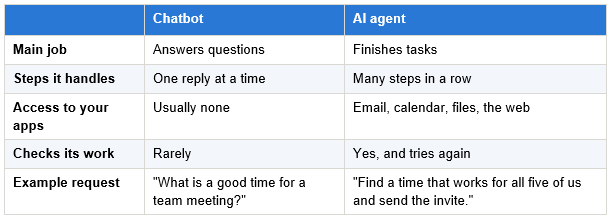
The line is getting blurry, though. Many chatbots now come with agent features, such as searching the web or filling in a form for you. So judge a tool by what it can do, not by what it is called. If it can take several steps on its own and use your apps, it is acting like an agent.
How Does an AI Agent Work?
You do not need to understand code to understand the idea. Most agents follow a simple loop, shown below.
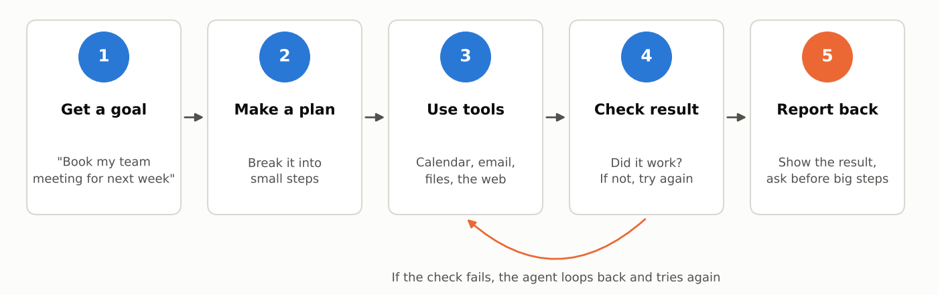
Figure 1: The basic loop most AI agents follow
Say you tell an agent, “Find a time next week for a team meeting and invite everyone.” It looks at five calendars, finds a free slot, drafts an invite, and checks that nobody has a clash. If someone does, it picks another time. Only then does it show you the result.
That loop of planning, acting, and checking is what makes agents feel so different. A chatbot gives you one reply and waits. An agent keeps going until the job is done, or until it gets stuck and asks you for help.
Where AI Agents Are Already Helping at Work
Agents are not a far-off idea. They are already used in many offices. Here are the areas where they show up most.
Customer Support
Support is where most people meet an agent first. The work has lots of repeat questions, which suits a tool that can look up an order and reply. One vendor, Intercom, says its agent can resolve up to half of support chats without a person. Gartner expects that by 2029, agents could solve as many as 80% of common service issues on their own. Vendor claims are often rosy, so read them with care. Still, the direction is clear.
Writing and Fixing Code
Coding agents can read a whole project, change several files, and run tests to see if the change works. Tools like GitHub Copilot, Cursor, and Claude Code work this way. Developers still review the result, but the boring parts go much faster.
Email and Meetings
Scheduling agents handle the back-and-forth of finding a time. They check calendars, sort out time zones, and send invites. Tools such as Reclaim and Motion are built for this. It sounds small, but for a busy manager it can save hours each week.
Research and Office Paperwork
Ask an agent to compare three payroll tools for a ten-person company, and it can gather pages, pull out the key points, and write a first draft. It can also sort invoices, check documents, and update records. Older automation repeats fixed scripts. An agent can handle an odd case, like an invoice with a missing number, by hunting for the answer or asking a person.
What the Numbers Say About AI Agents at Work
The data tells a more careful story than the headlines. In a Stack Overflow survey reported in June 2026, the share of workers using AI agents rose to 59%, up from 31% a year before. That is nearly double in one year.
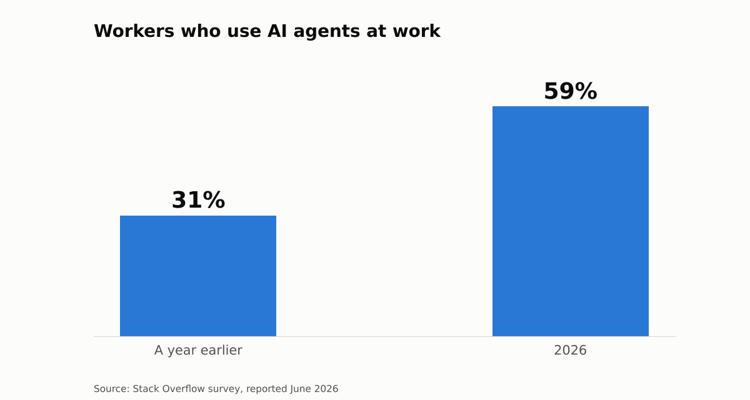
Figure 2: Use of AI agents at work, based on the Stack Overflow survey.
But look at how people use them:
- 63% said they rarely or never let an agent finish a task without a person stepping in.
- 82% worry about the accuracy of what agents produce.
- 77% worry about security and data privacy.
- Cost matters less than before. 38% called it a barrier, down from 53%.
A separate PwC survey of almost 50,000 workers in 48 countries shows the same gap. About 64% had used AI tools at work in the past year, but only 10% used AI agents daily, and 48% had not used one at all. Gartner expects about a third of business software to include agent features by 2028, up from less than 1% in 2024.
My reading is simple. Agents are growing fast, but trust is growing slower. People use them with a hand on the brakes. That is probably healthy.
A Day at Work With an AI Agent: A Simple Example
To make this real, here is a made-up but realistic example. Meera runs a small online shop selling handloom sarees from Gujarat. She has no big team. She sets up an agent for the dull jobs and keeps the final say for herself.
| Time | What the agent does | What Meera does |
| 9:00 AM | Reads overnight orders and emails, sorts them, and drafts replies to common questions | Skims the drafts and approves them |
| 11:30 AM | Checks stock and flags three sarees that are almost sold out | Decides what to reorder |
| 2:00 PM | Finds a time for a supplier call and sends the invite | Joins the call |
| 5:00 PM | Puts the day’s sales into a sheet and writes a short summary | Reads the summary in two minutes |
Notice what the agent is not doing. It is not setting prices, choosing designs, or talking to her best customers. Meera keeps the parts that need taste and care. The agent takes the small jobs that fill the gaps in her day.
That is the main thing I take from all this. The big gain is not speed on one huge task. It is the twenty tiny jobs that quietly eat your hours. And the people who do best are not always the most technical. They are the ones who can explain a task clearly, step by step. Writing a clear task may become a basic office skill, like writing a good email.
The Risks and Limits You Should Know
Agents are useful, but they are not magic. Watch for these problems:
- Confident mistakes. An agent can be wrong and sound sure. This is why so many workers worry about accuracy.
- Errors that pile up. A small slip in step one can grow by step ten, since each step builds on the last.
- Privacy and security. An agent with access to your email and files can leak or misuse data if it is set up badly.
- Too much trust. When a tool works nine times, it is easy to stop checking on the tenth.
- Wasted projects. Gartner has warned that more than 40% of agent projects could be cancelled. A clear goal matters more than a fancy tool.
Will AI Agents Take Your Job?
Nobody knows for sure, but here is the likely pattern. Tasks change before jobs do. The repeat, rule-based parts of a role, like data entry or first-line replies, are handed over first. The parts that need judgment, trust, and creativity stay with people.
Workers seem fairly calm about it. In a survey by People Managing People, 66% felt positive about AI at work and only 13% felt negative. The same report found that companies lag on training and clear rules. So the smart move now is to learn the tools, not fear them. For each task you do, ask one question: could an agent do the first draft?
How to Start Using AI Agents Safely
You do not need a big plan. Start small and build trust step by step.
- Pick one boring, repeated task. Something you do every week, like sorting emails or updating a sheet.
- Write down the steps. If you cannot explain the task to a new hire, you cannot explain it to an agent.
- Start in draft mode. Let the agent prepare things, but do not let it send or delete anything yet.
- Keep approvals on. Ask for your OK before it spends money, messages customers, or changes records.
- Check the first two weeks closely. Note every mistake. It shows you where the agent is weak.
- Give more freedom slowly. Widen its access only after it has earned your trust.
Frequently Asked Questions
What is an AI agent in simple words?
It is a tool that takes a goal, plans the steps, uses your apps to carry them out, and checks the result. A chatbot mostly answers. An agent acts.
Is ChatGPT an AI agent?
It depends on how you use it. A plain chat works like a chatbot. When the tool can use other apps and finish several steps on its own, it acts like an agent. The label depends on what the tool does, not its name.
Are AI agents safe to use at work?
They can be, with limits. Give them only the access they need, keep a person in charge of key steps, and check their work. Most companies in the Stack Overflow survey already work this way.
Do I need to know coding to use an AI agent?
No. Many agent tools let you describe the task in plain language. Coding helps if you want to build your own, but you do not need it to start.
Final Thoughts
AI agents are the next step after chatbots. They do not just talk. They plan, act, and check. At work, that means fewer small jobs on your plate and more time for the parts that need a human.
The numbers say it all: use is rising fast while trust is still being built. The best approach is a calm one. Try an agent on a small task, keep your hand on the wheel, and grow from there.
Similar Article
- Microsoft Fabric Pricing Explained: Capacity Costs, Licensing Options, and Cost Optimization
- Microsoft Fabric Real-Time Intelligence Tutorial: Build Real-Time Data Analytics Solutions
- Fabric Notebook Toolkit Tutorial for Beginners With Examples
- Microsoft Fabric vs Power BI: Key Differences, Features, Pricing, and Which One to Choose
- Microsoft Fabric Dataflows Gen2 Tutorial for Beginners: A Simple Step-by-Step Guide
- Microsoft Power Apps Raises Data Row Limit to 10,000: What Developers Need to Know
- Power Apps Gets a New Pop-Out Formula Editor: Write Power Fx Formulas More Easily
- Microsoft Introduces PCF Coding-Agent Plugin v1.0.0 Preview in Power Platform Skills Repository