Power BI October 2026 update explained: Gantt chart, list slicer dropdown, Fabric Skills custom visuals, surge protection and more.
Microsoft’s October 2026 Power BI update is not about one flashy headline. It is about less rework, more flexible reports and smarter capacity protection. From natural-language authoring of custom visuals to a long-awaited Gantt chart, this release gives report developers, business users and semantic model teams practical wins they can use right away.
In this guide, we break down all seven highlights, explain who benefits most, and show which skills are worth building next.


What is new in Power BI October 2026? (At a glance)
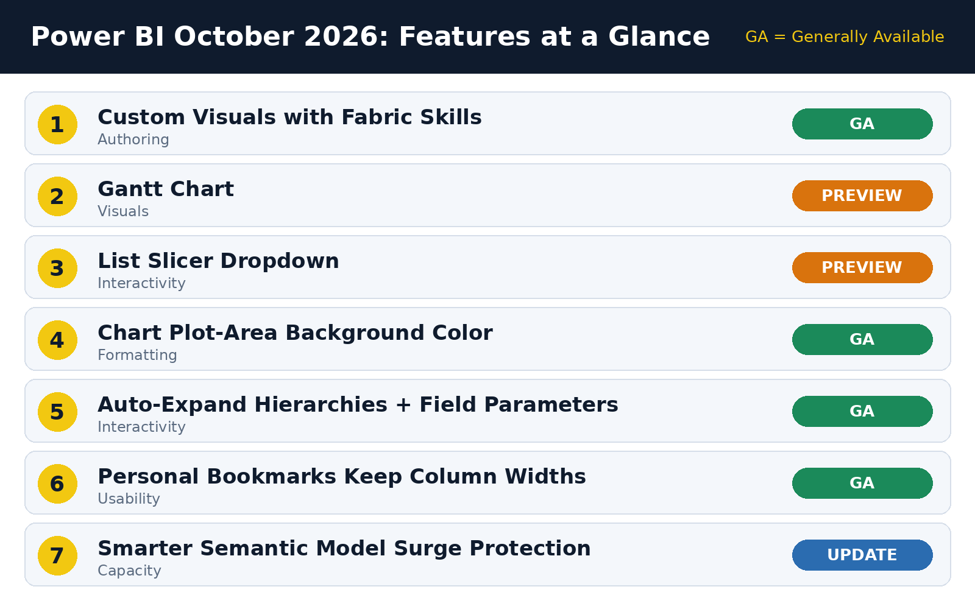
The seven October 2026 features and their release status
| # | Feature | Status | Best for |
| 1 | Custom Visuals with Fabric Skills | GA | Report developers |
| 2 | Gantt Chart | Preview | Project and PMO teams |
| 3 | List Slicer Dropdown | Preview | Business users, report designers |
| 4 | Chart Plot-Area Background Color | GA | Report designers |
| 5 | Auto-Expand Hierarchies + Field Parameters | GA | Report developers, analysts |
| 6 | Personal Bookmarks Preserve Column Widths | GA | Business users |
| 7 | Smarter Semantic Model Surge Protection | Update | Semantic model and capacity admins |
Note: GA means generally available. Preview features may change before final release, so test them before using them in business-critical reports.
1. Custom Visuals with Fabric Skills (GA)
This is the feature with the biggest potential to change how reports get built. With natural-language report authoring, you can describe what you want and let the skill add a supported custom visual, bind your data, apply formatting and validate the result.
Why it matters
- Faster builds: less time clicking through field wells and format panes.
- Fewer mistakes: validation is part of the flow, not an afterthought.
- Lower barrier: newer developers can reach a polished report sooner.
Practical tip: Be specific in your prompts. Name the visual, the fields and the formatting you expect, then review the output as you would any teammate’s work. AI-assisted authoring speeds you up, but you stay accountable for the final report.
2. Gantt Chart (Preview)
Project reporting in Power BI has long meant workarounds or third-party visuals. The new Gantt chart helps you plan projects, track task durations, show milestones and explore schedules on a time-based axis.
Where it fits
- Project and programme dashboards
- Delivery roadmaps with milestones
- Resource and schedule reviews for operations teams
Because it is in preview, validate it against your real task data (start dates, end dates, dependencies) before rolling it out to executives.
3. List Slicer Dropdown (Preview)
Long slicer lists waste space and frustrate users. The new list slicer dropdown makes them easier to navigate with a compact dropdown, selected-value pills, search, and a “Show selected first” option.
| Capability | What it does for users |
| Dropdown layout | Saves page space, especially on dense report pages |
| Selected-value pills | Shows active selections at a glance |
| Search | Finds one item quickly in a long list (products, customers, regions) |
| Show selected first | Keeps chosen values at the top so they are easy to review or clear |
4. Chart Plot-Area Background Color (GA)
You can now customize the plot area of a chart with a solid fill or conditional formatting. It sounds small, but it makes reports more visually meaningful.
- Solid fill: separate the chart area from the page background for cleaner design.
- Conditional formatting: let the background react to data, for example to highlight a period or a threshold breach.
Design caution: Keep contrast high and colors restrained. A good background supports the data; it should never compete with it.
5. Auto-Expand Hierarchies + Field Parameters (GA)
Report developers have long asked for more flexibility in bar, column and line charts. This release lets you switch hierarchy fields dynamically with field parameters and expand multiple levels automatically, without rebuilding your visuals.
Benefits in practice
- One visual can serve many views (for example Year > Quarter > Month, or Category > Subcategory > Product).
- Fewer duplicate pages and visuals to maintain.
- Users get self-service control over how deep they drill.
If you are not yet using field parameters, this update is a strong reason to start.
6. Personal Bookmarks Preserve Column Widths (GA)
Anyone who has resized and reordered table or matrix columns only to lose the layout will appreciate this fix. Personal bookmarks now return you to saved table and matrix layouts with your resized and reordered columns preserved.
- Business users can save a layout once and reuse it.
- Fewer repeat requests to developers to “fix the column widths”.
- A better experience for finance and operations reports full of wide tables.
7. Smarter Semantic Model Surge Protection
This one is for semantic model owners and capacity admins. Continuous capacity-unit reporting gives surge protection a more current view of resource consumption. That enables earlier intervention and fewer late-stage throttling rejections.
What this means for your team
- Spikes are spotted sooner, so action can start before users are affected.
- Fewer surprise rejections when capacity is under pressure.
- A stronger case for monitoring capacity as a routine habit, not a crisis response.
Who benefits most from the October 2026 update?
| Role | Features to look at first |
| Report developers | Custom Visuals with Fabric Skills, auto-expand hierarchies with field parameters, plot-area background color |
| Business users | List slicer dropdown, personal bookmarks with column widths |
| Project managers / PMO | Gantt chart |
| Semantic model and capacity teams | Smarter surge protection |
5 skills to build after this update
The theme of this release is clear: faster development and more flexible report experiences. To get the most from it, focus on these areas:
- Advanced DAX and semantic modeling: clean models make every new feature work better.
- Report design and usability: new formatting options only help if the design is purposeful.
- Dynamic hierarchies and field parameters: now GA, so they are safe to adopt widely.
- AI-assisted report authoring: learn to prompt well and to review what is generated.
- Fabric capacity and performance optimization: understand consumption so surge protection is a safety net, not a crutch.
How to try the new features safely
- Update Power BI Desktop to the latest version and review the official feature summary on the Power BI blog.
- Test preview features (Gantt chart, list slicer dropdown) in a development workspace first.
- Pilot GA features on one report, collect feedback, then roll them out more widely.
- Document new standards, such as when to use field parameters or what background colors are allowed.
Frequently asked questions
Are all October 2026 Power BI features generally available?
No. The Gantt chart and list slicer dropdown are in preview, while custom visuals with Fabric Skills, plot-area background color, auto-expand hierarchies with field parameters and personal bookmark column widths are GA.
Who should care about semantic model surge protection?
Semantic model owners and Fabric or Power BI capacity admins, because it improves how resource consumption is tracked and reduces late-stage throttling rejections.
Can I use the Gantt chart in production reports?
It is a preview feature, so test it thoroughly first. Preview features can change before general availability.
Do field parameters work with hierarchies now?
Yes. With this update you can switch hierarchy fields dynamically and auto-expand multiple levels in bar, column and line charts.
Final takeaway
The October 2026 Power BI update makes development more efficient and report experiences more flexible. Whether you are building visuals with natural language, planning projects on a Gantt chart or protecting capacity from surges, there is something here for every role on your data team.
Which October feature will make the biggest difference to your work? Share your pick in the comments, and tell us what you want covered next.Source note: feature details are based on the Power BI October 2026 update highlights. For full release notes and availability, check th
Similar Article
- Microsoft Fabric Pricing Explained: Capacity Costs, Licensing Options, and Cost Optimization
- Microsoft Fabric Real-Time Intelligence Tutorial: Build Real-Time Data Analytics Solutions
- Fabric Notebook Toolkit Tutorial for Beginners With Examples
- Microsoft Fabric vs Power BI: Key Differences, Features, Pricing, and Which One to Choose
- Microsoft Fabric Dataflows Gen2 Tutorial for Beginners: A Simple Step-by-Step Guide
- Microsoft Power Apps Raises Data Row Limit to 10,000: What Developers Need to Know
- Power Apps Gets a New Pop-Out Formula Editor: Write Power Fx Formulas More Easily
- Microsoft Introduces PCF Coding-Agent Plugin v1.0.0 Preview in Power Platform Skills Repository