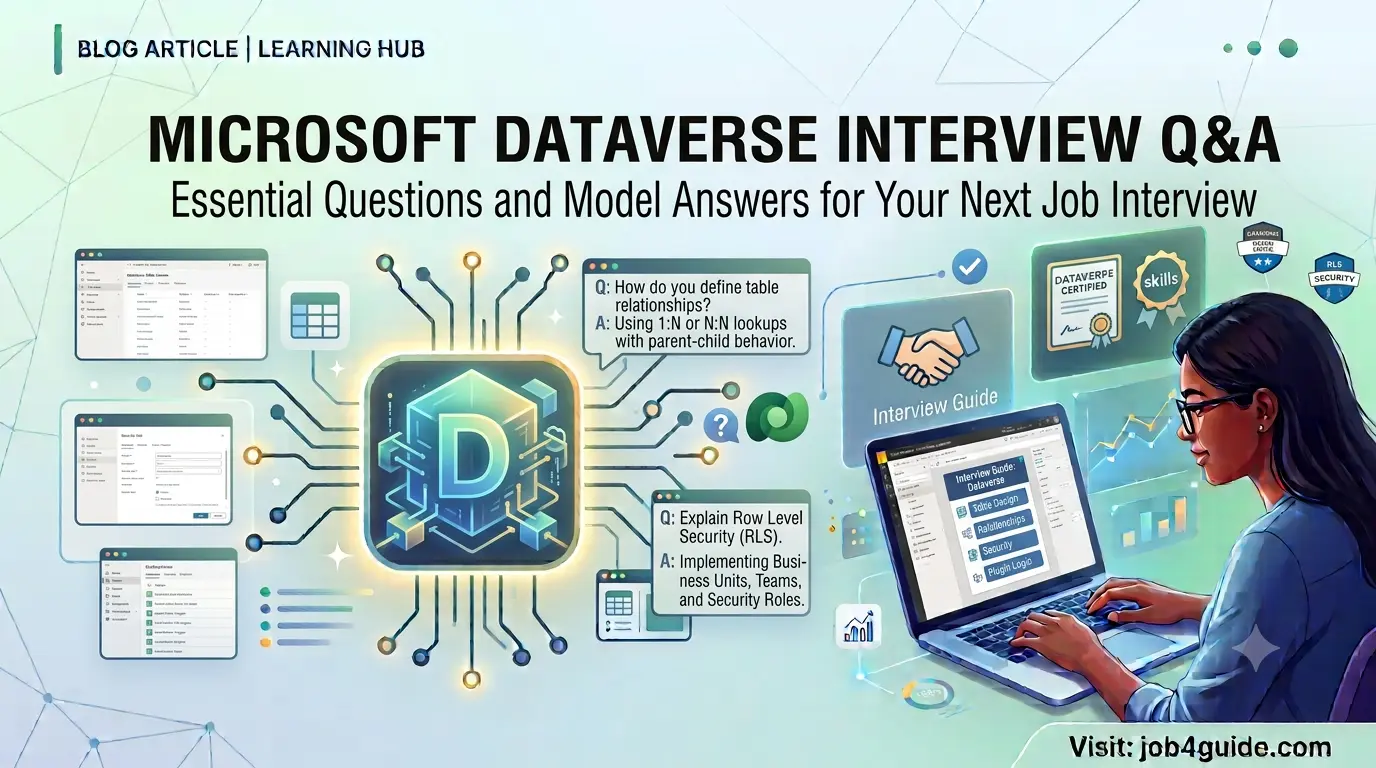
A simple, easy-to-follow guide to help you crack your next Dataverse interview
If you are getting ready for a job that uses Microsoft Power Platform or Dynamics 365, you will almost always be asked about Microsoft Dataverse. It is the storage system that sits behind Power Apps, Power Automate, Copilot Studio, and Dynamics 365. Interviewers like to test this topic because it shows if you really understand how data, security, and automation work together in the Microsoft cloud.
This guide covers the most common Dataverse interview questions and answers for 2026, written in plain and simple English. We have kept the answers short and clear so that you can revise them quickly before your interview. You will also find comparison tables, quick lists, and an FAQ section at the end.
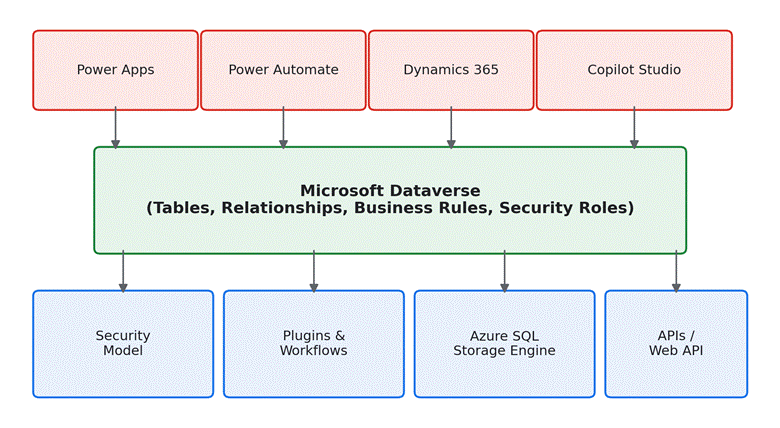
Figure 1: How Microsoft Dataverse connects Power Apps, Power Automate, Dynamics 365, and Copilot Studio to one shared data store.
What Is Microsoft Dataverse?
Microsoft Dataverse is a cloud database made for business apps. Think of it as a smart filing cabinet that stores your data in tables (rows and columns), but it also comes with ready-made security, business rules, and connections to other Microsoft tools. Instead of writing complex database code, you can build apps on top of Dataverse using simple, visual tools.
Before Power Platform changed its name in 2016, this same storage layer was known as the Common Data Service (CDS). Many interviewers still ask this as a trick question, so it is worth remembering.
Basic Dataverse Interview Questions
Q1. What is Microsoft Dataverse used for?
Answer: It is used to store and manage business data in a secure and structured way, so that apps such as Power Apps, Power Automate, and Dynamics 365 can all read and write to the same data.
Q2. What was Dataverse called before?
Answer: It was called the Common Data Service, or CDS. Microsoft renamed it to Dataverse in 2020 to make the name easier to understand.
Q3. What is a table in Dataverse?
Answer: A table stores data in rows and columns, just like a spreadsheet. Each row is one record, such as one customer, and each column is one piece of information, such as a phone number.
Q4. What is a column in Dataverse, and what types are there?
Answer: A column holds one field of data inside a table. Common column types include text, number, date and time, choice (a dropdown list), lookup (a link to another table), and yes/no.
Q5. What is the difference between a table and a solution?
Answer: A table stores data. A solution is a package that holds tables, forms, flows, and other app pieces together, so you can move them from one environment to another, such as from testing to live production.
Q6. What is an environment in Dataverse?
Answer: An environment is a separate space where your data and apps live. Companies usually keep at least three environments: one for development, one for testing, and one for production, so that new changes never break the live system.
Q7. Can Dataverse store files and images?
Answer: Yes. Dataverse has file and image column types that let you attach documents or pictures directly to a record, and it also supports notes with attachments.
Q8. What is a relationship in Dataverse?
Answer: A relationship connects two tables so that records can be linked. For example, one Account can be linked to many Contacts. The three common types are one-to-many, many-to-one, and many-to-many.
Dataverse vs Traditional SQL Server: Quick Comparison
Interviewers often ask how Dataverse is different from a normal SQL database. This table gives you a fast answer you can say out loud in an interview.
| Feature | Microsoft Dataverse | Traditional SQL Server |
| Hosting | Fully managed by Microsoft (cloud) | Self-managed or on-prem server |
| Schema changes | Point-and-click table designer | Manual DDL scripts |
| Security | Built-in row, field, and role security | Must be custom-built |
| Business logic | Business rules, plugins, Power Automate | Stored procedures, triggers |
| Best for | Low-code apps, Power Platform, Dynamics 365 | Custom enterprise database systems |
Table 1: Key differences between Microsoft Dataverse and a traditional SQL Server database.
Types of Tables in Dataverse
Another common question is about the different kinds of tables you can create. Here is a simple breakdown:
| Table Type | What It Means | Example |
| Standard table | Built-in table that ships with Dataverse | Account, Contact |
| Custom table | Table created by a maker for a specific need | Project, Invoice |
| Activity table | Used to track tasks and interactions | Email, Phone Call, Task |
| Virtual table | Shows data from an outside source, but the data itself stays in that outside source | External SQL data, SharePoint list |
Table 2: The main table types used in Microsoft Dataverse.
Intermediate Dataverse Interview Questions
Q9. What is the security model in Dataverse?
Answer: Dataverse security controls who can see or change data. It works at several levels: business units group users, security roles decide what actions a user can take, teams share access among a group of people, and record-level rules control access down to a single row or field.
Q10. What is a business rule in Dataverse?
Answer: A business rule is a simple, no-code way to apply logic to a form. For example, you can use it to hide a field, show a warning, or make a field required, without writing any code.
Q11. What is a plugin in Dataverse?
Answer: A plugin is a small piece of custom code that runs automatically when something happens in Dataverse, such as when a record is created or updated. Developers write plugins in C# when the built-in tools cannot do what is needed.
Q12. What is the difference between a workflow and a Power Automate cloud flow?
Answer: A classic workflow is an older automation tool built inside Dataverse. A Power Automate cloud flow is the newer, more flexible way to automate tasks, and it can also connect to hundreds of outside apps and services, not just Dataverse.
Q13. What is a virtual table, and why is it useful?
Answer: A virtual table shows data that actually lives outside Dataverse, such as in an external SQL database, but it appears inside Dataverse as if it were a normal table. This is useful when you do not want to copy or duplicate data.
Q14. What is the Dataverse Web API?
Answer: The Web API is a way for developers to connect to Dataverse using standard web calls (REST). It lets outside applications create, read, update, and delete records in Dataverse.
Q15. What is an alternate key in Dataverse?
Answer: An alternate key is a column, or a group of columns, that can uniquely identify a record besides the main record ID. It is often used when connecting Dataverse to outside systems that use their own ID numbers.
Q16. What happens to related records when you delete a record?
Answer: It depends on the relationship behaviour setting. Options include Cascade (delete related records too), Restrict (block the delete if related records exist), and Remove Link (delete the record but keep the related ones).
Advanced Dataverse Interview Questions
Q17. What is the difference between synchronous and asynchronous plugins?
Answer: A synchronous plugin runs immediately and the user must wait for it to finish before continuing. An asynchronous plugin runs in the background, so the user does not have to wait, but it is slightly slower to complete.
Q18. What are the plugin execution stages?
Answer: There are four main stages: Pre-validation (before the security check), Pre-operation (before the data is saved), Main operation (Dataverse saves the data), and Post-operation (after the data is saved). Knowing when to use each stage is a common interview topic.
Q19. What is Dataverse for Teams?
Answer: It is a lighter, built-in version of Dataverse that comes free inside Microsoft Teams. It is meant for small, team-level apps and has lower limits on storage and features compared to full Dataverse.
Q20. How does Dataverse handle large amounts of data?
Answer: Dataverse is built on Azure SQL Database under the hood, but Microsoft manages the scaling for you. It also offers Elastic tables for very high-volume, fast-changing data, such as logs or sensor readings.
Q21. What is a calculated column versus a rollup column?
Answer: A calculated column works out its value right away using a formula, such as adding two numbers. A rollup column gathers and summarises data from related records, such as counting all open orders for a customer, but it updates on a schedule, not instantly.
Q22. How do you move Dataverse customizations between environments?
Answer: You use solutions. You export a solution as managed (locked, for production) or unmanaged (open for editing, for development), then import it into the target environment.
Key Skills to Brush Up On Before the Interview
- Understanding of tables, columns, and relationships
- Security roles, business units, and teams
- Business rules and classic workflows
- Power Automate cloud flows connected to Dataverse
- Basics of plugin development and execution stages
- Solutions and how to move them between environments
- Dataverse Web API and how outside apps connect to it
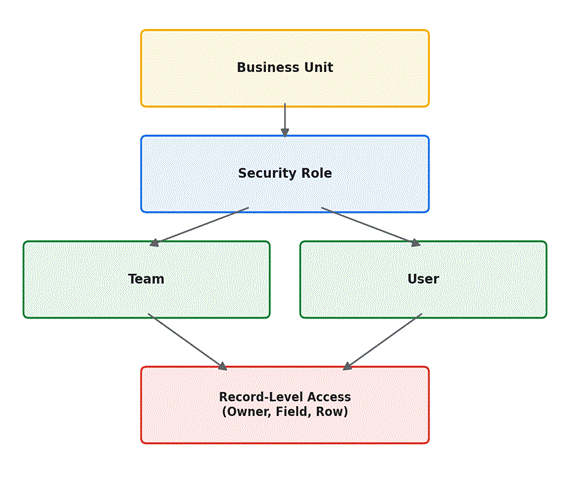
Figure 2: How Dataverse security flows from business unit down to individual records.
Interview Tips That Actually Help
Knowing the answers is only half the job. Here are a few extra tips that can make a real difference on interview day:
- Use simple, real-life examples when you answer, such as comparing tables to a spreadsheet.
- If you have built anything in Power Apps or Dataverse before, mention it, even a small practice project counts.
- Do not just memorise definitions, be ready to explain why a feature is useful, not just what it is.
- If you are unsure of an answer, say what you do know instead of staying silent.
- Practice saying your answers out loud, not just reading them, so you sound natural in the interview.
Frequently Asked Questions (FAQ)
Is Microsoft Dataverse the same as Dynamics 365?
No. Dataverse is the data storage layer underneath. Dynamics 365 is a set of business apps (like Sales or Customer Service) that are built on top of Dataverse.
Do I need to know coding to work with Dataverse?
Not always. Many tasks, such as creating tables or business rules, need no code at all. However, coding skills in C# or JavaScript help with advanced customisation, such as plugins.
Is Dataverse only used with Power Apps?
No. Dataverse also works with Power Automate, Power BI, Copilot Studio, Dynamics 365, and even outside applications through the Web API.
How is Dataverse licensed?
Dataverse capacity, such as storage, is usually included as part of Power Apps, Power Automate, or Dynamics 365 licensing plans. Pricing details can change, so it is best to check the current Microsoft pricing page before an interview.
What is the best way to practice for a Dataverse interview?
Try building a small app yourself using a free Power Apps developer plan. Create a few tables, add a relationship, write one business rule, and connect a Power Automate flow. Hands-on practice makes the answers much easier to remember.
Final Thoughts
Microsoft Dataverse interview questions usually test two things: do you understand how data is structured, and do you understand how security and automation work around that data. If you can explain tables, relationships, security roles, and the difference between business rules, workflows, and plugins in simple words, you are already ahead of most candidates.
Keep this guide handy, go through the questions a few times, and try to explain each answer in your own words rather than repeating it word for word. Good luck with your interview!