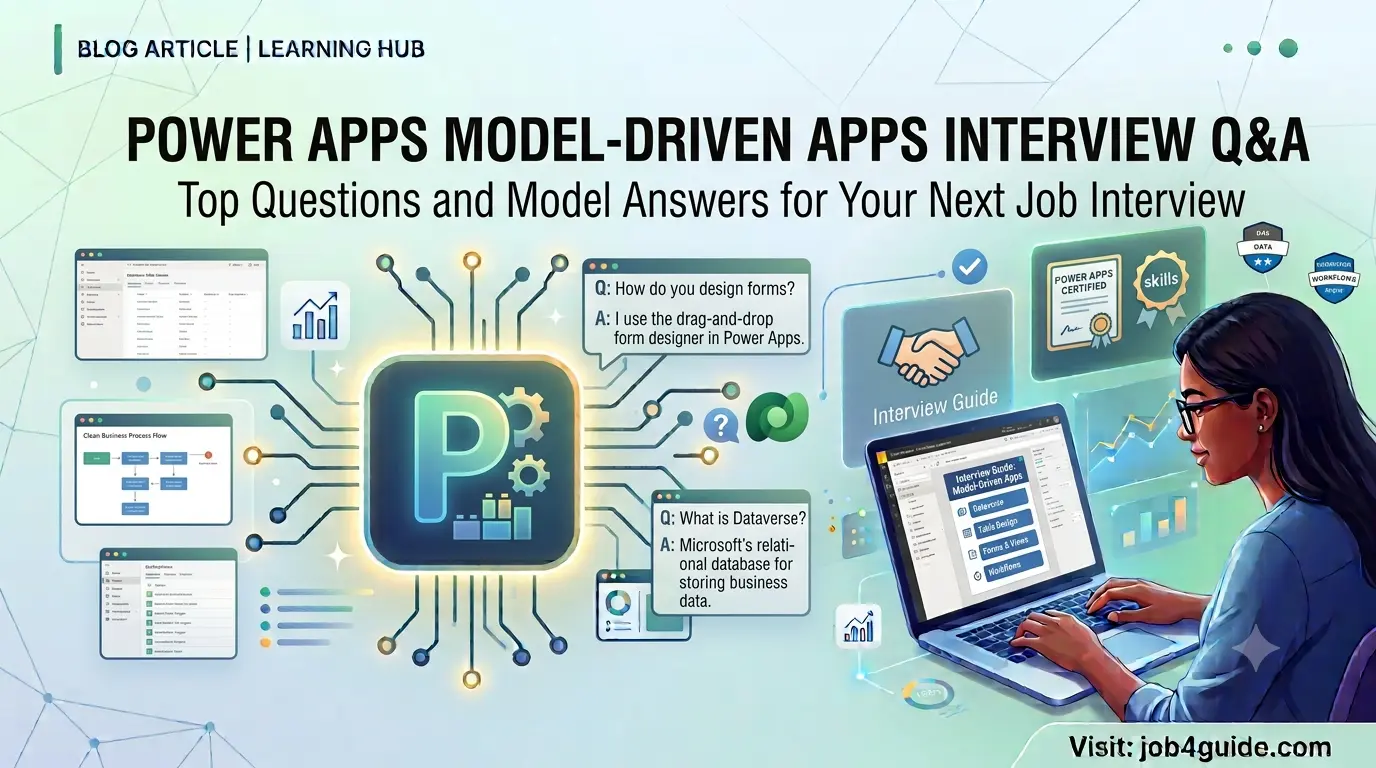
A simple, no-fluff guide to help you prepare for your next Power Apps interview — with real questions, plain-English answers, and examples you can actually remember.
If you are getting ready for a Power Apps interview in 2026, chances are the topic of Model-Driven Apps will come up. Companies that use Microsoft Dataverse and the Power Platform almost always ask a few questions about Model-Driven Apps, because this is the tool most businesses use to run their day-to-day operations — things like sales tracking, case management, or inventory systems.
In this article, I have put together the most common interview questions on this topic, sorted from easy to hard, along with answers written in plain language. No jargon-heavy definitions copied from documentation. Just the kind of answers you would actually give in a real conversation with an interviewer.
Let’s start with the basics.
What Is a Model-Driven App? (A Quick Refresher)
A Model-Driven App is a type of app you build inside Microsoft Power Apps that is based on data stored in Dataverse. Instead of designing every screen by hand like you would in a Canvas app, you set up your tables, forms, views, and business logic first. Power Apps then builds the screens for you automatically, based on that structure.
This is why Model-Driven Apps are used for bigger, more serious business apps — things like a CRM system, a helpdesk tool, or an HR case tracker. The app follows rules, keeps data clean, and looks consistent everywhere.
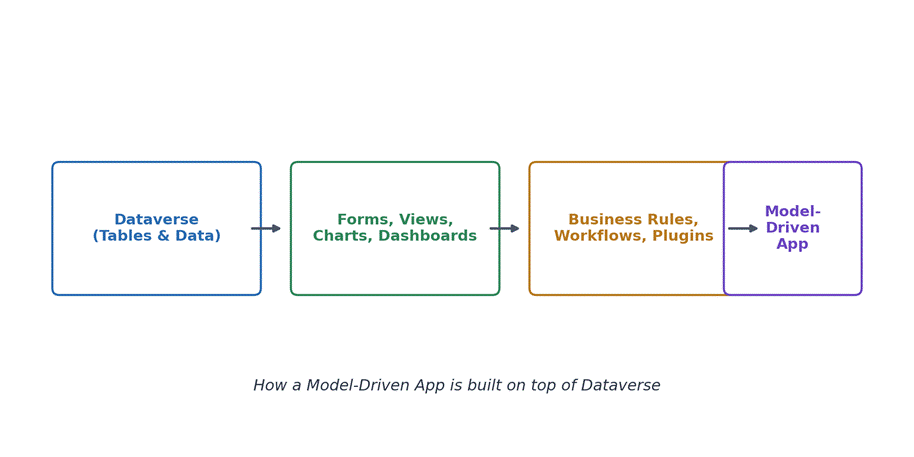
Figure 1: A Model-Driven App sits on top of Dataverse, forms, views, and business logic.
Canvas App vs Model-Driven App — Quick Comparison
This is one of the most common opening questions in interviews. Here is a simple table you can use to remember the difference.
| Point | Canvas App | Model-Driven App |
| Design style | Drag and drop, free design | Data-first, auto-generated UI |
| Data source | Many sources (SharePoint, SQL, etc.) | Mainly Dataverse tables |
| Best for | Small, custom-looking apps | Large business apps with complex data |
| Security | Basic, app-level | Deep, role-based (row and field level) |
| Build speed | Slower, manual screen building | Faster once tables are set up |
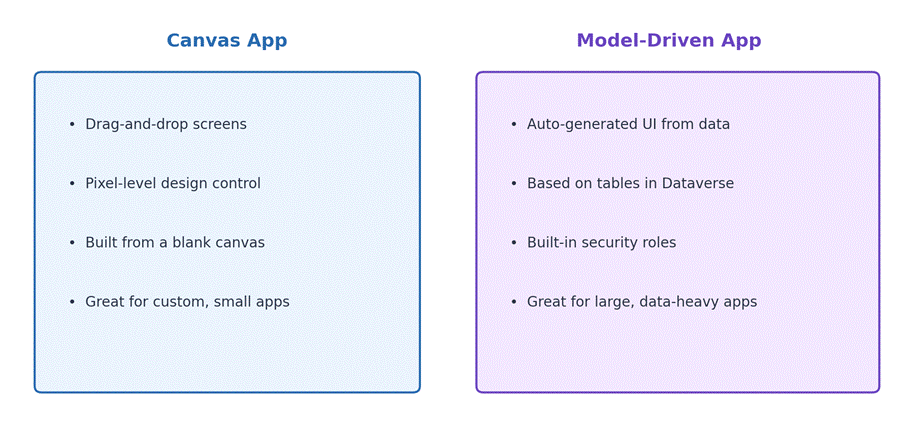
Figure 2: Canvas Apps vs Model-Driven Apps at a glance.
Beginner-Level Interview Questions and Answers
1. What is a Model-Driven App in Power Apps?
A Model-Driven App is an app type inside Power Apps that is built on top of Dataverse tables. You design the data model first — tables, columns, relationships — and then add forms, views, charts, and business rules. Power Apps takes care of the layout and navigation automatically, so the app looks and behaves in a consistent way.
2. What are the main building blocks of a Model-Driven App?
The main building blocks are: Tables (where data lives), Forms (used to view and edit a single record), Views (lists of records), Charts and Dashboards (for reporting), Business Rules (simple logic without code), and Security Roles (who can see or do what).
3. What is Dataverse and why does it matter here?
Dataverse is the database that sits behind every Model-Driven App. It stores your tables, relationships, and business rules in one secure place. Because Model-Driven Apps are built directly on Dataverse, any change you make to a table — like adding a new column — shows up in the app almost instantly.
4. What is a Site Map in a Model-Driven App?
The Site Map controls the navigation menu of the app — the areas, groups, and subareas you see on the left side. Think of it as the table of contents for your app. You can edit it visually using the Site Map Designer, no code needed.
5. What types of forms are available in a Model-Driven App?
The common form types are: Main form (the full detail view), Quick Create form (a small pop-up to add a record fast), Quick View form (a read-only summary shown inside another form), and Card form (used in some newer layouts). Each one serves a different purpose depending on how fast or detailed you need the data entry to be.
6. What is a View in Model-Driven Apps?
A View is basically a saved list of records with specific columns, filters, and sorting. There are System Views (built by makers, shared with everyone) and Personal Views (created by individual users for their own use).
7. Can you explain Business Rules in simple terms?
Business Rules let you add simple logic to a form without writing code. For example, you can hide a field unless another field has a certain value, or make a field required only in certain conditions. They run on both the form and, in many cases, the server side too.
Intermediate-Level Interview Questions and Answers
8. What is the difference between a Business Rule and a Business Process Flow?
A Business Rule handles small logic on a form, like showing or hiding a field. A Business Process Flow (BPF) is bigger — it guides the user step by step through a process, such as moving a lead through stages from New to Qualified to Won. BPFs can span multiple tables and multiple stages.
9. What are Security Roles and why are they important?
Security Roles decide what a user can see and do inside the app — read, write, delete, share, and so on. They can be set at different levels: User, Business Unit, Parent-Child Business Unit, and Organization. This is one of the biggest advantages Model-Driven Apps have over Canvas Apps, because security is baked right into the data layer, not just the app.
10. What is the difference between a Plugin and a Power Automate Flow?
A Plugin is custom code (usually C#) that runs on the Dataverse server, triggered by events like create, update, or delete. It runs fast and synchronously in many cases. A Power Automate Flow is a low-code way to automate the same kind of thing, but it’s generally easier to build and maintain, though it can be slightly slower for time-sensitive logic. Interviewers like this question because it checks if you understand when to use code versus low-code.
11. What is a Table Relationship, and what types exist?
A relationship connects two tables so data can be linked. The three main types are: One-to-Many (1:N), Many-to-One (N:1), and Many-to-Many (N:N). For example, one Account can have many Contacts — that’s a 1:N relationship.
12. What is the Command Bar (Ribbon) and can it be customized?
The Command Bar is the row of buttons at the top of a form or view, like Save, New, or Delete. Yes, it can be customized using the Command Bar designer or classic Ribbon Workbench, letting you add custom buttons tied to JavaScript or Power Fx actions.
13. What is the role of a Solution in Power Apps?
A Solution is a container that holds all the pieces of your app — tables, forms, views, flows, plugins, and more — so you can move them between environments (like Dev to Test to Production) in one package. Solutions can be Managed (locked, for deployment) or Unmanaged (editable, for development).
Advanced-Level Interview Questions and Answers
14. How does Model-Driven App security work at the field level?
Field-level security lets you lock down specific columns, even if a user has access to the record overall. You create a Field Security Profile, add the field to it, and assign users or teams to that profile. This is useful for sensitive fields like salary or social security numbers.
15. What is the difference between synchronous and asynchronous plugins?
A synchronous plugin runs immediately, as part of the same transaction — so if it fails, the whole operation can roll back. An asynchronous plugin runs in the background after the main operation completes, which is better for tasks that don’t need to block the user, like sending a notification.
16. What are Dataverse Web API and Xrm.WebApi used for?
Both let you talk to Dataverse data programmatically. The Dataverse Web API is a REST-based API you can call from outside the platform (like from a custom web app). Xrm.WebApi is the client-side JavaScript version used inside form scripts to read or update records without a full page reload.
17. What happens during the Model-Driven App lifecycle from a performance point of view?
A well-optimized app avoids overly complex forms, keeps the number of JavaScript libraries low, limits synchronous plugins, and uses indexed columns for filters. Interviewers ask this to see if you think about real-world performance, not just building something that technically works.
18. What is a Custom Page and how is it different from a Model-Driven form?
A Custom Page is a Canvas-app-style page that you can embed inside a Model-Driven App. It gives you full design freedom for one specific screen, while still living inside the structured Model-Driven App. It’s commonly used when a form’s layout needs something the standard form designer can’t do.
Scenario-Based Questions
Some interviewers like to test how you think, not just what you know. Here are a few scenario questions you might get, along with a short way to answer them.
19. “A user says a field is not showing up on the form, but it works for another user. What do you check first?”
Start with security — check the user’s Security Role and Field Security Profile. Then check the form itself, since a user may be seeing a different form based on their role (form switching rules). Finally, check if the field is hidden by a Business Rule.
20. “The app is loading slowly for one specific view. How would you troubleshoot it?”
Check the number of columns and filters in the view, look for unindexed columns being filtered, check for heavy calculated or rollup fields, and review any synchronous logic (plugins or business rules) that might run every time the view loads.
21. “You need to move an app from a test environment to production. What’s your approach?”
Package the components into a Solution, export it as Managed, then import it into the production environment. Before that, check for missing dependencies (like connection references or environment variables) so the import doesn’t fail.
Quick-Reference Cheat Sheet
Here is a short table you can glance at the night before your interview.
| Term | One-line meaning |
| Dataverse | The database behind every Model-Driven App |
| Form | Screen used to view or edit one record |
| View | A filtered, sorted list of records |
| Business Rule | No-code logic on a form |
| Business Process Flow | Guided, multi-stage process across records |
| Security Role | Controls what a user can see or do |
| Solution | Package used to move app components between environments |
| Plugin | Custom server-side code triggered by data events |
Tips to Prepare Before the Interview
- Build one small Model-Driven App yourself, even a simple one — it makes every answer easier to explain.
- Get comfortable explaining the difference between Canvas and Model-Driven apps in your own words.
- Know the difference between a Business Rule, a Business Process Flow, and a Workflow — this comes up a lot.
- Practice explaining Security Roles with a real example, like sales reps only seeing their own accounts.
- Read up on Solutions and ALM (Application Lifecycle Management), since almost every team asks about deployment.
Frequently Asked Questions
Is Power Apps Model-Driven App development still in demand in 2026?
Yes. As more companies move away from old, custom-built systems and standardize on Dataverse, the demand for people who understand Model-Driven Apps keeps growing, especially in CRM, field service, and case management projects.
Do I need to know coding for Model-Driven Apps?
Not always. Many parts — tables, forms, views, business rules — can be built without code. But knowing some JavaScript, Power Fx, or C# (for plugins) will help you stand out and handle more advanced tasks.
What is the average interview difficulty level for this topic?
It depends on the role. A junior role usually focuses on basic concepts like tables, forms, and views. A senior role will dig into security, performance, plugins, and solution management.
Should I learn Dynamics 365 along with Model-Driven Apps?
It helps a lot. Dynamics 365 apps (like Sales or Customer Service) are actually built using Model-Driven App technology, so the skills overlap heavily.
What is the best way to practice for a Model-Driven App interview?
Set up a free Power Apps developer environment, create a couple of tables, build a form, add a business rule, and set up a basic security role. Hands-on practice will help you answer questions with real examples instead of memorized definitions.
Final Thoughts
Model-Driven Apps interview questions usually circle around the same core ideas: how data is structured in Dataverse, how forms and views work, how security is set up, and how logic is added through business rules, flows, or plugins. If you understand these pieces well and can explain them in your own words with a small example, you will be in good shape for most interviews in 2026.
Take your time going through the questions above, try building a small app on your own, and you’ll walk into your interview with real confidence instead of memorized answers.