If you have an interview coming up for a Power BI or reporting job, there is a good chance the interviewer will ask you something about Power BI Service. Many people spend most of their time in Power BI Desktop and only touch the Service part once in a while. That gap shows up quickly in an interview. This article walks through the Power BI Service questions that keep coming up in 2026, written in plain language, with real examples, tables, and a short FAQ at the end so you can revise it in one sitting.
What Is Power BI Service?
Power BI Service is the online, cloud-based part of Power BI. You build a report on your own computer using Power BI Desktop, and once it is ready, you publish it to Power BI Service. From there, your team can open it in a web browser, refresh it, comment on it, and share it with others without needing Power BI Desktop installed on their machine.
A simple way to remember it: Power BI Desktop is the workshop where you build the report. Power BI Service is the shop window where you display it and let people see it.
| Feature | Power BI Desktop | Power BI Service |
| Where it runs | On your own computer | In the browser, on the cloud |
| Main job | Build reports and data models | Share, view, and manage reports |
| Cost | Free | Free, Pro, or Premium plans |
| Working with others | Not really possible | Yes, through workspaces and apps |
| Scheduled data refresh | Not available | Available |
Table 1: Power BI Desktop vs Power BI Service, side by side
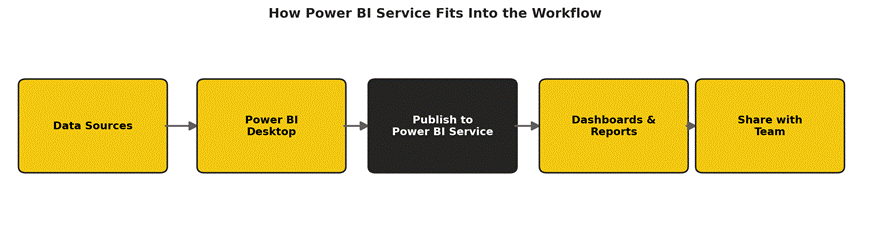
Figure 1: A typical Power BI project moves from data, to Desktop, to Service, to your team
Why Do Interviewers Ask About Power BI Service?
Building a report is only half the job. Companies also need someone who can publish that report safely, control who can see what, keep data refreshing on time, and fix things when a dashboard suddenly stops updating. This is exactly the part that Power BI Service handles, so interviewers use it to check if you can manage a real, live reporting system, not just design one on your own laptop.
Basic Power BI Service Interview Questions and Answers
Q1. What is Power BI Service?
Answer: Power BI Service is the cloud version of Power BI where published reports and dashboards live. Users open it through a web browser at app.powerbi.com to view, share, and manage reports.
Q2. What is a workspace in Power BI Service?
Answer: A workspace is like a shared folder inside Power BI Service. It holds related reports, dashboards, and datasets together, and you decide who from your team can view or edit the content inside it.
Q3. What is a dashboard, and how is it different from a report?
Answer: A report can have several pages and lets you click, filter, and dig into the data. A dashboard is a single page made up of tiles pulled from one or more reports. It gives a quick summary view, but you usually cannot filter inside a dashboard tile the way you can in a full report.
Q4. What is a dataset in Power BI Service?
Answer: A dataset is the data model that sits behind your report. It holds the tables, relationships, and calculations. One dataset can actually be used by more than one report, which saves time and keeps numbers consistent.
Q5. Can you edit a report directly inside Power BI Service, without Desktop?
Answer: Yes, for small changes. Power BI Service lets you rearrange visuals, change colours, or add a simple chart right in the browser. However, bigger changes, like adding new data sources or writing complex calculations, still need to be done in Power BI Desktop.
Q6. What is a Power BI Gateway, and why is it needed?
Answer: A gateway is a small piece of software that acts as a bridge between Power BI Service and data that sits inside your company’s own network, such as a local SQL Server database. Without a gateway, Power BI Service in the cloud has no way to safely reach that private data.
Q7. How do you publish a report from Desktop to Power BI Service?
Answer: You open the report in Power BI Desktop, click Publish, sign in with your work account, and pick the workspace you want to send it to. Within a few seconds, the report and its dataset both appear in Power BI Service.
Q8. What happens if two people edit the same report in a workspace at the same time?
Answer: Power BI Service does not fully support real-time co-editing like a Google Doc. If two people open the same report in Desktop and publish separately, the last person to publish will overwrite the other person’s changes, so teams usually agree on who edits what and when.
Power BI Service License Types
This is a favourite topic in interviews because it shows if you understand how companies actually roll Power BI out to hundreds of users. Here is a simple breakdown.
| Plan | Who it’s for | Can you share reports? | Rough cost |
| Free | One person, learning or personal use | No, only with yourself | $0 |
| Pro | Most business users and teams | Yes, with other Pro users | Paid, per user/month |
| Premium (Capacity) | Large companies with many viewers | Yes, even with free users | Paid, per capacity |
| Premium Per User (PPU) | Teams that need premium features but a smaller user count | Yes, with other PPU users | Paid, per user/month |
Table 2: Power BI Service licence types compared
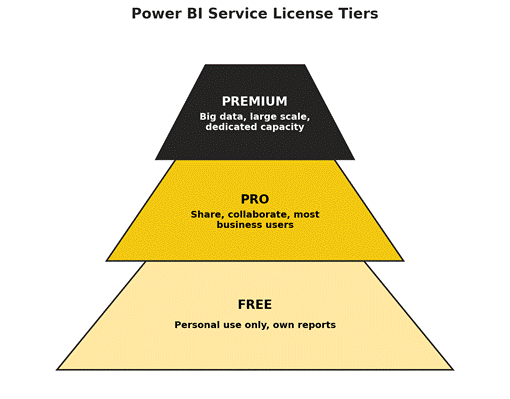
Figure 2: Free sits at the bottom for personal use, Pro covers most teams, and Premium is for larger, heavier needs
Intermediate Power BI Service Interview Questions and Answers
Q9. What is Row-Level Security (RLS), and how do you use it in Power BI Service?
Answer: Row-Level Security lets you show different rows of the same report to different people. For example, a sales manager in Delhi should only see Delhi’s numbers, while one in Mumbai sees only Mumbai’s numbers. You create the security rule inside Power BI Desktop, publish the report, and then assign users to that rule inside Power BI Service under the dataset’s security settings.
Q10. What is a Personal Workspace, and how is it different from a normal Workspace?
Answer: Every user gets one Personal Workspace when they first sign in, and it is meant only for their own practice or drafts. A normal Workspace, sometimes called an app workspace, is built for team use, where several people can be given access to view or edit the same content.
Q11. How do you schedule a data refresh in Power BI Service?
Answer: Open the dataset’s settings in Power BI Service, turn on Scheduled Refresh, and pick how often you want it to run, for example once or several times a day. If the data source is inside your company network, you also need a gateway connected before the schedule will work.
Q12. What are Apps in Power BI Service?
Answer: An App is a neat, read-only package of one or more reports and dashboards that you hand out to a wider audience, like an entire department. Instead of giving people access to a messy workspace full of drafts, you publish a clean App that only shows the finished, approved content.
Q13. What are the different ways to share content in Power BI Service?
Answer: You can share a single report or dashboard directly with a person or group, give someone a role inside the workspace, or package everything into an App and distribute it to a wider group. There is also Publish to Web, but that makes the report visible to anyone on the internet, so it should only be used for content that is not private.
Q14. Why might a dataset refresh fail, and how would you fix it?
Answer: Common reasons include a changed password on the data source, a missing or offline gateway, a table or column that was renamed at the source, or the refresh simply taking longer than the time limit allowed. You would check the refresh history in Power BI Service first, since it usually points straight to the error, then fix the connection or gateway and try again.
Q15. What is the Q&A feature in Power BI Service?
Answer: Q&A lets a user type a plain question, like ‘total sales by region last year’, and Power BI Service tries to build a chart from that question automatically. It is handy for quick answers but works best when column names in the dataset are clear and easy to understand.
Q16. Can Power BI Service send alerts automatically?
Answer: Yes. You can set a data alert on a dashboard tile with a number, for example being notified when total sales cross a certain value. Power BI Service checks the data on a schedule and sends an email or a notification the moment that condition is met.
Advanced and Scenario-Based Questions
Q17. A dashboard is showing old data. Walk me through how you would fix it.
Answer: First, check the dataset’s refresh history in Power BI Service to see if the last scheduled refresh actually succeeded. If it failed, look at the error message, since it is usually a gateway, credential, or source connection issue. If the refresh did succeed but the dashboard still looks old, check whether the dashboard tile is pinned from a live connection or a snapshot, since snapshot tiles only update when the underlying report refreshes.
Q18. How would you give 200 people access to the same set of reports without adding them one by one?
Answer: Instead of adding 200 individual users, you would create a security group in your company’s directory, add all 200 people to that group once, and then give the group access to the workspace or App in Power BI Service. Managing one group is far easier than managing 200 separate permissions.
Q19. When would a company need Power BI Premium instead of Pro?
Answer: When they have a large number of viewers who only need to look at reports, not build them, or when their data is very large and needs more processing power and storage than Pro offers. Premium also unlocks bigger file size limits and lets you share content with people who do not have a Pro licence.
Q20. What is a Deployment Pipeline in Power BI Service?
Answer: A Deployment Pipeline lets a team move a report through stages, usually Development, Test, and Production, in a controlled way. This means changes are checked in a safe test area before they reach the version that everyone in the company actually uses.
Q21. How do you check who is using your reports in Power BI Service?
Answer: Power BI Service has a built-in Usage Metrics report for each report and dashboard. It shows things like how many times it was viewed, by how many different people, and on which days, which helps you understand if a report is actually being used or if it can be retired.
Q22. What security features does Power BI Service offer?
Answer: It supports Row-Level Security for controlling which data rows a user can see, sensitivity labels to mark content as confidential or internal, and works with your organisation’s sign-in system so access always follows normal company login rules. Data sent to and from Power BI Service is also encrypted.
Quick Tips to Crack Your Power BI Service Interview
- Practice publishing a real report from Desktop to Service so you can describe the steps from memory, not from a guess.
- Know the difference between a report, a dashboard, and a dataset cold, since this trips up a lot of candidates.
- Be ready to explain Row-Level Security with a simple, real-world example, not just the textbook definition.
- Understand the licence types well enough to say which one fits which situation, not just their names.
- If you have not used Deployment Pipelines or Premium features yourself, it is fine to say so honestly and explain what you do know about them.
Frequently Asked Questions
Is Power BI Service free to use?
Yes, there is a free version, but it only lets you view and work with your own reports. Sharing reports with other people usually needs at least a Pro licence.
Do I need Power BI Desktop to use Power BI Service?
Not always. You can view, comment on, and lightly edit reports that someone else has already published, all inside a browser. But to build a new report from scratch or make deep changes, you still need Power BI Desktop.
What is the difference between Power BI Pro and Premium Per User (PPU)?
Pro covers the standard sharing and collaboration features that most teams need. PPU costs more but adds premium features like bigger datasets and more frequent refreshes, while still being billed per user rather than per capacity.
Is Power BI Service the same thing as Power BI Online?
Yes, people often use these two names for the same thing. Power BI Service is the official name; Power BI Online is just a common nickname for it.
Do I need to know coding to work with Power BI Service?
No coding is required for most day-to-day tasks like publishing, sharing, and managing access. Knowing DAX (Power BI’s formula language) helps with building reports in Desktop, but it is a Desktop skill more than a Service skill.
How long does it take to get comfortable with Power BI Service?
Most people who already know Power BI Desktop can get comfortable with the Service side, including workspaces, sharing, and refresh schedules, within a week or two of regular hands-on practice.
Final Thoughts
Power BI Service questions are not really about memorising definitions. Interviewers want to see that you understand how a report moves from your laptop to your team, and that you know what to do when something in that chain breaks. Go through the questions above a couple of times, try them out yourself in a free Power BI account if you can, and you will walk into your interview with real, working knowledge instead of just words you memorised.