A simple, no-jargon guide to help you clear your next Power Apps interview with confidence.
If you are getting ready for a Power Apps job or a role change, you have landed on the right page. Power Apps is one of the most used tools inside the Microsoft Power Platform, and Canvas Apps are the part most companies ask about first in interviews. This guide is written the way a mentor would explain things to you over a cup of coffee — plain words, real examples, and answers you can actually remember.
We will cover beginner, mid-level, and advanced questions, along with a comparison table, a quick-prep roadmap, and a FAQ section at the end. Let’s get started.
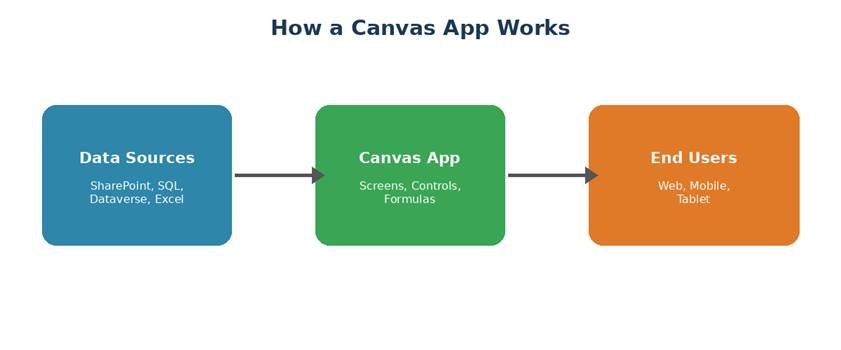
What Is a Power Apps Canvas App?
A Canvas App is a type of app you build inside Power Apps where you place buttons, text boxes, images, and other items on a blank screen, much like designing a slide in PowerPoint. You control exactly where every item sits. Once the screen looks the way you want, you connect it to data using simple, Excel-style formulas.
Companies like Canvas Apps because normal staff, not just developers, can build small tools to solve daily problems — like a leave request app, an inventory checker, or a visitor log.
Why Do Interviewers Ask About Canvas Apps?
Canvas Apps sit at the center of many company workflows today. An interviewer wants to check three things:
- Do you understand how screens, controls, and data work together?
- Can you write and read simple formulas without help?
- Have you actually built something real, not just watched a video?
Basic Level Interview Questions
Q1. What is Power Apps?
Power Apps is a Microsoft tool that lets you build business apps without writing heavy code. It comes in two main types: Canvas Apps and Model-Driven Apps.
Q2. What is the difference between a Canvas App and a Model-Driven App?
A Canvas App gives you full control of the screen design, and you build it item by item. A Model-Driven App is built around your data structure, and the layout is mostly set for you. See the comparison table below for a quick view.
Q3. What are the main data sources you can connect in Canvas Apps?
Some common ones are SharePoint, Excel, SQL Server, Dataverse, and Microsoft Teams. Power Apps supports more than 200 connectors in total, including many outside Microsoft’s own products.
Q4. What is a control in Power Apps?
A control is any item you drop onto the screen, such as a button, label, text input, gallery, or image. Every control has properties like Text, Color, and OnSelect that you can set using formulas.
Q5. What is a Gallery control used for?
A Gallery shows a list of records from your data source, like a list of employees or products. You can set it to show items in a vertical list, a grid, or even flip through them one by one.
Canvas App vs Model-Driven App — Quick Comparison
| Point | Canvas App | Model-Driven App |
| Design | You build the screen pixel by pixel, like PowerPoint | Layout is set by the data, less design freedom |
| Data Source | Can connect to 200+ sources | Mainly built on Dataverse |
| Best For | Small, task-based apps | Big, data-heavy business apps |
| Logic Used | Excel-like formulas | Business rules, workflows |
Intermediate Level Interview Questions
Q6. What is delegation in Power Apps, and why does it matter?
Delegation means letting the data source do the heavy work of filtering and sorting, instead of Power Apps pulling all the data first and then sorting it. This matters a lot with large data sets, because without delegation, your app may only show the first 500 or 2000 records correctly.
Q7. Name some functions that are not fully delegable.
Functions such as Search, and some uses of filtering with complex conditions on certain data sources, are not always delegable. The exact list depends on the data source you are using, so it is smart to check the delegation warning (blue underline) that Power Apps shows in the formula bar.
Q8. What is the difference between Patch and SubmitForm?
Patch lets you save specific fields of a record, and you can use it with or without a form. SubmitForm saves whatever is inside a connected Edit form control. Patch gives you more control, while SubmitForm is quicker for standard form-based screens.
Q9. What is a Collection in Power Apps?
A Collection is a table of data that lives only inside the app, in memory. It is useful for storing temporary data, like items added to a cart before final submission. You create one using the ClearCollect or Collect function.
Q10. How do you handle offline usage in a Canvas App?
You can save data locally using collections and the SaveData and LoadData functions. This lets the app work even without internet and sync data back once the connection returns.
Q11. What is the use of the Concurrent function?
Concurrent lets you run several formulas at the same time instead of one after another. This can make your app load faster, especially when pulling data from more than one source at app start.
Advanced Level Interview Questions
Q12. How do you improve the performance of a large Canvas App?
Some proven ways are: load only the data you need on each screen, use collections wisely, turn off unused controls, avoid too many nested If statements, and use the Concurrent function where possible. Also, keep your App.OnStart formula light, since a heavy OnStart slows down the opening time for every user.
Q13. What is component-based design, and when should you use it?
A component is a reusable piece of the app, like a custom header or a rating control, that you build once and use on many screens. It saves time and keeps your app consistent. Use it when the same visual piece or logic repeats across screens.
Q14. How do you manage user roles and security in a Canvas App?
You can check the logged-in user with the User() function, and combine it with a lookup table that stores role information. Based on the role, you can show or hide screens and buttons using the Visible property.
Q15. What is the difference between a Canvas App and a Custom Page in Model-Driven Apps?
A Custom Page brings the flexible, Canvas-style design directly inside a Model-Driven App. This means you get the free design control of Canvas along with the structured data model of Dataverse, all in one place.
Q16. How would you connect a Canvas App to an AI feature?
Power Apps has built-in AI Builder actions, such as text recognition, object detection, and sentiment analysis, that you can call right from a formula, similar to calling any other function.
Scenario-Based Questions
Interviewers often mix in real-life situations to see how you think, not just what you remember. Here are a few you may face:
- You built an app that works fine with 50 records but fails with 5,000. What do you check first? (Answer hint: delegation warnings and non-delegable functions.)
- A client wants the same header, logo, and menu on 10 screens. How do you avoid repeating work? (Answer hint: use a component.)
- Users complain the app opens slowly. Where do you look? (Answer hint: App.OnStart, number of data calls, image sizes.)
- The client wants managers to see all records but staff to see only their own. How do you set this up? (Answer hint: filter using User().Email and a role or manager table.)
Quick Prep Roadmap
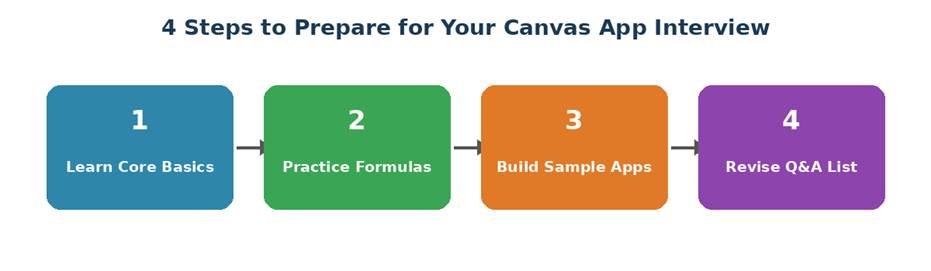
Follow this simple order if your interview is close. First, get comfortable with the basic controls and screens. Second, practice formulas daily, even ten minutes helps. Third, build two or three small apps on your own, such as a leave tracker or a simple to-do app. Fourth, go through common questions one more time a day before the interview.
Common Mistakes Candidates Make
- Only watching tutorials, never building an app hands-on
- Not knowing the difference between delegable and non-delegable functions
- Memorizing formula names without knowing when to use them
- Ignoring app performance topics, which senior interviewers love to ask
- Not being able to explain a project they listed on their resume in simple words
Tips to Stand Out in Your Interview
Bring your own examples. If you built even a small app for practice, talk about the problem it solved, not just the technical steps. Interviewers remember candidates who explain their thinking, not just the final answer. Keep your answers short and clear, and it is okay to say “I have not used that yet, but I know where to look it up” instead of guessing.
Frequently Asked Questions (FAQ)
Is Power Apps still in demand in 2026?
Yes. More companies want quick, low-code tools, so skilled Canvas App makers are needed.
Do I need to know coding for Power Apps?
Basic logic helps, but you mainly write simple formulas, not full code.
How long does it take to learn Canvas Apps?
Most people learn the basics in 4 to 6 weeks with daily practice.
Which is easier, Canvas App or Model-Driven App?
Canvas App is easier for beginners because it works like building slides.
What is asked most in interviews?
Formulas, data sources, delegation, and real app examples come up the most.
Final Thoughts
Power Apps Canvas Apps are not hard to learn, but they do reward people who practice with real screens and real data, not just theory. Use this guide as a checklist, build a small app this week if you have not already, and go into your interview ready to talk about what you made, not just what you read. Good luck!