If you have started working with Microsoft Fabric, you have probably hit this question already: should this project be a Lakehouse or a Warehouse? On paper they sound like two names for the same thing. Both store data, both connect to Power BI, both sit inside Fabric. But once you start building, the differences matter a lot — and picking the wrong one can mean redoing your whole data setup later.
This guide breaks down what each item actually is, how they are built under the hood, and which one fits which job. No jargon dump, just a plain explanation with examples you can actually use.
What Is Microsoft Fabric, In Short
Microsoft Fabric is Microsoft’s all-in-one data platform. It brings together data engineering, data warehousing, data science, and reporting (Power BI) into one workspace, instead of forcing you to stitch together five separate tools.
At the center of Fabric is something called OneLake. Think of it as one big shared storage layer that every Fabric tool reads from and writes to. A Lakehouse and a Warehouse are both just different ways of organizing and working with data that lives on this same OneLake storage.
Key point: a Lakehouse and a Warehouse are not two separate storage systems. They are two different ways to work with data that is stored in the same underlying place. That is exactly why you can mix and match them in one project.
What Is a Fabric Lakehouse?
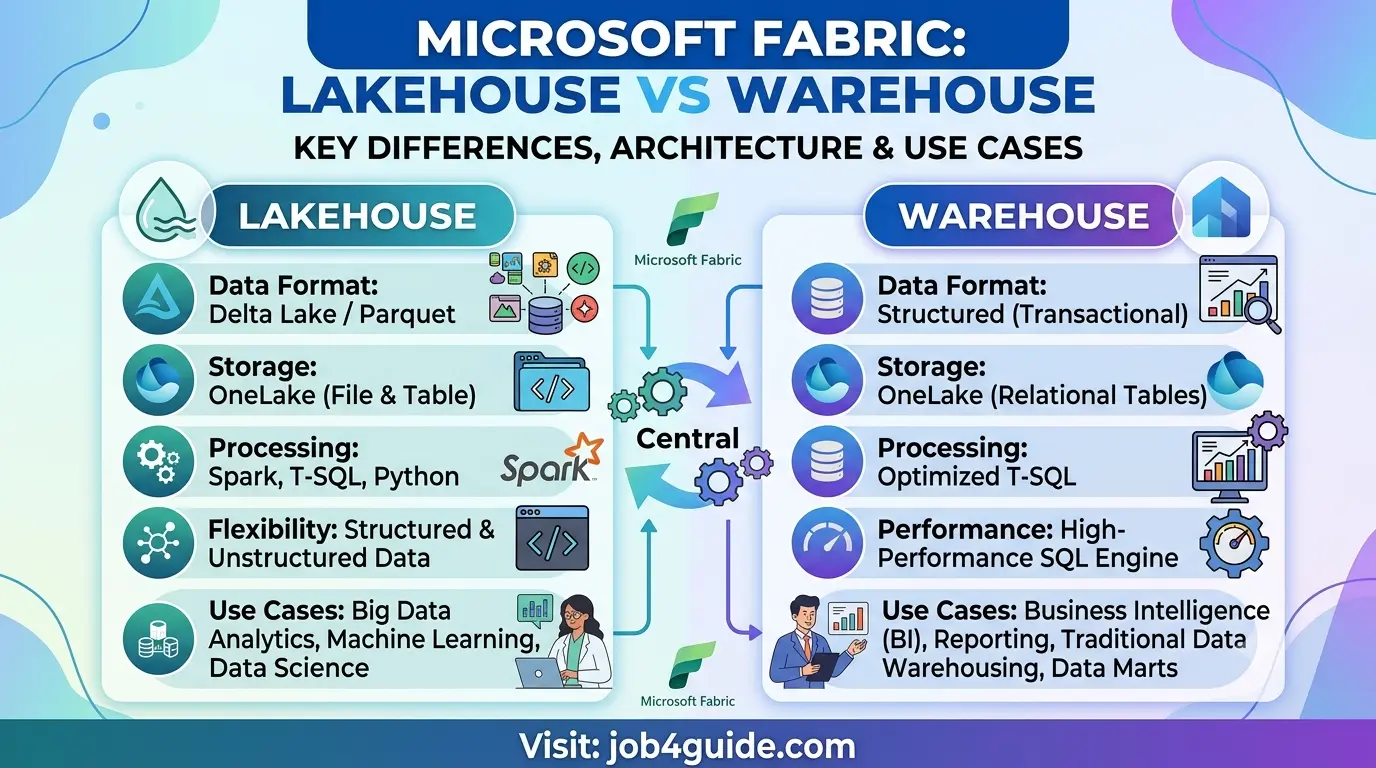
A Lakehouse is built for data in almost any shape — neat tables, loose files, JSON documents, images, even video. It stores everything as files and Delta tables inside OneLake, and gives you two ways to work with that data:
- Spark notebooks and Spark jobs, for cleaning, transforming, or analyzing large or messy data
- A built-in SQL endpoint, so you can also query the tables using plain SQL when needed
This mix makes a Lakehouse the natural home for raw or semi-structured data — the stuff that lands in your system before it has been cleaned up. Data engineers and data scientists tend to live in a Lakehouse, because that is where the heavy transformation work happens.
What Is a Fabric Warehouse?
A Warehouse is built for structured, relational data — the kind you would normally put into a traditional SQL database. It runs on a full T-SQL engine, the same query language used in SQL Server and Azure SQL Database, so anyone who already knows SQL will feel right at home.
Unlike a Lakehouse, a Warehouse enforces a strict schema. Every table has defined columns and data types, and the engine checks that data follows the rules before it is written in. This makes a Warehouse a strong fit for clean, business-ready data — sales numbers, finance records, customer tables — the kind of data that feeds directly into dashboards and reports.
Just like a Lakehouse, a Warehouse stores its tables as Delta files in OneLake. So even though it behaves like a classic database, other Fabric tools can still read that same data directly, without needing an export step.
Architecture: How They Are Actually Built
Here is a simple side-by-side view of how data moves through each one:
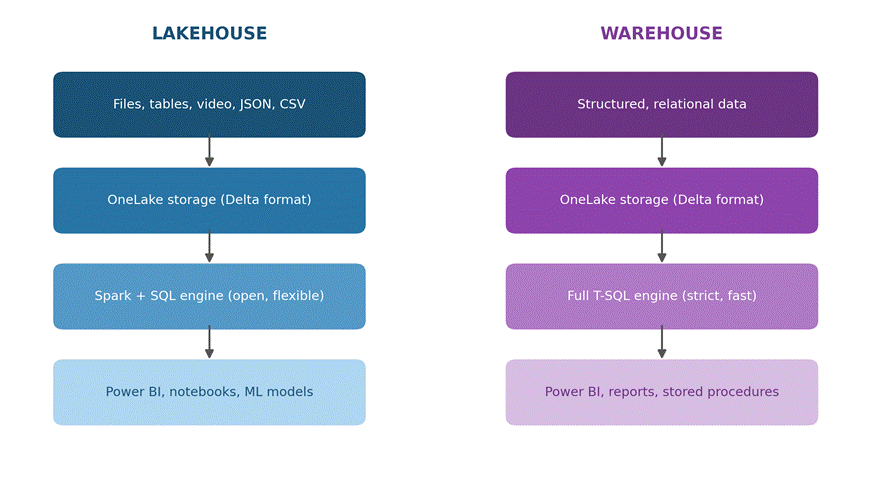
Notice that both paths start and end in similar places — both store data in OneLake using the Delta format, and both can feed Power BI. The real difference sits in the middle: which engine handles the data, and how strict that engine is about structure.
Lakehouse vs Warehouse: Side-by-Side Comparison
| Feature | Fabric Lakehouse | Fabric Warehouse |
| Data type | Structured, semi-structured, and unstructured (files, images, JSON, video) | Structured, relational data only |
| Storage format | Delta Lake tables and files, in OneLake | Delta Lake tables, in OneLake |
| Query engine | Spark for big data jobs, plus a built-in SQL endpoint | Full T-SQL engine, built for high-performance queries |
| Who uses it | Data engineers, data scientists, ML teams | Data analysts, BI teams, SQL developers |
| Write access | Spark notebooks, pipelines, and (read-only) SQL endpoint | Full read and write access using T-SQL |
| Schema rules | Flexible — schema can change or grow over time | Strict — schema is fixed and enforced like a normal database |
| Best for | Data lakes, machine learning, raw data landing zones | Reporting, dashboards, finance and business data marts |
| Transactions (ACID) | Yes, at the table level through Delta Lake | Yes, full multi-table transaction support |
When To Use a Lakehouse
A Lakehouse is the right pick when:
- Your data arrives in mixed formats — CSV files, JSON, images, logs, or a mix of all of them
- You need to run machine learning or data science work on top of the data
- You are building a raw data landing zone before any cleanup happens
- Your team is comfortable with Spark, Python, or notebooks
- The schema of your data might shift or grow as new sources get added
When To Use a Warehouse
A Warehouse is the right pick when:
- Your data is already structured and clean, or close to it
- You need fast, complex SQL queries for reporting and dashboards
- Your team already writes SQL and prefers stored procedures over Spark code
- You need strict rules around data types and table structure
- You are building a business-facing data mart, like a finance or sales reporting layer
A Quick Way To Decide
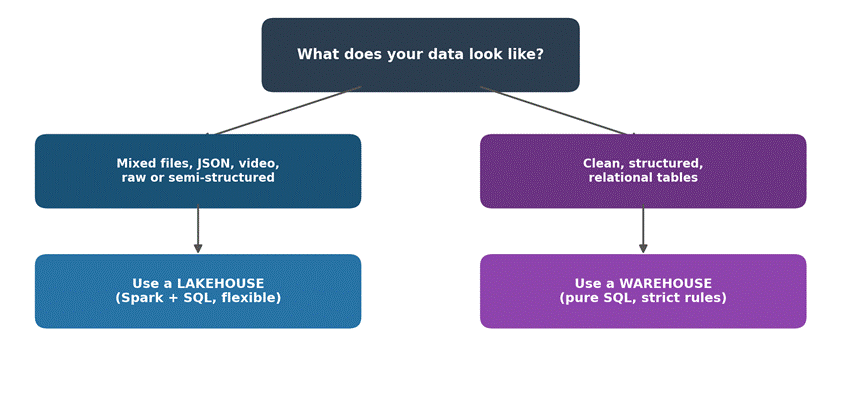
Using a Lakehouse and Warehouse Together
Most real Fabric projects do not pick just one — they use both, at different stages of the same pipeline. A common pattern looks like this:
- Raw data lands in a Lakehouse, straight from source systems
- Spark notebooks clean, join, and reshape that data
- The finished, business-ready tables are loaded into a Warehouse
- Power BI reports connect to the Warehouse for fast, reliable dashboards
This setup gives you the flexibility of a Lakehouse for messy, early-stage work, and the speed and structure of a Warehouse for the reports people actually look at every day. Because both sit on OneLake, you are not duplicating storage or building fragile export jobs between them.
Performance and Cost: A Few Honest Notes
A Warehouse generally wins on raw query speed for structured, reporting-style workloads, because its T-SQL engine is purpose-built for that job. A Lakehouse SQL endpoint can run similar queries, but it was designed more for flexibility than raw speed, so heavy reporting workloads may feel a bit slower there.
On the cost side, both draw from the same Fabric capacity, so the bigger cost driver is usually how much compute your Spark jobs or SQL queries actually use, not which item type you picked. Poorly written Spark jobs or unoptimized SQL queries will cost more no matter where they run.
Common Mistakes To Avoid
- Putting messy, unstructured data straight into a Warehouse and fighting the schema the whole way
- Using only a Lakehouse for heavy reporting and wondering why dashboards feel slow
- Forgetting that a Lakehouse SQL endpoint is read-only for direct queries — writes still happen through Spark or pipelines
- Building two separate copies of the same data instead of reusing OneLake
- Choosing one item type for the whole project instead of matching each stage to the right tool
Frequently Asked Questions
Can I use both a Lakehouse and a Warehouse in the same Fabric project?
Yes, and most real projects do. A common setup is to land raw data in a Lakehouse, clean it up with Spark, then load the finished tables into a Warehouse for reporting. Both sit on the same OneLake storage, so you are not copying data between two separate systems.
Which one is faster for Power BI reports?
A Warehouse is usually faster for heavy, complex reports because it runs on a full T-SQL engine built for that kind of work. A Lakehouse SQL endpoint is fine for lighter reporting, but it was not built to be the fastest query engine in Fabric.
Do I need to know Spark to use a Lakehouse?
Not always, but it helps. You can load data into a Lakehouse without writing any Spark code, using pipelines or dataflows. Spark becomes useful when you need to clean, reshape, or transform large amounts of raw data.
Is a Fabric Warehouse the same as a normal SQL Server database?
It feels similar because it uses T-SQL, but it is not the same thing under the hood. A Fabric Warehouse stores its data as Delta tables in OneLake, so other Fabric tools like Spark or Power BI can read that same data directly.
Which one should a beginner start with?
If your data already comes in clean, structured tables and your main goal is reporting, start with a Warehouse — it feels closer to normal SQL work. If you are dealing with mixed file types or plan to do data science, start with a Lakehouse.
Final Thoughts
A Fabric Lakehouse and a Fabric Warehouse are not competing products — they are two tools built for two different jobs, sitting on the same shared storage. Pick a Lakehouse when your data is raw, mixed, or feeding into data science work. Pick a Warehouse when your data is clean, structured, and feeding straight into reports people rely on daily. And when a project needs both, that is not a compromise — that is how Fabric was actually designed to be used.