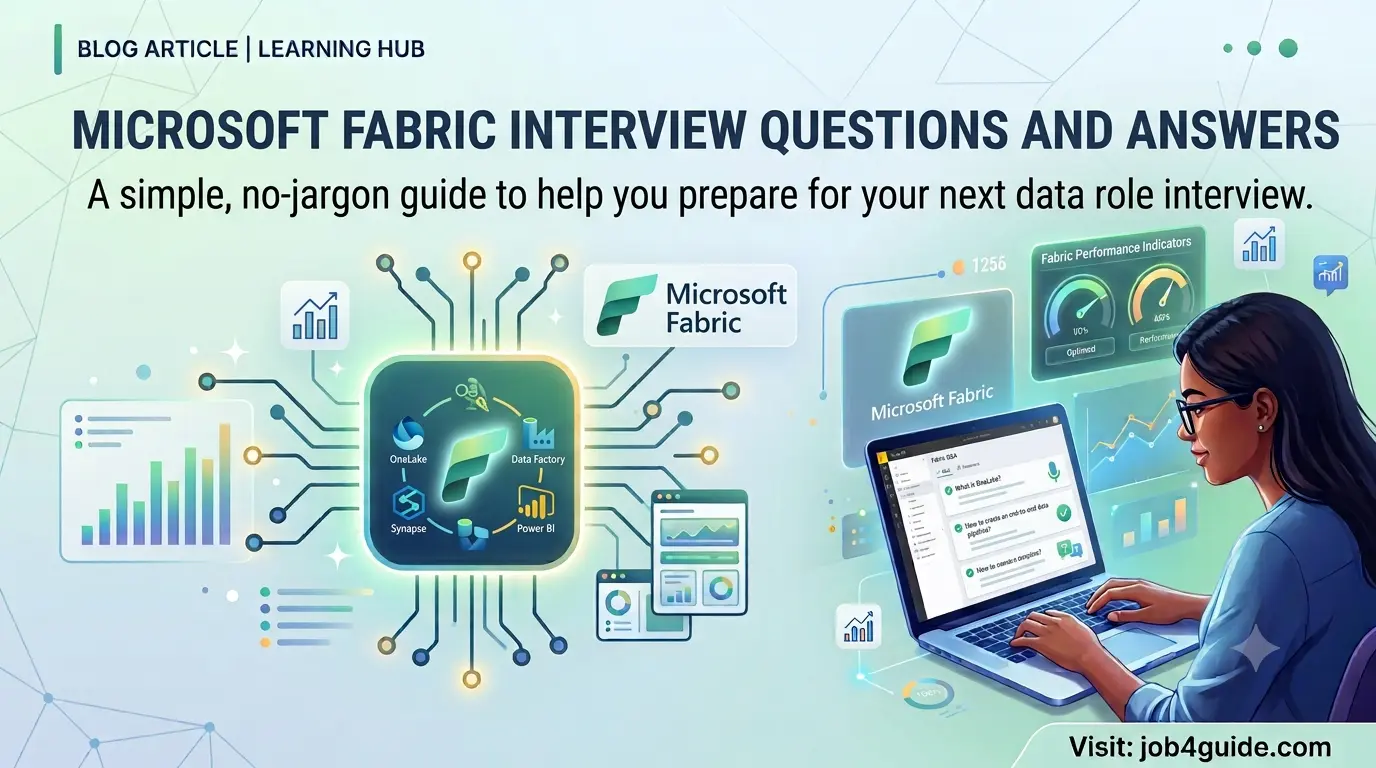
A simple, no-jargon guide to help you prepare for your next data role interview
Microsoft Fabric has quickly become one of the most talked-about skills in the data world, and more companies are now asking about it in interviews. If you have an interview coming up and you are looking for real, practical questions instead of a random copied list, you are in the right place.
This guide covers questions that actually come up for roles like data engineer, BI developer, and data analyst. Every answer is written in plain, everyday language. No confusing jargon, no dictionary definitions copied from a textbook. Just what you need to sound confident and clear when you are sitting in front of an interviewer.
We will start from the basics and move step by step into intermediate, advanced, and scenario-based questions. Interviewers use scenario questions to check how you think, not just what you have memorised, so pay extra attention to that part. There is also a quick FAQ section near the end for a few other common doubts.
What Is Microsoft Fabric?
Microsoft Fabric is an all-in-one data platform built by Microsoft. Before Fabric came along, a data team usually had to juggle several different tools: one to move data, another to store it, another to build reports, and so on. Each tool had its own login, its own storage, and its own way of doing things.
Fabric puts all of that under one roof. You get one workspace, one login, and one shared storage layer called OneLake. Think of Fabric as a toolbox. Inside it, you will find tools for moving data, cleaning it, storing it, analysing it in real time, running machine learning, and building Power BI reports. Every one of these tools reads and writes data to the same place, so you are not copying the same data five different times for five different tools.
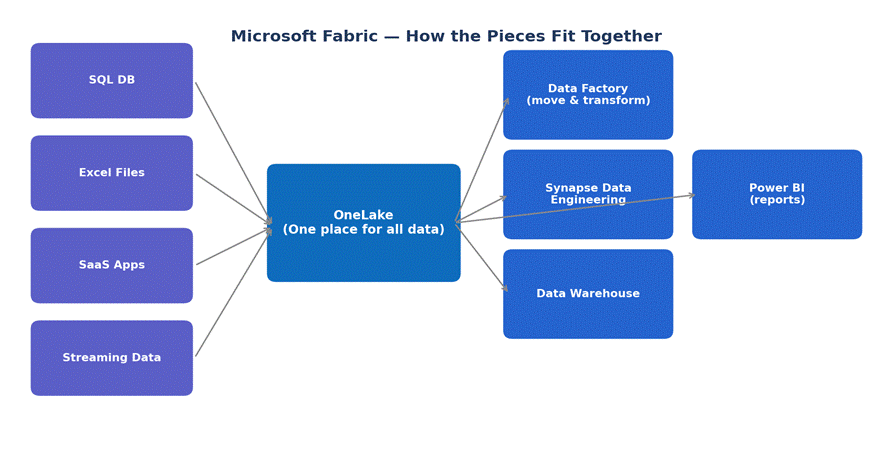
Figure 1: A simple view of how data flows through Microsoft Fabric
Why Are Companies Hiring for Microsoft Fabric Skills Right Now?
- Many companies already use Power BI and Azure, so moving to Fabric is a small, natural step rather than a big change.
- Fabric reduces the number of separate tools a team has to manage, which saves both time and licensing cost.
- There is no need to keep copying data between different systems, since everything sits in one shared storage layer.
- Microsoft keeps adding new features to Fabric every few months, so the demand for people who know it is growing fast.
- Not many people have deep, hands-on experience with Fabric yet, so candidates who do stand out quickly.
Core Components of Microsoft Fabric
Before jumping into questions, it helps to know the main building blocks of Fabric. Here is a short table you can use as a quick refresher.
| Component | What It Does |
| OneLake | Central storage for all data, shared across every tool in Fabric |
| Data Factory | Moves and transforms data coming from different sources |
| Synapse Data Engineering | Cleans and prepares data using notebooks and Spark |
| Synapse Data Warehouse | Stores data in tables so it can be queried with SQL |
| Synapse Real-Time Analytics | Handles fast-moving data such as logs and sensor events |
| Data Science | Builds and runs machine learning models on your data |
| Power BI | Turns the data into dashboards and reports for the business |
Basic Microsoft Fabric Interview Questions and Answers
These are the questions you should expect first, especially if this is an entry-level or early-career interview.
Q1. What is Microsoft Fabric?
Answer: Microsoft Fabric is a single platform that brings together data movement, data storage, data engineering, real-time analytics, data science, and Power BI reporting. Instead of using separate tools for each job, a team can do all of it inside one workspace.
Q2. What is OneLake?
Answer: OneLake is the shared storage layer that sits underneath every tool in Fabric. Whether you are building a report in Power BI or running a Spark notebook, the data is stored in the same OneLake location, so there is no need to move or copy it around.
Q3. How is Microsoft Fabric different from Power BI?
Answer: Power BI is mainly a reporting and dashboard tool. Fabric is much bigger than that, it includes Power BI as one of its parts, but it also covers data movement, data storage, data engineering, and data science. In short, Power BI is one room in the Fabric house.
Q4. What is a workspace in Fabric?
Answer: A workspace is a shared area where a team keeps its items, such as Lakehouses, pipelines, notebooks, and reports. It works like a folder, but with permissions, so you can control who can view or edit what is inside it.
Q5. What format does OneLake use to store data?
Answer: OneLake stores data mainly in Delta Lake format, which is built on top of Parquet files. This format keeps a history of changes and lets many different Fabric tools read the same data without any conversion.
Q6. What is a Lakehouse in Fabric?
Answer: A Lakehouse is an item in Fabric that combines the flexibility of a data lake with the structure of a database. You can drop in raw files as well as store neat, organised tables, and query both using SQL or Spark.
Q7. What license do you need to use Microsoft Fabric?
Answer: You need a Fabric capacity, which is sold under F SKUs (like F2, F4, F64, and so on), or a Power BI Premium capacity that already includes Fabric. Microsoft also offers a free trial capacity so beginners can practice without paying anything.
Q8. Can Microsoft Fabric connect to sources outside of Microsoft, such as Google Cloud or AWS?
Answer: Yes. Fabric can connect to many outside sources including Amazon S3, Google BigQuery, Snowflake, and other databases. It also supports shortcuts, which let you point to data sitting in another cloud without physically copying it into OneLake.
Intermediate Microsoft Fabric Interview Questions and Answers
Once the basics are out of the way, interviewers usually check if you understand how the pieces work together in real projects.
Q9. What is the difference between a Lakehouse and a Data Warehouse in Fabric?
Answer: A Lakehouse is more flexible, it can hold raw files, images, and structured tables, and you can work with it using Spark or SQL. A Data Warehouse is built only for structured, table-based data and is queried using SQL alone. Teams often pick a Warehouse when the reporting team is more comfortable with SQL and does not need to touch raw files.
Q10. What is Dataflow Gen2?
Answer: Dataflow Gen2 is a tool inside Fabric that lets you clean and shape data using a visual, drag-and-drop style editor, similar to Power Query. It is a good option for people who prefer clicking through steps instead of writing code.
Q11. What is a shortcut in OneLake?
Answer: A shortcut is like a pointer to data that lives somewhere else, either in another OneLake location or in an outside system such as Amazon S3. It lets you use that data as if it were local, without actually copying or duplicating it.
Q12. How does Fabric handle security and access control?
Answer: Fabric uses role-based access at the workspace level, and it also supports finer controls such as row-level security and object-level security inside a Warehouse. Since everything sits on OneLake, permissions can be set once and they apply no matter which tool is used to read the data.
Q13. What is Direct Lake mode in Power BI?
Answer: Direct Lake is a way for Power BI to read data straight from OneLake without importing a copy into its own memory and without sending live queries every time like DirectQuery does. This gives reports that are almost as fast as Import mode, but without the wait for a data refresh.
Q14. What is a Fabric pipeline?
Answer: A pipeline is a set of steps arranged in order to move and transform data automatically. For example, a pipeline might copy files from an FTP server, clean them using a notebook, and then load the result into a Warehouse table, all on a schedule.
Q15. What is medallion architecture, and does Fabric support it?
Answer: Medallion architecture organises data into three layers: Bronze (raw, untouched data), Silver (cleaned and joined data), and Gold (data that is ready for reports). Fabric supports this pattern naturally, since you can create separate Lakehouses or folders for each layer within the same OneLake.
Q16. What are Fabric capacities, and how do they affect cost?
Answer: A capacity is the amount of compute power reserved for your Fabric workloads, sold in sizes like F2, F8, F64, and so on. All the tools you use, like pipelines, notebooks, and reports, draw from this same pool. Bigger capacities cost more but let more work run at the same time without slowing down.
Advanced Microsoft Fabric Interview Questions and Answers
These questions are common for senior roles, or when the interviewer wants to see how deep your hands-on experience really goes.
Q17. How does Direct Lake mode improve performance compared to Import and DirectQuery?
Answer: Import mode is fast but needs a scheduled refresh, so the data can go stale between refreshes. DirectQuery is always fresh but can be slow because it sends a query to the source every time someone opens a report. Direct Lake gets the best of both: it reads the Delta files in OneLake directly into memory only when needed, so reports stay fast and the data stays current without a manual refresh step.
Q18. What is the role of Apache Spark inside Fabric?
Answer: Spark is the engine behind Fabric’s notebooks and Data Engineering experience. It lets you process large amounts of data in parallel, across many machines at once, using Python, Scala, or SQL. This is what makes it possible to clean or transform huge datasets in a reasonable amount of time.
Q19. How do you monitor and troubleshoot a failed pipeline in Fabric?
Answer: Fabric has a built-in Monitoring hub that shows the run history of every pipeline, notebook, and dataflow. You can open a failed run to see exactly which step failed and read the error message. From there, common checks include looking at source data availability, credentials, and whether the capacity was overloaded at that time.
Q20. What is Git integration in Fabric, and why does it matter?
Answer: Git integration lets you connect a Fabric workspace to a Git repository, such as Azure DevOps or GitHub. This means changes to reports, notebooks, and pipelines can be tracked, reviewed, and rolled back, just like source code. It matters because it brings proper version control to a place that used to rely on manual backups.
Q21. How do you manage cost when a Fabric capacity gets overloaded?
Answer: First, check the Capacity Metrics app to see which items are using the most compute. Common fixes include moving heavy jobs to run at off-peak hours, optimising slow queries or notebooks, splitting workloads across more than one capacity, or simply scaling up to a bigger capacity size if the workload has genuinely grown.
Q22. What is Copilot in Fabric, and how does it help data teams?
Answer: Copilot is an AI assistant built into Fabric that can help write code in notebooks, build data pipelines from plain English instructions, and even explain what a piece of Spark or SQL code does. It does not replace the need to understand your data, but it does speed up repetitive or boilerplate work.
Scenario-Based Microsoft Fabric Interview Questions
These questions do not have one fixed textbook answer. Interviewers use them to see how you approach a real problem, so it is fine to explain your thought process out loud.
Q23. A Power BI report is showing outdated numbers. What would you check first?
Answer: I would first check if the report is using Import mode with a scheduled refresh, since that is the most common reason for stale data. If it is on Direct Lake or DirectQuery, I would check whether the underlying pipeline that loads the Lakehouse or Warehouse actually ran successfully and on time. I would also check the Monitoring hub for any failed or delayed runs.
Q24. A pipeline that used to run in 10 minutes now takes an hour. How do you find the cause?
Answer: I would start with the Monitoring hub to compare the current run against past runs and see which specific step is now taking longer. From there I would check if the source data volume suddenly grew, if the capacity is shared with other heavy jobs running at the same time, or if a recent change to the pipeline logic added an inefficient step.
Q25. Your manager wants both raw data and cleaned data kept separately. How would you set this up in Fabric?
Answer: I would set up a medallion-style structure using two or three Lakehouses: one for Bronze (raw, untouched data), one for Silver (cleaned and validated data), and optionally a Gold layer for data that is fully ready for reporting. A pipeline or notebook would move data forward from one layer to the next.
Q26. How would you decide between using a Warehouse or a Lakehouse for a new project?
Answer: If the team mainly writes SQL and the data is already structured, a Warehouse is usually simpler to manage. If the project involves raw files, needs Spark for heavy transformations, or the data types are mixed, a Lakehouse gives more flexibility. Sometimes teams use both together, a Lakehouse for engineering work and a Warehouse for the final reporting layer.
Microsoft Fabric vs Traditional Azure Synapse
This comparison comes up often in interviews, especially if the company is planning to move from an older Azure setup to Fabric.
| Point | Azure Synapse (older setup) | Microsoft Fabric |
| Storage | Separate storage for each service | One shared storage layer (OneLake) |
| Billing | Pay for each service separately | Single capacity-based billing for everything |
| Setup time | Longer, needs more manual configuration | Faster, workspace is ready to use quickly |
| Reporting | Power BI connected as a separate service | Power BI built in, can use Direct Lake mode |
| Collaboration | Harder to share items across teams | Workspaces make sharing and permissions simpler |
Tips to Prepare for a Microsoft Fabric Interview
- Do not just read definitions, open a free Fabric trial and click around for a couple of hours. Hands-on time makes your answers sound real instead of memorised.
- Build one small end-to-end project, for example, load a CSV file into a Lakehouse, clean it with a notebook, and show it on a Power BI report using Direct Lake mode.
- Keep your answers short and clear. Interviewers usually prefer a crisp two or three sentence answer over a long, rambling one.
- Practice explaining your own project out loud. Most interviews spend more time on your project than on textbook definitions.
- Read the release notes for Fabric once a month. Since it changes often, mentioning a recent feature shows that you are actively following the platform.
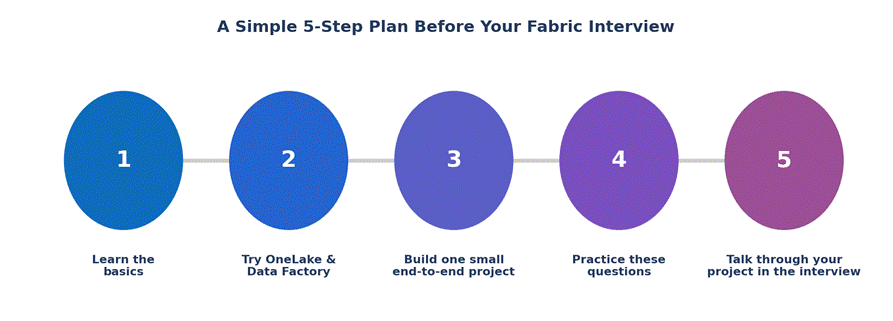
Figure 2: A simple five-step plan to follow before your interview
FAQ: Microsoft Fabric Interview Questions
Is Microsoft Fabric hard to learn if I already know Power BI?
No, it is actually a natural next step. Since Power BI is already part of Fabric, you will recognise a lot of the reporting side. The new parts to learn are mainly OneLake, Lakehouses, and pipelines.
Do I need to know coding for a Microsoft Fabric job?
It depends on the role. A BI developer role can often get by with SQL and DAX. A data engineer role usually expects some Python or PySpark, since notebooks are a big part of the data engineering work in Fabric.
Is Microsoft Fabric the same as Azure Synapse?
Not exactly. Fabric grew out of ideas from Synapse and Power BI, but it packages everything into one product with shared storage. Synapse Analytics still exists on Azure, but Microsoft is steering new projects toward Fabric.
How long does it take to prepare for a Fabric interview?
If you already know Power BI or SQL, two to three weeks of steady practice, including one small hands-on project, is usually enough to answer most questions confidently.
Is Microsoft Fabric free to try before an interview?
Yes. Microsoft offers a free trial capacity that gives you enough resources to practice with Lakehouses, pipelines, notebooks, and Power BI reports without paying anything.
Final Thoughts
Microsoft Fabric interviews are not really about memorising definitions. Interviewers want to see that you understand why the platform exists, how the pieces connect, and how you would handle a real problem if one showed up. Go through the questions in this guide a few times, build one small project with your own hands, and practice saying your answers out loud before the interview. That combination will take you a lot further than reading definitions alone.