A simple and effective guide to help you pick the right tool for your data.
If you work with data in any way, you have probably heard both names being used a lot lately: Power BI and Microsoft Fabric. Some people use the two names as if they mean the same thing. They don’t. They are related, but they are not the same product, and mixing them up can lead you to buy the wrong tool or waste money on something you don’t need.
In this guide, we will break down what each one actually does, how they connect to each other, and how to decide which one your team needs. No jargon, no fluff — just a clear answer.
What is Power BI?
Power BI is a tool made by Microsoft that turns raw data into charts, graphs, and dashboards. Think of it as the tool you open when you want to see how your sales are doing this month, or check which product is selling best in which city.
You connect Power BI to a data source — this could be an Excel sheet, a database, or an online service — and it helps you build reports that are easy to read and easy to share with your team.
Power BI has been around for years and is one of the most popular reporting tools in the world. Many companies, big and small, already use it daily.
In short: Power BI answers the question “What is my data telling me?”
What is Microsoft Fabric?
Microsoft Fabric is a much bigger platform. Instead of just showing you charts, Fabric handles the entire journey of your data — from the moment it is collected, to the moment it gets cleaned and organized, all the way to the final report.
Fabric brings together several tools that used to be separate products. It includes tools for moving data, storing data, building data pipelines, running AI models, and yes — Power BI is included too, as the reporting layer on top.
Here is the easiest way to picture it: Fabric is like a full kitchen, and Power BI is like the plate you serve the finished meal on. You still need the plate, but the kitchen is where all the real cooking happens.
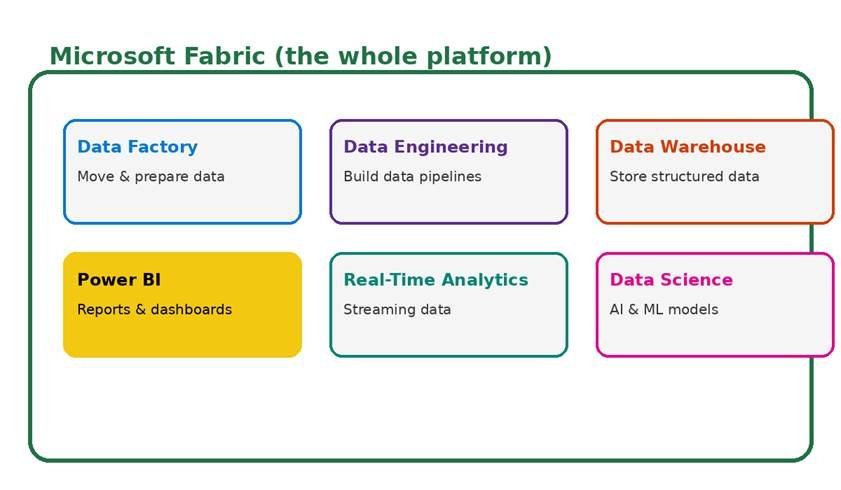
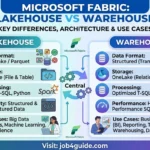
Figure 1: Power BI is one part of the bigger Microsoft Fabric platform.
Power BI vs Microsoft Fabric: Key Differences
Let’s line up the main differences side by side so you can see exactly where each tool stands.
| Point | Power BI | Microsoft Fabric |
| What it is | A tool for reports and dashboards | A full platform for all data work |
| Main job | Turn data into visuals | Move, store, prepare, and analyze data — then visualize it |
| Who uses it | Business users, analysts | Data teams, engineers, analysts, and business users |
| Data storage | Limited (mostly small datasets) | Built-in lake called OneLake, made for large data |
| Data prep tools | Basic (Power Query) | Full data pipelines, Spark, notebooks, and more |
| AI & Machine learning | Not built in | Built in, with Data Science tools |
| Real-time data | Limited | Yes, with Real-Time Analytics |
| Best for | Small teams needing dashboards fast | Companies handling data from many sources |
| License | Can be bought on its own | Comes as one bundle, Power BI is included |
How Power BI and Microsoft Fabric Work Together
Here is something many people miss: you are not choosing one over the other forever. Power BI lives inside Microsoft Fabric. When your company signs up for Fabric, Power BI comes along with it, along with extra storage and data tools.
This means the real question is not “Power BI or Fabric?” It is closer to “Do I need just the reporting tool, or do I need the reporting tool plus everything that feeds it?”
Here is a simple example. Say your sales data sits in one system, your customer data sits in another, and your website traffic sits in a third. Without Fabric, someone on your team has to manually pull all this data into one place before Power BI can use it. With Fabric, this pulling and cleaning happens inside the same platform, and Power BI just picks it up from there.
Who Should Use Power BI Alone?
Power BI on its own is still a great choice for many teams. You should stick with just Power BI if:
- Your data already lives in one or two simple places, like Excel or a single database
- Your team is small and does not have a dedicated data engineer
- You mainly need dashboards and reports, not data pipelines
- You want a lower cost and a shorter learning curve
- You are just starting out with data and want to build good habits first
Who Should Use Microsoft Fabric?
Microsoft Fabric makes more sense once your data needs grow past simple reporting. Consider Fabric if:
- Your data comes from many different systems and needs to be combined
- You have a data team that builds pipelines and manages large datasets
- You want to add AI or machine learning on top of your data
- You need real-time data, such as live sensor data or streaming events
- Your company is growing and outgrowing spreadsheets and manual data pulls
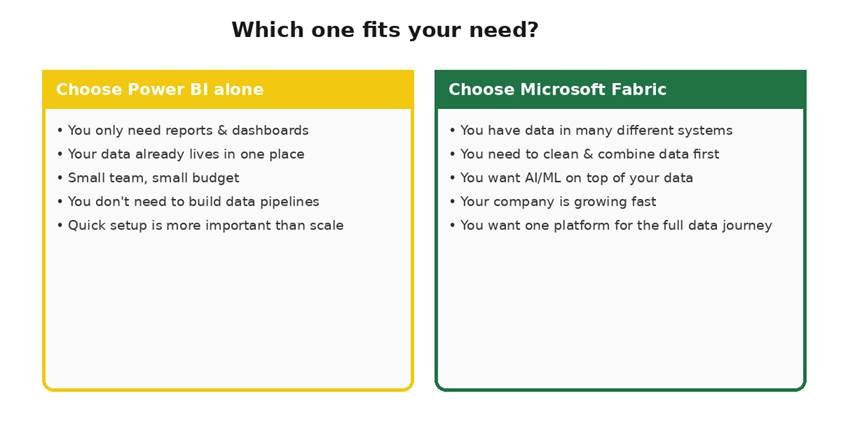
Figure 2: A quick way to decide which tool fits your current stage.
A Simple Analogy to Remember the Difference
Picture a small bakery versus a large restaurant chain. A small bakery just needs a display case to show off its bread — that’s Power BI. A large restaurant chain, on the other hand, needs a supply chain, a kitchen system, storage rooms, and staff to prepare food before it ever reaches the display case — that’s Microsoft Fabric, with Power BI as the display case at the end of it all.
As a business grows, it usually needs more than just a display case. That is exactly what happens with data too — the more sources and the more volume you have, the more you need something like Fabric behind the scenes.
Common Mistakes People Make
After seeing many teams pick between these two tools, a few mistakes come up again and again:
- Buying Fabric before the team is ready to use its data engineering tools, which leaves half the platform unused
- Sticking with only Power BI for too long while manually copying data between five different spreadsheets every week
- Assuming Fabric replaces Power BI, so they stop training staff on Power BI skills — this is not true, Power BI skills still matter
- Not checking whether their current Microsoft license already includes some Fabric features before buying more
Pricing: What to Know
Power BI can be bought as its own product, with a cost per user each month. Microsoft Fabric pricing works differently — it is based on the amount of computing power (called capacity) your organization uses, and it covers all the tools in the platform, not just reporting.
Because pricing structures and plans change often, it is best to check Microsoft’s official pricing page for the latest numbers before you budget. As a general rule though, a small team doing only reports usually pays less by sticking with Power BI alone, while a company already juggling several data tools may save money by moving everything under one Fabric plan.
Final Thoughts
Power BI and Microsoft Fabric are not rivals — they are teammates, with Fabric being the bigger platform and Power BI being the visible part most people interact with every day. If your needs are simple, Power BI alone will likely serve you well for a long time. If your data is scattered, growing fast, or needs heavy preparation before it becomes useful, Microsoft Fabric gives you the missing pieces.
The smartest move is to start with what you need today, and keep Fabric in mind as a natural next step once your data starts outgrowing simple spreadsheets and single dashboards.
Frequently Asked Questions
Is Microsoft Fabric replacing Power BI?
No. Power BI is not going away. It is now one part of Microsoft Fabric. You can still use Power BI on its own, or use it inside Fabric with more data tools around it.
Do I need Microsoft Fabric to use Power BI?
No. Power BI still works as a stand-alone product. You only need Fabric if you want the extra tools for moving, storing, and preparing large amounts of data.
Is Microsoft Fabric more expensive than Power BI?
It can be, because Fabric covers more services. But if your team already pays for several separate tools (storage, pipelines, dashboards), Fabric can work out cheaper because it puts everything under one license.
Can small businesses use Microsoft Fabric?
Yes, but most small businesses with simple reporting needs are fine with Power BI alone. Fabric makes more sense once your data comes from many places and needs cleaning before it is useful.
What is OneLake in Microsoft Fabric?
OneLake is the single storage place inside Fabric. Instead of copying data into many separate systems, all Fabric tools, including Power BI, read and write to this one lake. This cuts down duplicate data and copy-paste work.
Will my old Power BI reports still work in Fabric?
Yes. Your existing Power BI reports, dashboards, and datasets carry over. Fabric adds new tools around Power BI; it does not remove or change what you already built.